Product, Category, Option File Upload
(This plugin consists of three modules.)
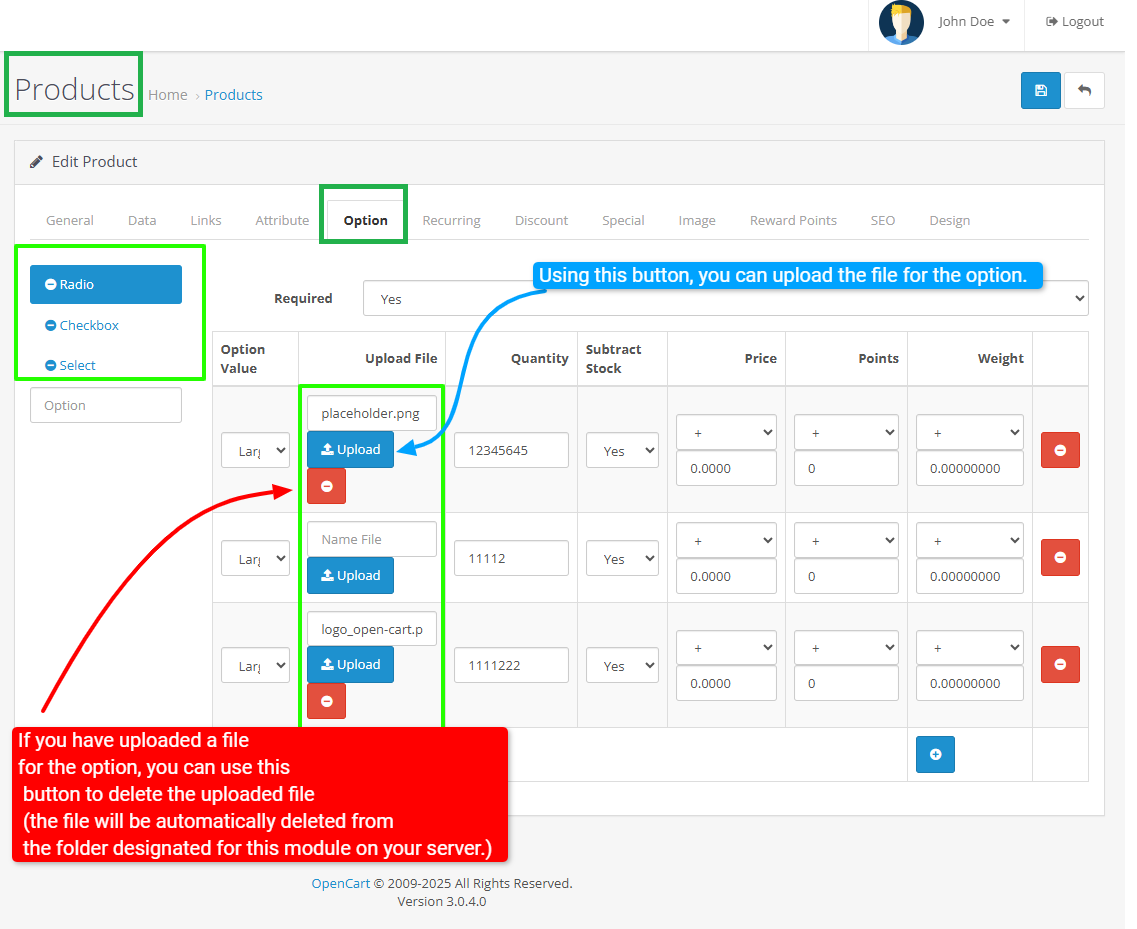
Using this module, you can upload files for each option, including select options, checkboxes, and radios.
This feature allows you to provide the associated files for each option separately based on your product needs, which increases scalability and satisfaction.
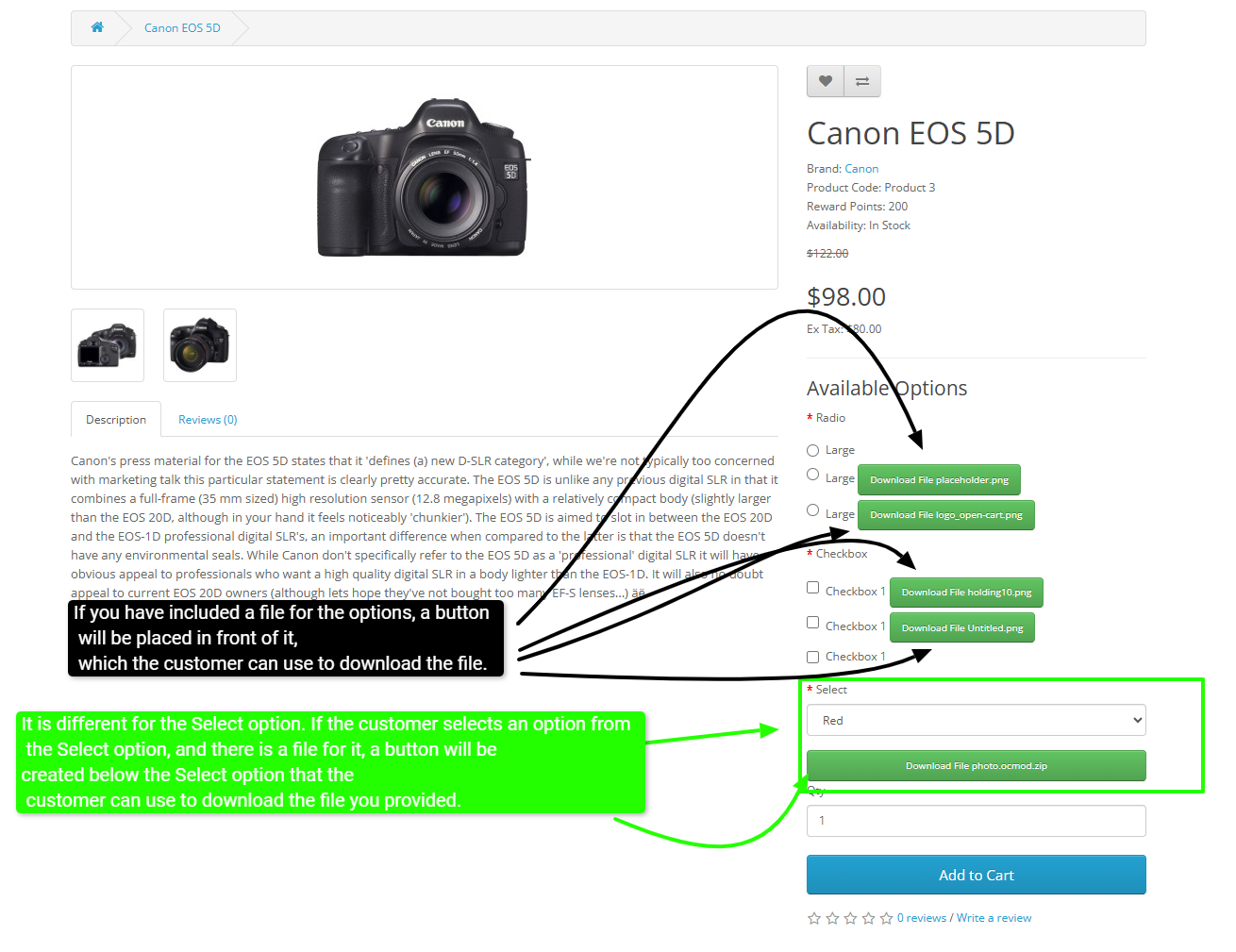
On the product page, each option is displayed as a button next to it.
When the customer clicks on this button, the file for that option is downloaded directly to them.
This process is designed to be user-friendly and fast so that customers can easily download and use the files they need.
This feature is especially useful in cases where products need to include help files, software updates, images, or any other type of file that customers need to access independently and easily.
By using this module, sellers and online store managers can improve the process of providing files related to each option and enhance the customer shopping experience.
In addition, this system features simple and effective file management, allowing you to customize and update different files based on the type of option and specific product needs.
As a result, this tool is a comprehensive and professional solution for adding file upload and download capabilities to your product pages, which can play a significant role in increasing customer engagement and satisfaction.
This module enhances your OpenCart store by enabling file uploads associated with products and categories.
It allows administrators to upload, manage, and link files (such as manuals, images, or other documents) directly to products or categories.
Category Form
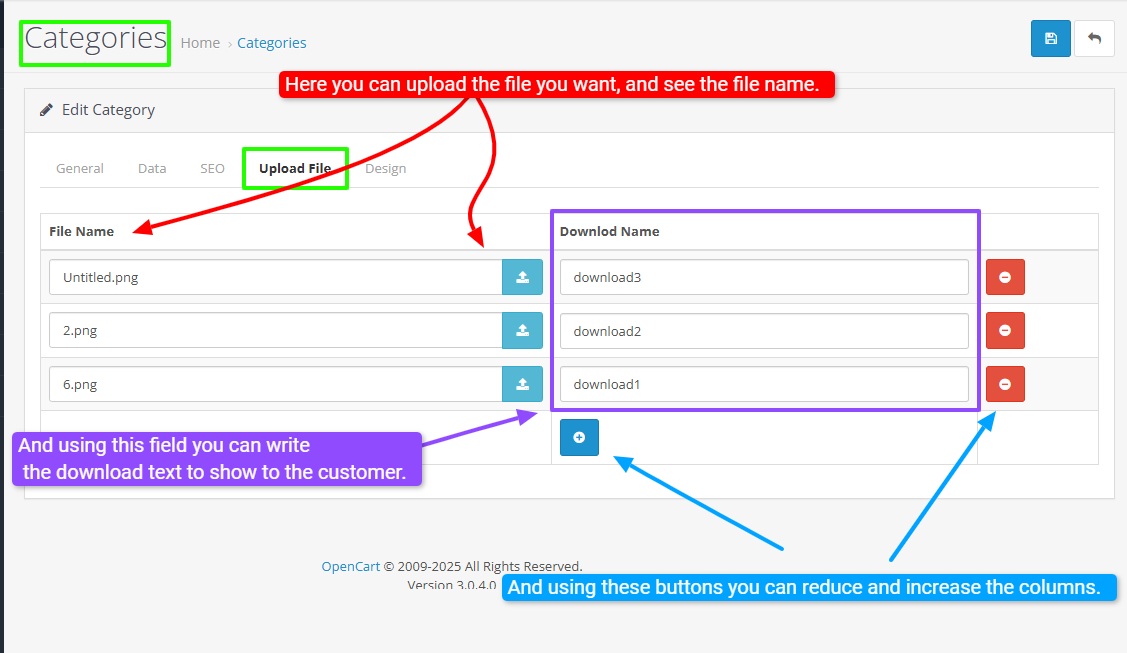
Product Form
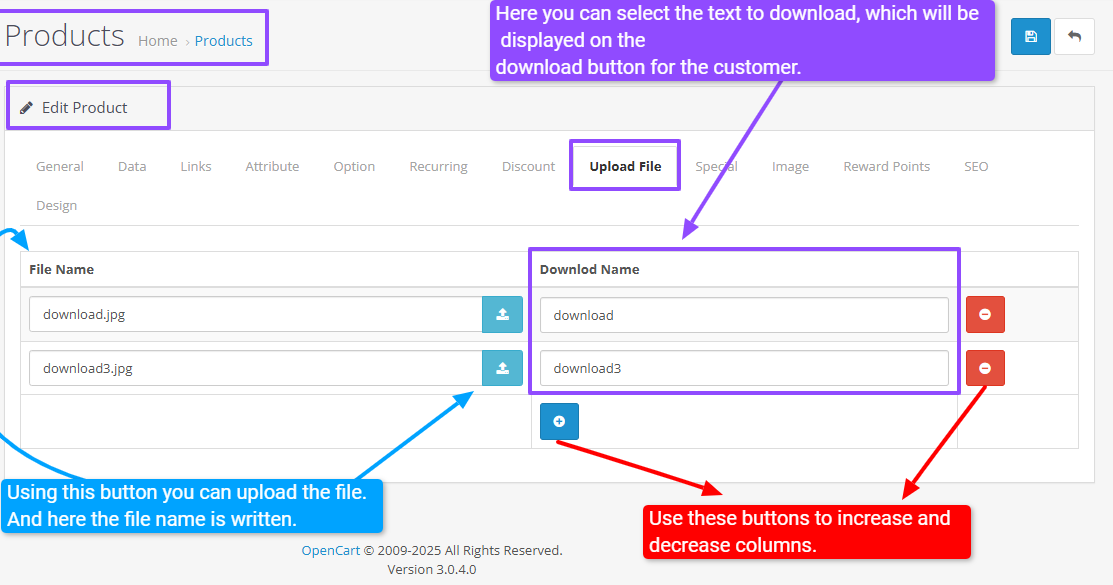
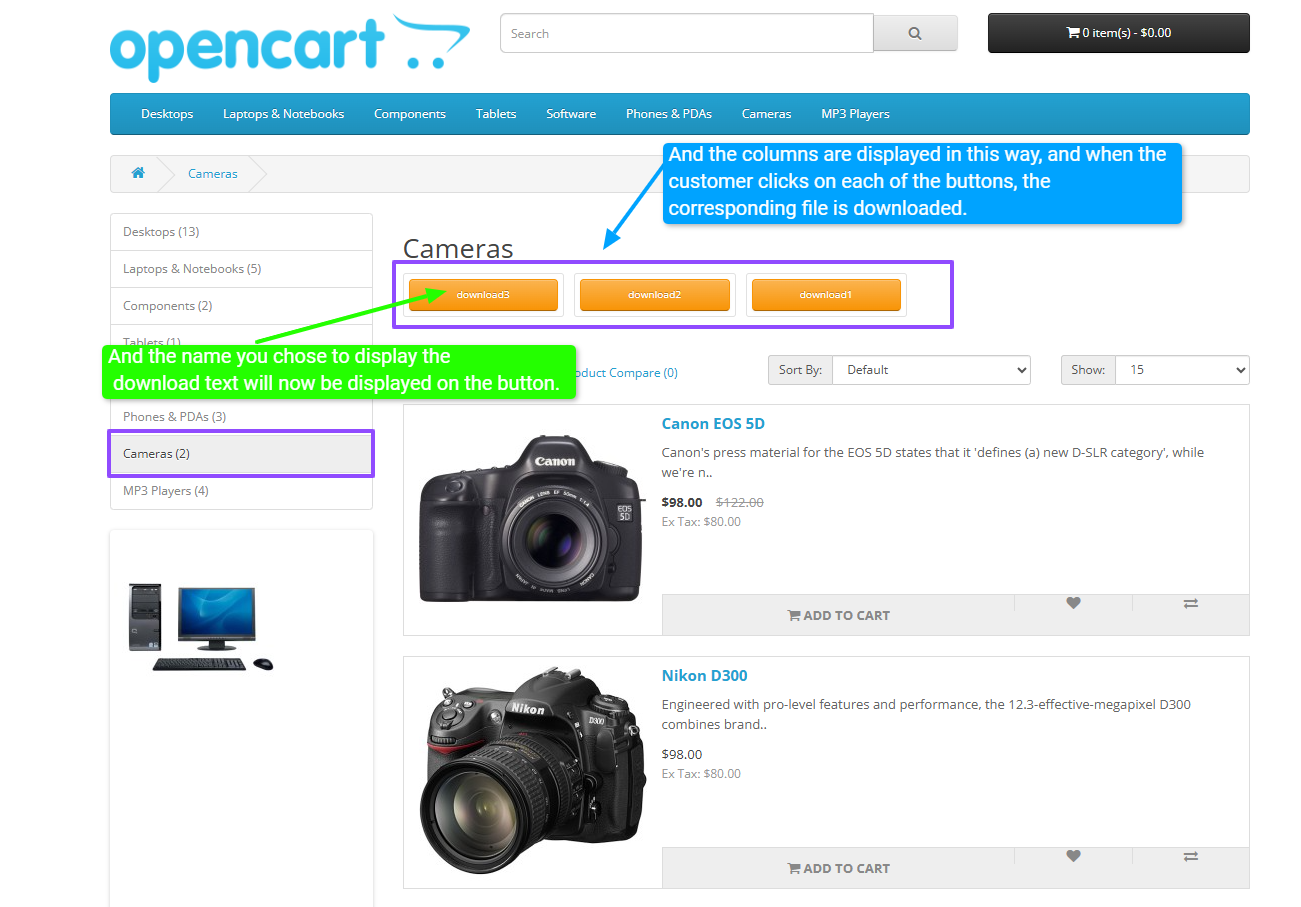
Users can download these files from the product or category pages, providing a richer and more interactive shopping experience.
Category Page
Product Page
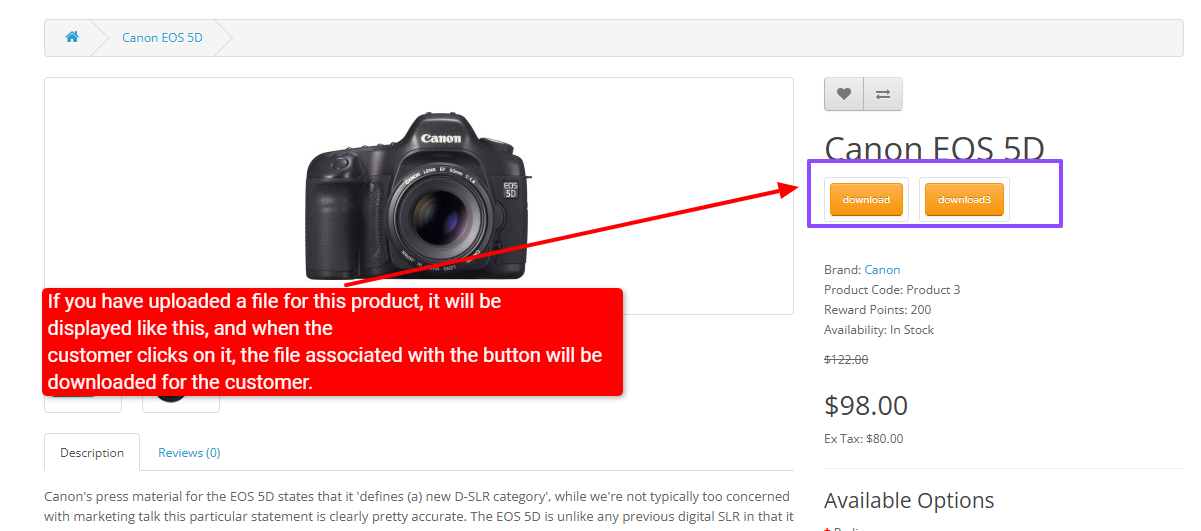
The module includes features like multiple file uploads, file validation, secure download links, and easy management through the admin panel.
It is designed to streamline file handling, improve product documentation, and offer customers convenient access to related files, all integrated seamlessly within your OpenCart environment.
Demo Admin
Product Admin Demo
Category Admin Demo
Produt Page Demo
Category Page Demo
(By purchasing one plugin, you get three modules.)
Install:
First download the Zip file.
Then go to Extensions>Installer and click on the "Upload" button.
Then select the downloaded Zip file and upload it.
Go to Extensions>Modifications and click on the "Refresh" button to apply the new changes.
Support:
cartcraft.oc@gmail.com
Using this module, you can upload files for each option, including select options, checkboxes, and radios.
This feature allows you to provide the associated files for each option separately based on your product needs, which increases scalability and satisfaction.
On the product page, each option is displayed as a button next to it.
When the customer clicks on this button, the file for that option is downloaded directly to them.
This process is designed to be user-friendly and fast so that customers can easily download and use the files they need.
This feature is especially useful in cases where products need to include help files, software updates, images, or any other type of file that customers need to access independently and easily.
By using this module, sellers and online store managers can improve the process of providing files related to each option and enhance the customer shopping experience.
In addition, this system features simple and effective file management, allowing you to customize and update different files based on the type of option and specific product needs.
As a result, this tool is a comprehensive and professional solution for adding file upload and download capabilities to your product pages, which can play a significant role in increasing customer engagement and satisfaction.
This module enhances your OpenCart store by enabling file uploads associated with products and categories.
It allows administrators to upload, manage, and link files (such as manuals, images, or other documents) directly to products or categories.
Category Form
Product Form
Users can download these files from the product or category pages, providing a richer and more interactive shopping experience.
Category Page
Product Page
The module includes features like multiple file uploads, file validation, secure download links, and easy management through the admin panel.
It is designed to streamline file handling, improve product documentation, and offer customers convenient access to related files, all integrated seamlessly within your OpenCart environment.
Demo Admin
Product Admin Demo
Category Admin Demo
Produt Page Demo
Category Page Demo
(By purchasing one plugin, you get three modules.)
Install:
First download the Zip file.
Then go to Extensions>Installer and click on the "Upload" button.
Then select the downloaded Zip file and upload it.
Go to Extensions>Modifications and click on the "Refresh" button to apply the new changes.
Support:
cartcraft.oc@gmail.com
Price
$20.00
- Developed by OpenCart Community
- 12 Months Free Support
- Documentation Included
Rating
Compatibility
3.0.0.0, 3.0.1.0, 3.0.1.1, 3.0.1.2, 3.0.1.3, 3.0.2.0, 3.0.3.0, 3.0.3.1, 3.0.3.2, 3.0.3.3, 3.0.3.5, 3.0.3.6, 3.0.3.7, 3.0.3.8, 3.x.x.x, 3.0.3.9, 3.0.4.0, 3.0.4.1, 3.0.5.0, 3.0.0.0, 3.0.1.0, 3.0.1.1, 3.0.1.2, 3.0.1.3, 3.0.2.0, 3.0.3.0, 3.0.3.1, 3.0.3.2, 3.0.3.3, 3.0.3.5, 3.0.3.6, 3.0.3.7, 3.0.3.8, 3.x.x.x, 3.0.3.9, 3.0.4.0, 3.0.4.1, 3.0.5.0, 3.0.0.0, 3.0.1.0, 3.0.1.1, 3.0.1.2, 3.0.1.3, 3.0.2.0, 3.0.3.0, 3.0.3.1, 3.0.3.2, 3.0.3.3, 3.0.3.5, 3.0.3.6, 3.0.3.7, 3.0.3.8, 3.x.x.x, 3.0.3.9, 3.0.4.0, 3.0.4.1, 3.0.5.0
Last Update
26 May 2026
Created
17 May 2025
0 Sales
0 Comments

Login and write down your comment.
Login my OpenCart Account