Download Tab in Product Page
Downloads Tab for Product Pages
======================
Demo
Front Store Demo
======================
1. Description
Enhance your OpenCart product pages by adding a professional and user-friendly "Downloads" tab. This extension seamlessly integrates into your product page, providing a dedicated space to offer valuable resources like user manuals, specification sheets, software drivers, brochures, or any other digital file.
The tab is intelligently designed to appear only when a product has downloads assigned, keeping your product pages clean and uncluttered. With a modern layout, dynamic file-type icons, and supports Japanese language as well, this extension is the perfect solution for stores selling digital goods or products that require supporting documentation.
Provide a better user experience and increase customer satisfaction by making important files easily accessible directly on the product page.
________________________________________
2. Features
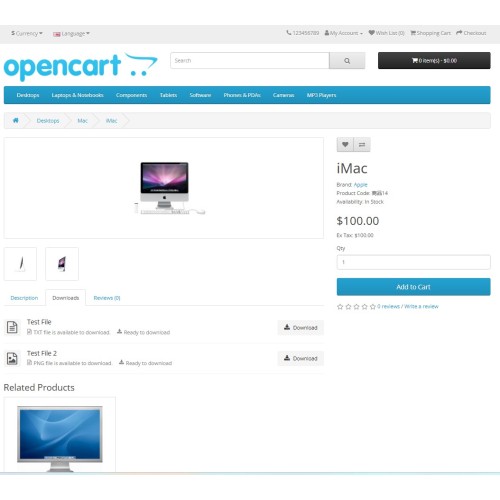
• Dynamic Tab Display: The "Downloads" tab automatically appears on the product page only if downloads are linked to that product.
• Clean & Modern Layout: A sleek, organized list of files that matches modern theme designs, complete with CSS styling for a professional look.
• Dynamic File Icons: Automatically displays a relevant icon based on the file type, providing a quick visual cue for the user. Supports:
o PDF
o Archives ( .zip, .rar, .7z)
o Images (.jpg, .png, .gif)
o Documents (.doc, .txt)
o Spreadsheets (.xls, .csv)
o A generic fallback icon (Storage) for all other file types.
• User-Friendly File Naming:
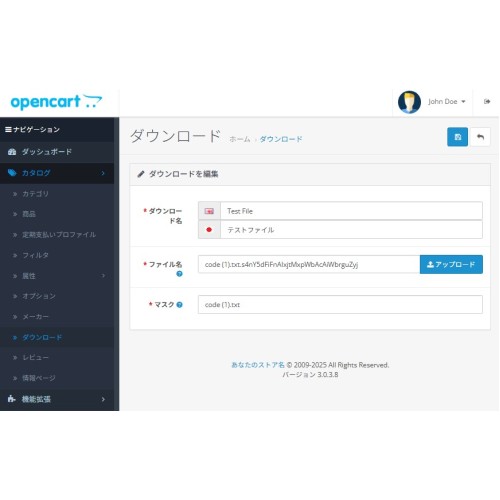
o Displays the language-specific Download Name you set in the admin panel as the main title.
o Uses the Mask field for the actual filename when the user downloads it, keeping your server filenames secure and private.
• Informative Meta Text: Includes translatable text below each download title, such as "PDF file is available to download" and "Ready to download."
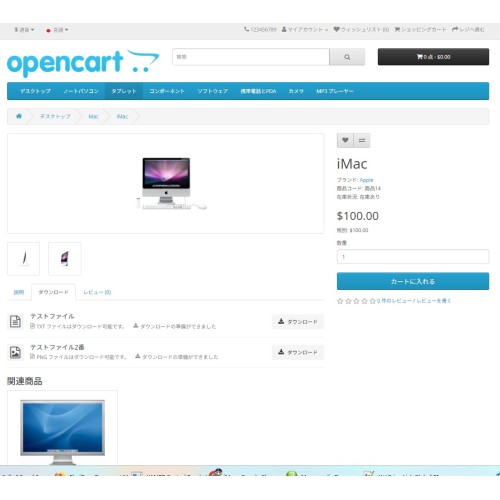
• Support Japanese Language: All front-facing text (tab title, meta text, etc.) is handled through OpenCart's language system. English and Japanese are included by default, and other languages can be added easily.
• Secure Download Handling: Uses OpenCart's built-in, secure download controller, ensuring that only valid files associated with the product can be downloaded.
• Simple OCMOD Installation: No core files are overwritten. The extension is a single OCMOD/XML file that is easy to install, uninstall, and manage through the OpenCart admin panel.
======================
Demo
Front Store Demo
======================
1. Description
Enhance your OpenCart product pages by adding a professional and user-friendly "Downloads" tab. This extension seamlessly integrates into your product page, providing a dedicated space to offer valuable resources like user manuals, specification sheets, software drivers, brochures, or any other digital file.
The tab is intelligently designed to appear only when a product has downloads assigned, keeping your product pages clean and uncluttered. With a modern layout, dynamic file-type icons, and supports Japanese language as well, this extension is the perfect solution for stores selling digital goods or products that require supporting documentation.
Provide a better user experience and increase customer satisfaction by making important files easily accessible directly on the product page.
________________________________________
2. Features
• Dynamic Tab Display: The "Downloads" tab automatically appears on the product page only if downloads are linked to that product.
• Clean & Modern Layout: A sleek, organized list of files that matches modern theme designs, complete with CSS styling for a professional look.
• Dynamic File Icons: Automatically displays a relevant icon based on the file type, providing a quick visual cue for the user. Supports:
o PDF
o Archives ( .zip, .rar, .7z)
o Images (.jpg, .png, .gif)
o Documents (.doc, .txt)
o Spreadsheets (.xls, .csv)
o A generic fallback icon (Storage) for all other file types.
• User-Friendly File Naming:
o Displays the language-specific Download Name you set in the admin panel as the main title.
o Uses the Mask field for the actual filename when the user downloads it, keeping your server filenames secure and private.
• Informative Meta Text: Includes translatable text below each download title, such as "PDF file is available to download" and "Ready to download."
• Support Japanese Language: All front-facing text (tab title, meta text, etc.) is handled through OpenCart's language system. English and Japanese are included by default, and other languages can be added easily.
• Secure Download Handling: Uses OpenCart's built-in, secure download controller, ensuring that only valid files associated with the product can be downloaded.
• Simple OCMOD Installation: No core files are overwritten. The extension is a single OCMOD/XML file that is easy to install, uninstall, and manage through the OpenCart admin panel.
Price
$30.00
- Developed by OpenCart Community
- 3 Months Free Support
- Documentation Included
Rating
Compatibility
3.x.x.x
Last Update
8 Jul 2025
Created
8 Jul 2025
0 Sales
0 Comments

Login and write down your comment.
Login my OpenCart Account