Reward Shipping Method

Using this module, managers can easily configure the scoring system based on different shipping methods.
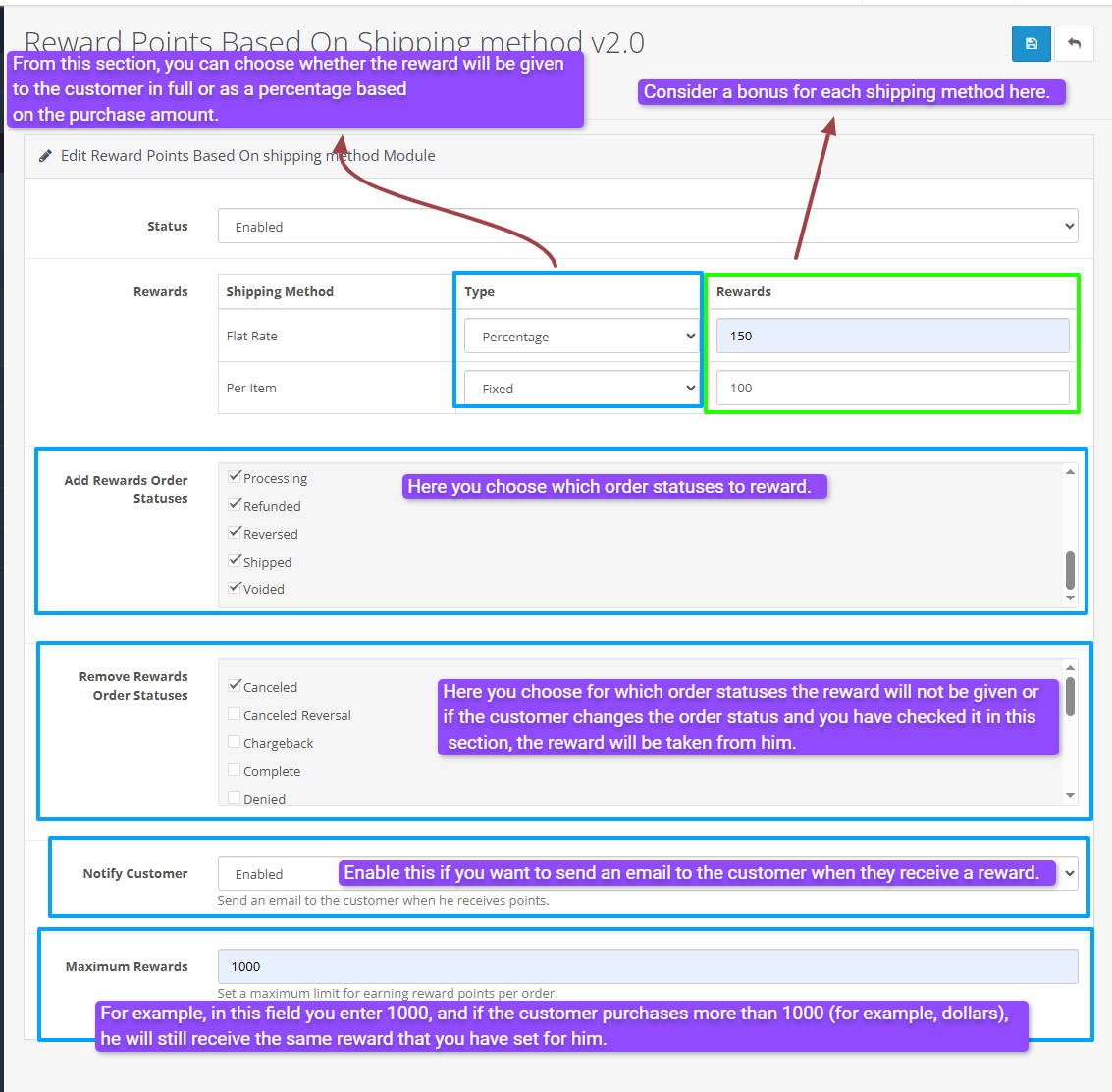
This feature allows managers to specify how many points (percentage or full) are awarded to customers for each shipping method.
In addition, managers can set specific conditions for awarding rewards.
For example, a reward is only given to the customer if their order status changes to "Complete."
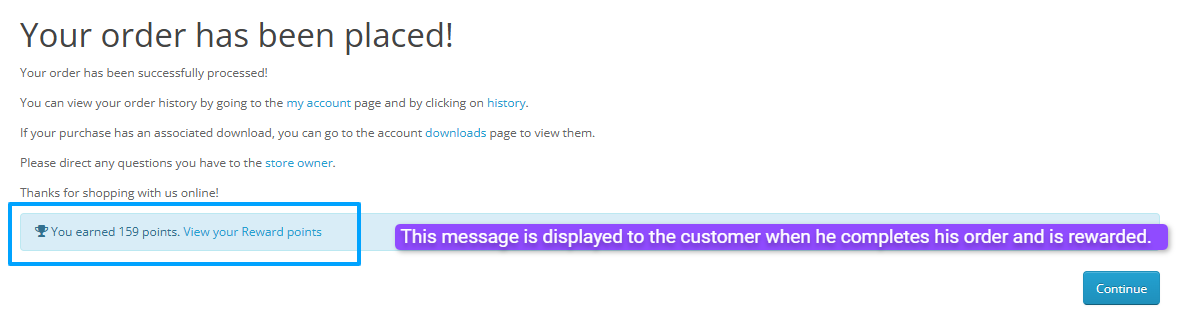
Furthermore, if the manager activates the email status, an automatic email will be sent to the customer after the order status changes to one of the statuses defined by the manager. This email informs the customer that they have received a reward.
And in the "Max" field, if the manager enters a number and the customer makes a purchase exceeding that amount, they will not receive a reward greater than the entered number.
This feature helps attract and retain customers and improves their shopping experience. Additionally, with this module, managers can easily manage their reward system and use it to encourage customers to make larger purchases.
Admin Demo
username:demo/password:demo
Store Demo
email:cartcraft.oc@gmail.com/password:1234
Install:
First download the ZIP file.
Then go to Extension>Installer Click on the (Upload) button And upload the downloaded ZIP file.
Extension>Extension>Modules and enable the "Reward Points Based on Submission Method Version 2.0" module.
Support:
cartcraft.oc@gmail.com
This feature allows managers to specify how many points (percentage or full) are awarded to customers for each shipping method.
In addition, managers can set specific conditions for awarding rewards.
For example, a reward is only given to the customer if their order status changes to "Complete."
Furthermore, if the manager activates the email status, an automatic email will be sent to the customer after the order status changes to one of the statuses defined by the manager. This email informs the customer that they have received a reward.
And in the "Max" field, if the manager enters a number and the customer makes a purchase exceeding that amount, they will not receive a reward greater than the entered number.
This feature helps attract and retain customers and improves their shopping experience. Additionally, with this module, managers can easily manage their reward system and use it to encourage customers to make larger purchases.
Admin Demo
username:demo/password:demo
Store Demo
email:cartcraft.oc@gmail.com/password:1234
Install:
First download the ZIP file.
Then go to Extension>Installer Click on the (Upload) button And upload the downloaded ZIP file.
Extension>Extension>Modules and enable the "Reward Points Based on Submission Method Version 2.0" module.
Support:
cartcraft.oc@gmail.com
Price
$20.00
- Developed by OpenCart Community
- 12 Months Free Support
- Documentation Included
Rating
Compatibility
3.0.0.0, 3.0.1.0, 3.0.1.1, 3.0.1.2, 3.0.1.3, 3.0.2.0, 3.0.3.0, 3.0.3.1, 3.0.3.2, 3.0.3.3, 3.0.3.5, 3.0.3.6, 3.0.3.7, 3.0.3.8, 3.x.x.x, 3.0.3.9, 3.0.4.0, 3.0.4.1, 3.0.5.0
Last Update
26 May 2026
Created
24 Jul 2025
0 Sales
0 Comments

Login and write down your comment.
Login my OpenCart Account