Transaction Payment Method
This module allows the store owner to define a Transaction amount for each payment method and specify how it should be calculated. Then the system assigns a fixed amount to each transaction based on the customer’s purchase price. In simple terms:
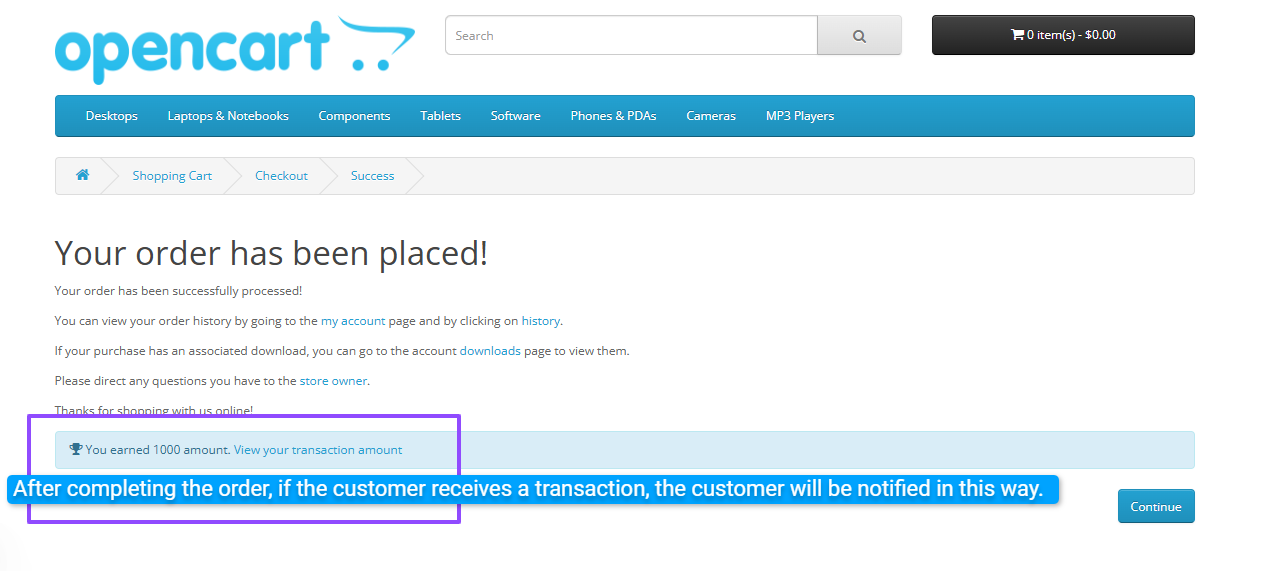
Customer notification: send an email to the customer or show a notification on the page after payment or order completion.
Sections:
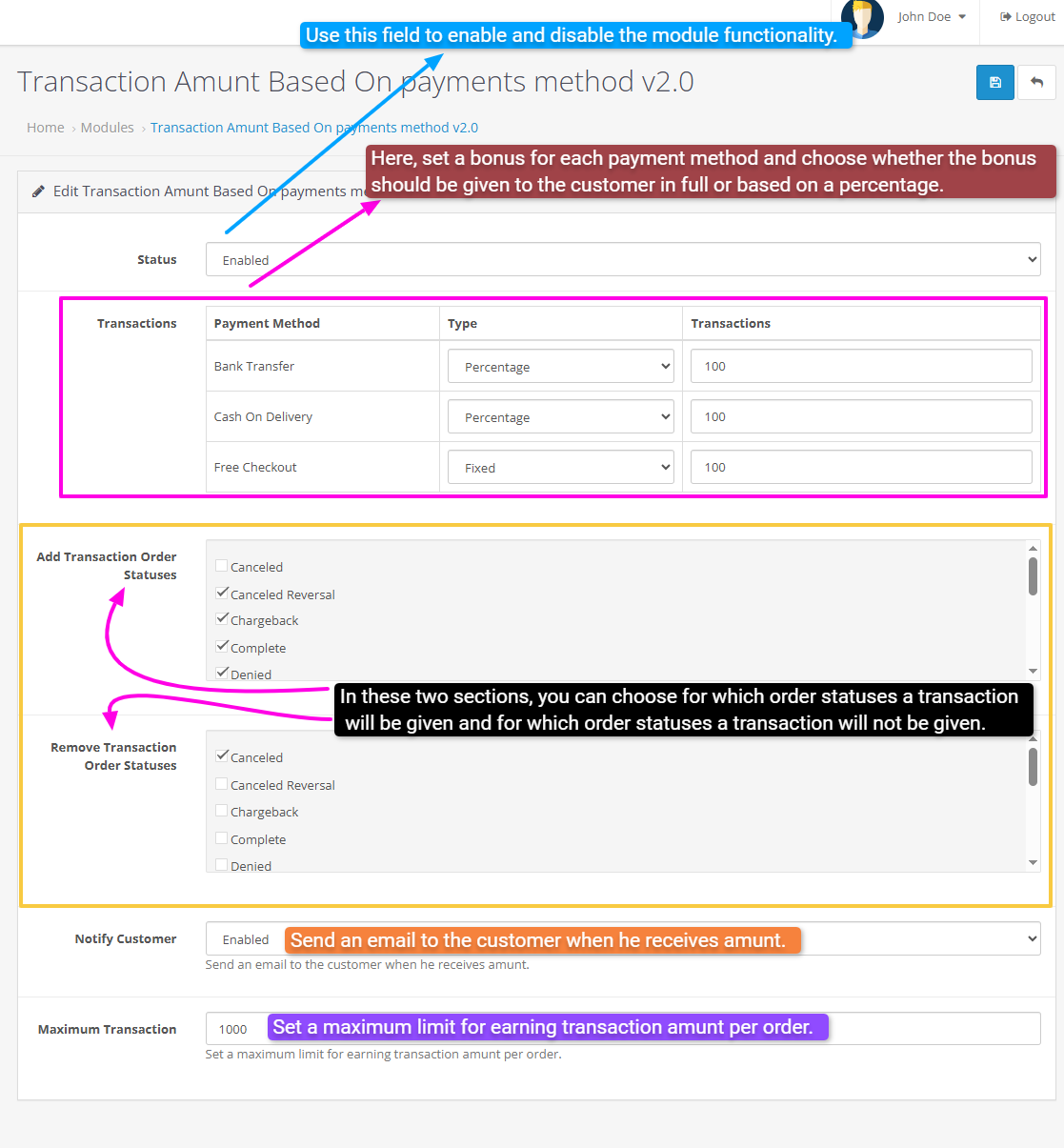
Transactions: list of payments with columns Payment Method, Type (Percentage or Fixed), and Transactions (the transaction amount).
Add Transaction Order Statuses: select the statuses to which the transaction is assigned.
Remove Transaction Order Statuses: select the statuses to which the transaction does not apply.
Notify Customer: enable sending a notification to the customer when a transaction is received.
Maximum Transaction: set the maximum transaction amount per order.
Only fill in the desired values for each field:
Result: When a customer makes a purchase for $100 and the transaction for the chosen payment method is set as a percentage (e.g., 100%), the customer will receive a defined amount, such as $100 or a percentage of the purchase, according to your settings. This is done without any coding and is configurable from the admin panel.
Live Demo:
username:demo/password:demo
email:cartcraft.oc@gmail.com/password:1234
Install:
Free Installation And Support:
- For each payment method, you define a transaction.
- You can set the transaction as either a percentage or a fixed amount.
- Percentage: the transaction amount is calculated as a percentage of the total purchase price.
- Fixed: the entire transaction amount is paid to the customer.
- If you set a Maximum Transaction value, the customer will not receive more than this amount.
- You can specify which order statuses (e.g., processing, delivered, canceled, etc.) the transaction applies to or does not apply to.
- The module can be enabled/disabled via the Status option.
Customer notification: send an email to the customer or show a notification on the page after payment or order completion.
Sections:
Transactions: list of payments with columns Payment Method, Type (Percentage or Fixed), and Transactions (the transaction amount).
Add Transaction Order Statuses: select the statuses to which the transaction is assigned.
Remove Transaction Order Statuses: select the statuses to which the transaction does not apply.
Notify Customer: enable sending a notification to the customer when a transaction is received.
Maximum Transaction: set the maximum transaction amount per order.
Only fill in the desired values for each field:
- Is it a percentage or fixed?
- The percentage or fixed transaction amount?
- For which order statuses should the transaction be active?
- What is the maximum transaction amount?
- Should the customer be informed by email or not?
Result: When a customer makes a purchase for $100 and the transaction for the chosen payment method is set as a percentage (e.g., 100%), the customer will receive a defined amount, such as $100 or a percentage of the purchase, according to your settings. This is done without any coding and is configurable from the admin panel.
Live Demo:
username:demo/password:demo
email:cartcraft.oc@gmail.com/password:1234
Install:
- First download the ZIP file.
- Then go to Extension>Installer Click on the (Upload) button And upload the downloaded ZIP file.
- Go to Extensions > Extensions > Modules and enable the "Transaction Amount by Payment Method Version 2.0" module.
Free Installation And Support:
- cartcraft.oc@gmail.com
Price
$20.00
- Developed by OpenCart Community
- 12 Months Free Support
- Documentation Included
Rating
Compatibility
3.0.0.0, 3.0.1.0, 3.0.1.1, 3.0.1.2, 3.0.1.3, 3.0.2.0, 3.0.3.0, 3.0.3.1, 3.0.3.2, 3.0.3.3, 3.0.3.5, 3.0.3.6, 3.0.3.7, 3.0.3.8, 3.x.x.x, 3.0.3.9, 3.0.4.0, 3.0.4.1, 3.0.5.0
Last Update
26 May 2026
Created
11 Aug 2025
0 Sales
0 Comments

Login and write down your comment.
Login my OpenCart Account