Apex Catalog Export - Send Products to Marketplaces
# Apex Catalog Export - OpenCart Extension
## Description
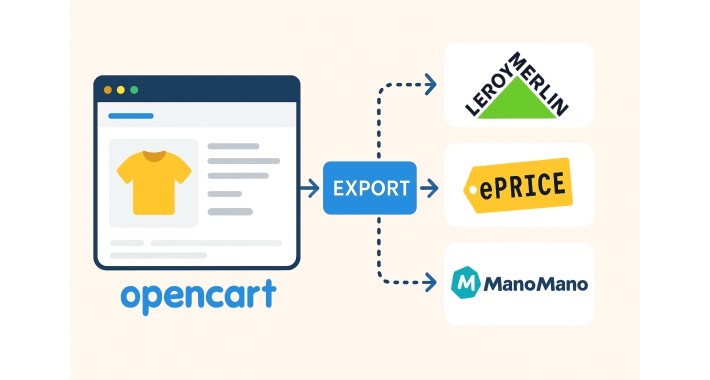
**Apex Catalog Export** is an OpenCart extension that allows automatic export of the product catalog. The extension has been developed to send products to various marketplaces and e-commerce platforms like **ManoMano**, **Leroy Merlin**, **ePrice**, **Brico Bravo** and others, automatically maintaining sent products updated through automatic synchronization. Users must have active accounts in the marketplaces where they want to export products.
## Main Features
### Automated Export
- Exports all catalog products to marketplaces via cron job to automate the process
- New products will be exported automatically
- Existing products will be updated with latest information
- Deleted products will be automatically removed from marketplaces
### Exported Data
The export includes all essential product data:
- **Identification codes**: EAN, MPN, SKU
- **Product information**: Name, description, category, brand
- **Pricing**: Base price, discounted price, VAT
- **Inventory**: Available quantity
- **Images**: Up to 10 images per product
- **Technical details**: Weight, product URL
- **Variants**: Complete product options management
and others data.
### Variant Management
- Full support for products with options/variants
- Automatic generation of separate rows for each option combination
- Connection between parent product and variants via ParentSKU
### Marketplace Integration
The exported catalog is optimized for integration with various marketplaces, including **ManoMano**, **Leroy Merlin**, **ePrice**, **Brico Bravo**, thanks to the structured data format that includes all necessary fields for product synchronization.
## Installation
1. Download the `apexcatalogo.ocmod.zip` file
2. Access the OpenCart admin panel
3. Go to **Extensions > Installer**
4. Upload the extension ZIP file
5. Go to **Extensions > Extensions** and select "Feeds" type
6. Find "Catalog Export" and click "Install"
7. Configure the extension by clicking "Edit"
## Configuration
1. Access the OpenCart admin panel
2. Navigate to **Extensions > Extensions**
3. Select "Feeds" type from the dropdown menu
4. Find "Catalog Export" and click "Edit"
5. Set the **Status** to "Enabled"
6. Save the configuration
## Description
**Apex Catalog Export** is an OpenCart extension that allows automatic export of the product catalog. The extension has been developed to send products to various marketplaces and e-commerce platforms like **ManoMano**, **Leroy Merlin**, **ePrice**, **Brico Bravo** and others, automatically maintaining sent products updated through automatic synchronization. Users must have active accounts in the marketplaces where they want to export products.
## Main Features
### Automated Export
- Exports all catalog products to marketplaces via cron job to automate the process
- New products will be exported automatically
- Existing products will be updated with latest information
- Deleted products will be automatically removed from marketplaces
### Exported Data
The export includes all essential product data:
- **Identification codes**: EAN, MPN, SKU
- **Product information**: Name, description, category, brand
- **Pricing**: Base price, discounted price, VAT
- **Inventory**: Available quantity
- **Images**: Up to 10 images per product
- **Technical details**: Weight, product URL
- **Variants**: Complete product options management
and others data.
### Variant Management
- Full support for products with options/variants
- Automatic generation of separate rows for each option combination
- Connection between parent product and variants via ParentSKU
### Marketplace Integration
The exported catalog is optimized for integration with various marketplaces, including **ManoMano**, **Leroy Merlin**, **ePrice**, **Brico Bravo**, thanks to the structured data format that includes all necessary fields for product synchronization.
## Installation
1. Download the `apexcatalogo.ocmod.zip` file
2. Access the OpenCart admin panel
3. Go to **Extensions > Installer**
4. Upload the extension ZIP file
5. Go to **Extensions > Extensions** and select "Feeds" type
6. Find "Catalog Export" and click "Install"
7. Configure the extension by clicking "Edit"
## Configuration
1. Access the OpenCart admin panel
2. Navigate to **Extensions > Extensions**
3. Select "Feeds" type from the dropdown menu
4. Find "Catalog Export" and click "Edit"
5. Set the **Status** to "Enabled"
6. Save the configuration
Price
$100.00
- Developed by OpenCart Community
- 12 Months Free Support
- Documentation Included
Rating
Compatibility
2.3.0.0, 2.3.0.1, 2.3.0.2, 4.x.x.x, 3.x.x.x
Last Update
9 Oct 2025
Created
23 Sep 2025
0 Sales
0 Comments

Login and write down your comment.
Login my OpenCart Account