Age Restriction

Age Restriction — Simple, secure age-gate with consent logging & anti-abuse
Lightweight age verification popup for OpenCart — records consent/decline, protects pages with cookie-based gating, and logs everything (IP/session/browser/user-agent) for audit and compliance.
What it does (brief)
This module shows a full-screen age-restriction popup to visitors who don’t yet have the consent cookie. Visitors can confirm they are of age (“Yes”) or decline (“No”). Both responses are stored in the database with contextual metadata (email if logged in, session id, IP, browser, platform, user agent, request/referer, timestamp). A cookie is set only for Yes so consenting users won’t be asked again until the cookie expires. Declines are recorded, and the popup continues to show until the user consents.
Key features:
- Simple age-gate popup (configurable title & message from admin).
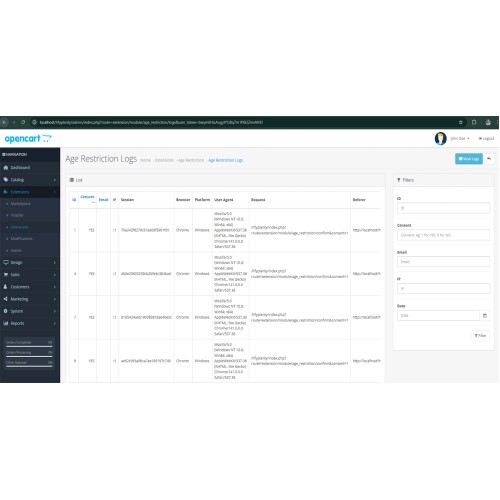
- Record consent and declines to age_restriction table with:
---
- Cookie control — configurable cookie duration (days) from admin panel.
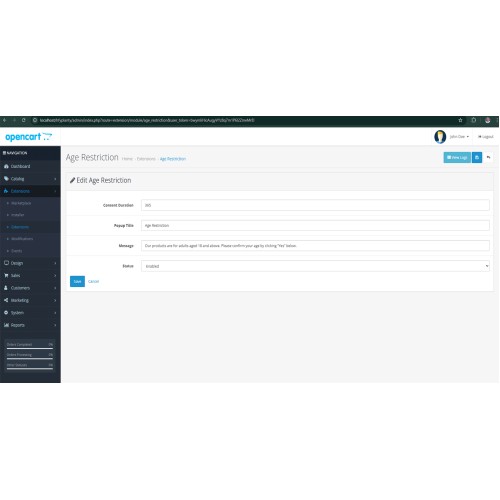
- Admin settings page to enable/disable module and edit popup text and cookie duration.
- View logs — quick access to consent records from the module config (View Logs button).
- Robust AJAX for local + production — uses fallback for localhost so devs can test easily.
- Anti-abuse / rate limiting — simple per-IP rate check prevents DB flooding (configurable threshold in code).
- Network/timeouts handled — client-side timeout & clear inline feedback for robust UX.
- Compatibility & stacking fixes:
--- Popup uses position: fixed and a very high z-index so it appears above common GDPR/consent banners.
--- Optionally moves popup to
--- Notes and guidance provided for blocking third-party consent scripts (GTM/ConsentManager) until age consent when needed.
- Accessible — basic ARIA roles/labels included so screen readers can identify the dialog.
- Small, dependency-free — no external libs required.
- Easy to use — install, enable, set the message, add module to layout — done.
Quick support — contact haradhan.sharma@gmil.com for help (as provided).
Why this module (benefits)
- Keeps under-age visitors off age-restricted content while collecting an auditable log of user responses for compliance.
- Minimal overhead: popup is small, responsive, and configurable without template hacking.
- Built-in mitigations against automated posting/flooding; you can further harden rate-limits or integrate Redis for heavy traffic.
- Works in local development (GET fallback) and in production (POST + credentials) out of the box.
Admin options
From the module configuration (Extensions → Extensions → Modules → Age Restriction) you can:
- Enable / disable the plugin.
- Set the popup title and popup message (use language strings if you want translations).
- Set cookie lifetime (in days).
- Click View Logs to inspect stored consent records.
Security & privacy notes
- The module stores metadata to help auditing and to spot abuse (IP, session, UA, timestamp). Do not treat UA/IP as proof of identity — they are for logs only.
- Rate limiting is implemented (count of recent inserts per IP) to defend against flood attacks. For production high-traffic sites, we recommend upgrading to an in-memory store (Redis) or adding CAPTCHA after suspicious activity.
- Cookie is only set on affirmative consent; declines are purposely not cookie-stored so the visitor sees the popup again.
- If you need GDPR/CCPA compatibility, use this module alongside your legal/privacy tooling — the module records consent state (useful for audit), but it does not replace a full consent management platform.
Technical notes for integrators
- Table created: DB_PREFIX + age_restriction.
- Controller accepts consent via POST (production) and GET (localhost fallback for developers). The DB write stores consent as 0 or 1.
- Frontend JS uses a robust XMLHttpRequest fallback to avoid fetch()/CORS problems on local setups.
- Popup styling includes very large z-index and logic to append to document.body to prevent stacking context traps; for iframe-based third-party banners you may need to delay loading those scripts until age consent is given (we provide guidance).
Installation (quick)
1. Extensions → Installer → Upload age_restriction.ocmod.zip (or use OCMOD package).
2. Extensions → Modifications → Refresh.
3. Extensions → Extensions → Modules → Find Age Restriction → Install; then Edit and Enable.
4. Design → Layouts → Home (or your desired layout) → Add Age Restriction to Content Bottom (or Footer) so it displays site-wide.
5. Save and test (clear Twig/template cache if needed).
Troubleshooting & tips
- If popup appears behind other banners: increase the z-index in the module CSS or enable the “append to body” snippet.
- If you see “Network error” during local dev: use the provided localhost fallback (GET) or check DevTools → Network to confirm the endpoint URL and status.
- If many declines/inserts appear from a single IP, increase the rate limiting logic or move to Redis-based throttling for robust control.
- Want custom text for buttons, translations or to show the popup only on certain pages? The module template is simple to extend — we can help add those options.
Changelog (high level)
v1.0 — Initial release: age popup, DB logging, cookie handling.
v1.x — Added decline logging, rate limiting, local dev fallback, improved JS (XHR fallback), z-index/DOM append fixes, accessibility tags, admin configuration fields and View Logs button.
Support & contact
Quick support is available — reach out to:
Lightweight age verification popup for OpenCart — records consent/decline, protects pages with cookie-based gating, and logs everything (IP/session/browser/user-agent) for audit and compliance.
What it does (brief)
This module shows a full-screen age-restriction popup to visitors who don’t yet have the consent cookie. Visitors can confirm they are of age (“Yes”) or decline (“No”). Both responses are stored in the database with contextual metadata (email if logged in, session id, IP, browser, platform, user agent, request/referer, timestamp). A cookie is set only for Yes so consenting users won’t be asked again until the cookie expires. Declines are recorded, and the popup continues to show until the user consents.
Key features:
- Simple age-gate popup (configurable title & message from admin).
- Record consent and declines to age_restriction table with:
---
email, consent (1 = yes / 0 = no), session_id, ip, browser, platform, user_agent, request_url, referer_url, date_added.- Cookie control — configurable cookie duration (days) from admin panel.
- Admin settings page to enable/disable module and edit popup text and cookie duration.
- View logs — quick access to consent records from the module config (View Logs button).
- Robust AJAX for local + production — uses fallback for localhost so devs can test easily.
- Anti-abuse / rate limiting — simple per-IP rate check prevents DB flooding (configurable threshold in code).
- Network/timeouts handled — client-side timeout & clear inline feedback for robust UX.
- Compatibility & stacking fixes:
--- Popup uses position: fixed and a very high z-index so it appears above common GDPR/consent banners.
--- Optionally moves popup to
<body> to avoid stacking context problems.--- Notes and guidance provided for blocking third-party consent scripts (GTM/ConsentManager) until age consent when needed.
- Accessible — basic ARIA roles/labels included so screen readers can identify the dialog.
- Small, dependency-free — no external libs required.
- Easy to use — install, enable, set the message, add module to layout — done.
Quick support — contact haradhan.sharma@gmil.com for help (as provided).
Why this module (benefits)
- Keeps under-age visitors off age-restricted content while collecting an auditable log of user responses for compliance.
- Minimal overhead: popup is small, responsive, and configurable without template hacking.
- Built-in mitigations against automated posting/flooding; you can further harden rate-limits or integrate Redis for heavy traffic.
- Works in local development (GET fallback) and in production (POST + credentials) out of the box.
Admin options
From the module configuration (Extensions → Extensions → Modules → Age Restriction) you can:
- Enable / disable the plugin.
- Set the popup title and popup message (use language strings if you want translations).
- Set cookie lifetime (in days).
- Click View Logs to inspect stored consent records.
Security & privacy notes
- The module stores metadata to help auditing and to spot abuse (IP, session, UA, timestamp). Do not treat UA/IP as proof of identity — they are for logs only.
- Rate limiting is implemented (count of recent inserts per IP) to defend against flood attacks. For production high-traffic sites, we recommend upgrading to an in-memory store (Redis) or adding CAPTCHA after suspicious activity.
- Cookie is only set on affirmative consent; declines are purposely not cookie-stored so the visitor sees the popup again.
- If you need GDPR/CCPA compatibility, use this module alongside your legal/privacy tooling — the module records consent state (useful for audit), but it does not replace a full consent management platform.
Technical notes for integrators
- Table created: DB_PREFIX + age_restriction.
- Controller accepts consent via POST (production) and GET (localhost fallback for developers). The DB write stores consent as 0 or 1.
- Frontend JS uses a robust XMLHttpRequest fallback to avoid fetch()/CORS problems on local setups.
- Popup styling includes very large z-index and logic to append to document.body to prevent stacking context traps; for iframe-based third-party banners you may need to delay loading those scripts until age consent is given (we provide guidance).
Installation (quick)
1. Extensions → Installer → Upload age_restriction.ocmod.zip (or use OCMOD package).
2. Extensions → Modifications → Refresh.
3. Extensions → Extensions → Modules → Find Age Restriction → Install; then Edit and Enable.
4. Design → Layouts → Home (or your desired layout) → Add Age Restriction to Content Bottom (or Footer) so it displays site-wide.
5. Save and test (clear Twig/template cache if needed).
Troubleshooting & tips
- If popup appears behind other banners: increase the z-index in the module CSS or enable the “append to body” snippet.
- If you see “Network error” during local dev: use the provided localhost fallback (GET) or check DevTools → Network to confirm the endpoint URL and status.
- If many declines/inserts appear from a single IP, increase the rate limiting logic or move to Redis-based throttling for robust control.
- Want custom text for buttons, translations or to show the popup only on certain pages? The module template is simple to extend — we can help add those options.
Changelog (high level)
v1.0 — Initial release: age popup, DB logging, cookie handling.
v1.x — Added decline logging, rate limiting, local dev fallback, improved JS (XHR fallback), z-index/DOM append fixes, accessibility tags, admin configuration fields and View Logs button.
Support & contact
Quick support is available — reach out to:
haradhan.sharma@gmil.comPrice
$30.00
- Developed by OpenCart Community
- 12 Months Free Support
- Documentation Included
Rating
Compatibility
3.0.3.1, 3.0.3.2, 3.0.3.3, 3.0.3.5, 3.0.3.6, 3.0.3.7, 3.0.3.8, 3.x.x.x, 3.0.3.9, 3.0.4.0, 3.0.4.1
Last Update
8 Oct 2025
Created
7 Oct 2025
0 Sales
0 Comments

Login and write down your comment.
Login my OpenCart Account