Multizone Flat Rate

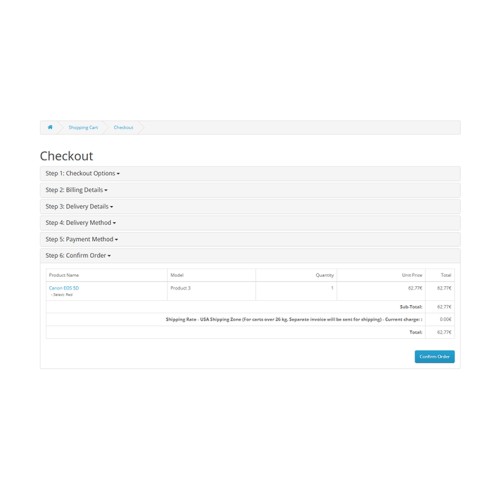
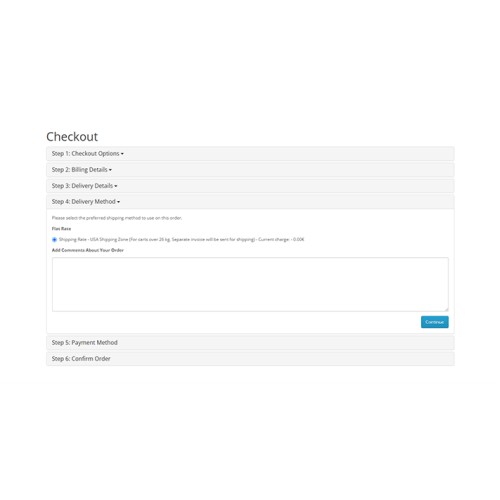
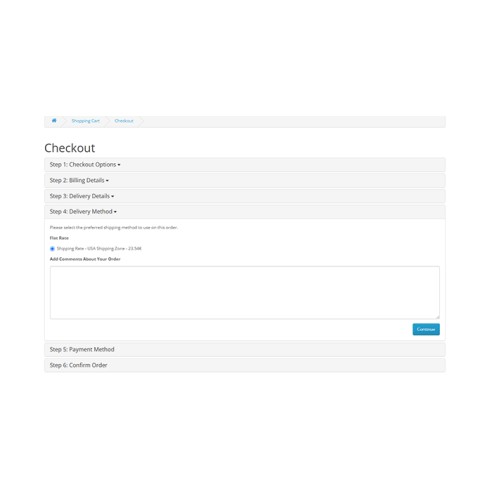
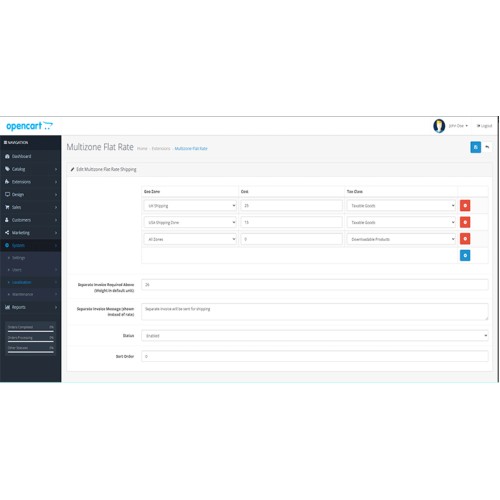
Multizone Flat Rate — simple, flexible shipping by geo-zone & weight threshold
Flexible multizone flat-rate shipping for OpenCart — per-geo-zone costs, tax class support, and built-in overweight invoice handling.
Multizone Flat Rate is a lightweight, easy-to-configure OpenCart shipping extension that lets you define flat shipping costs per geo-zone, attach tax classes to each rate, and automatically switch to a “separate invoice” workflow when the cart weight exceeds a configurable threshold. It’s designed for merchants who want predictable shipping charges by region while retaining the flexibility to invoice heavy shipments separately.
This module focuses on clarity, reliability and developer-friendly integration:
-- Admin UI to add/edit multiple rates and assign them to geo-zones.
-- Built-in validation for rates to avoid configuration mistakes.
-- Automatic detection of store weight unit and cart weight calculation.
-- Clear invoice messaging when orders exceed the configured weight threshold.
-- Works with OpenCart tax and currency systems for correct display of totals.
Key features
-- Define multiple flat-rate entries, each mapped to:
---- a Geo Zone (or “All Zones” with geo_zone_id = 0),
---- a flat cost, and
---- an optional tax class.
-- Per-rate tax class support — charges are tax-calculated using OpenCart tax settings.
-- Overweight handling — configure a weight limit above which shipping is invoiced separately (cost is shown as zero in checkout and an invoice notice replaces the rate).
-- Customizable separate invoice message that appears to the customer when the cart is overweight.
-- Automatically formats the cost with the store currency and tax calculation
-- Admin-side validation to ensure costs are numeric and sane.
-- Works with any OpenCart weight class — module detects the store’s weight unit and displays it in the invoice message.
-- All-zones fallback — use a geo-zone id of 0 to apply a rate globally.
-- Lightweight, dependency-free code — no external libraries required.
-- Developer-friendly methods for retrieving geo-zone names and weight class lookup
Benefits
-- Predictable shipping costs by region — easy to explain to customers.
-- Avoid undercharging / loss on heavy shipments by automatically switching to a separate invoice workflow.
-- Safe admin configuration: invalid rates are rejected with clear errors.
-- Fully integrated with OpenCart tax, currency and cart subsystems.
-- Simple to extend or customize for custom workflows (e.g., adding per-product surcharges or volumetric weight rules).
Admin options (what you can configure)
-- Add/remove/edit shipping rates (geo-zone, cost, tax class).
-- Set Separate Invoice Required Above (Weight) — numeric threshold in your store’s weight unit.
-- Edit Separate Invoice Message (shown instead of the rate text for overweight orders).
-- Enable/disable the shipping method and set Sort Order.
-- Works with existing Geo Zones and Tax Classes configured in OpenCart.
Installation (quick)
-- Upload the extension via Extensions → Installer (use the OCMOD/zip provided).
-- Extensions → Modifications → Refresh.
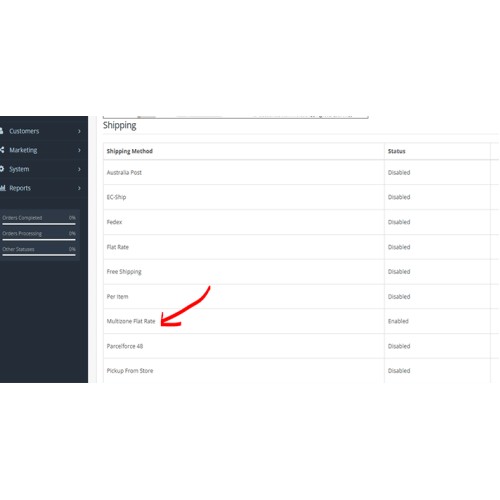
-- Extensions → Extensions → Shipping → find Multizone Flat Rate → Install.
-- Edit the module and configure your rates, invoice weight limit, and messages.
-- Add the shipping method to the appropriate store zones/layout if needed (shipping methods show automatically at checkout by address match).
Technical notes (for integrators)
-- Quote generation lives in ModelExtensionShippingMultizoneFlatRate::getQuote($address). It:
---- reads
---- checks zone membership via zone_to_geo_zone,
---- calculates tax using
---- formats cost with
-- Overweight logic: if cart weight > configured limit, the checkout display shows an invoice message and sets the quoted shipping cost to 0.00 (so shipping is invoiced separately).
-- Admin validation enforces numeric costs; invalid entries are rejected at save time.
-- Geo-zone id
-- The module uses the store’s configured weight class name (via getWeightClass) to make the invoice message readable and accurate.
-- Compatible with multi-currency stores and OpenCart tax system.
Troubleshooting & tips
-- If a rate is not appearing at checkout, verify:
---- the customer address country/zone matches the configured geo-zone, or a global rate (geo_zone_id = 0) exists;
---- the module is Enabled and sort_order doesn’t hide it behind other shipping methods per your theme/UI.
-- Overweight behavior: confirm that cart weight is measured in the same unit shown in admin (module auto-detects the store weight unit).
-- Formatting issues: ensure your store currency and tax settings are correct — the module delegates formatting to OpenCart core.
-- Need custom behaviour (e.g., per-product shipping overrides, volumetric weight) — the module is small and easy to extend; contact support for a custom patch.
Security & reliability
-- Admin-side input validation guards against malformed rate data.
-- Module performs minimal DB reads/writes and leverages OpenCart core APIs for tax and currency — low risk under normal load.
-- For complex enterprise shipping logic or high-volume shipping APIs, consider combining this module with a background job processor or a dedicated shipping service.
Support & contact
Quick support is available:
Email: haradhan.sharma@gmil.com
When contacting support please provide:
-- OpenCart version, theme name, and any relevant third-party shipping / checkout customizations.
-- Steps to reproduce the issue and screenshots (if available).
Flexible multizone flat-rate shipping for OpenCart — per-geo-zone costs, tax class support, and built-in overweight invoice handling.
Multizone Flat Rate is a lightweight, easy-to-configure OpenCart shipping extension that lets you define flat shipping costs per geo-zone, attach tax classes to each rate, and automatically switch to a “separate invoice” workflow when the cart weight exceeds a configurable threshold. It’s designed for merchants who want predictable shipping charges by region while retaining the flexibility to invoice heavy shipments separately.
This module focuses on clarity, reliability and developer-friendly integration:
-- Admin UI to add/edit multiple rates and assign them to geo-zones.
-- Built-in validation for rates to avoid configuration mistakes.
-- Automatic detection of store weight unit and cart weight calculation.
-- Clear invoice messaging when orders exceed the configured weight threshold.
-- Works with OpenCart tax and currency systems for correct display of totals.
Key features
-- Define multiple flat-rate entries, each mapped to:
---- a Geo Zone (or “All Zones” with geo_zone_id = 0),
---- a flat cost, and
---- an optional tax class.
-- Per-rate tax class support — charges are tax-calculated using OpenCart tax settings.
-- Overweight handling — configure a weight limit above which shipping is invoiced separately (cost is shown as zero in checkout and an invoice notice replaces the rate).
-- Customizable separate invoice message that appears to the customer when the cart is overweight.
-- Automatically formats the cost with the store currency and tax calculation
($this->currency->format() + $this->tax->calculate()).-- Admin-side validation to ensure costs are numeric and sane.
-- Works with any OpenCart weight class — module detects the store’s weight unit and displays it in the invoice message.
-- All-zones fallback — use a geo-zone id of 0 to apply a rate globally.
-- Lightweight, dependency-free code — no external libraries required.
-- Developer-friendly methods for retrieving geo-zone names and weight class lookup
(getGeoZoneName(), getWeightClass()).Benefits
-- Predictable shipping costs by region — easy to explain to customers.
-- Avoid undercharging / loss on heavy shipments by automatically switching to a separate invoice workflow.
-- Safe admin configuration: invalid rates are rejected with clear errors.
-- Fully integrated with OpenCart tax, currency and cart subsystems.
-- Simple to extend or customize for custom workflows (e.g., adding per-product surcharges or volumetric weight rules).
Admin options (what you can configure)
-- Add/remove/edit shipping rates (geo-zone, cost, tax class).
-- Set Separate Invoice Required Above (Weight) — numeric threshold in your store’s weight unit.
-- Edit Separate Invoice Message (shown instead of the rate text for overweight orders).
-- Enable/disable the shipping method and set Sort Order.
-- Works with existing Geo Zones and Tax Classes configured in OpenCart.
Installation (quick)
-- Upload the extension via Extensions → Installer (use the OCMOD/zip provided).
-- Extensions → Modifications → Refresh.
-- Extensions → Extensions → Shipping → find Multizone Flat Rate → Install.
-- Edit the module and configure your rates, invoice weight limit, and messages.
-- Add the shipping method to the appropriate store zones/layout if needed (shipping methods show automatically at checkout by address match).
Technical notes (for integrators)
-- Quote generation lives in ModelExtensionShippingMultizoneFlatRate::getQuote($address). It:
---- reads
shipping_multizone_flat_rate_rates from config,---- checks zone membership via zone_to_geo_zone,
---- calculates tax using
$this->tax->calculate(),---- formats cost with
$this->currency->format().-- Overweight logic: if cart weight > configured limit, the checkout display shows an invoice message and sets the quoted shipping cost to 0.00 (so shipping is invoiced separately).
-- Admin validation enforces numeric costs; invalid entries are rejected at save time.
-- Geo-zone id
0 acts as “All Zones”.-- The module uses the store’s configured weight class name (via getWeightClass) to make the invoice message readable and accurate.
-- Compatible with multi-currency stores and OpenCart tax system.
Troubleshooting & tips
-- If a rate is not appearing at checkout, verify:
---- the customer address country/zone matches the configured geo-zone, or a global rate (geo_zone_id = 0) exists;
---- the module is Enabled and sort_order doesn’t hide it behind other shipping methods per your theme/UI.
-- Overweight behavior: confirm that cart weight is measured in the same unit shown in admin (module auto-detects the store weight unit).
-- Formatting issues: ensure your store currency and tax settings are correct — the module delegates formatting to OpenCart core.
-- Need custom behaviour (e.g., per-product shipping overrides, volumetric weight) — the module is small and easy to extend; contact support for a custom patch.
Security & reliability
-- Admin-side input validation guards against malformed rate data.
-- Module performs minimal DB reads/writes and leverages OpenCart core APIs for tax and currency — low risk under normal load.
-- For complex enterprise shipping logic or high-volume shipping APIs, consider combining this module with a background job processor or a dedicated shipping service.
Support & contact
Quick support is available:
Email: haradhan.sharma@gmil.com
When contacting support please provide:
-- OpenCart version, theme name, and any relevant third-party shipping / checkout customizations.
-- Steps to reproduce the issue and screenshots (if available).
Price
$30.00
- Developed by OpenCart Community
- 12 Months Free Support
- Documentation Included
Rating
Compatibility
3.0.3.1, 3.0.3.2, 3.0.3.3, 3.0.3.5, 3.0.3.6, 3.0.3.7, 3.0.3.8, 3.x.x.x, 3.0.3.9, 3.0.4.0, 3.0.4.1
Last Update
7 Oct 2025
Created
7 Oct 2025
0 Sales
0 Comments

Login and write down your comment.
Login my OpenCart Account