Remove Cart, Wishlist & Compare

Overview
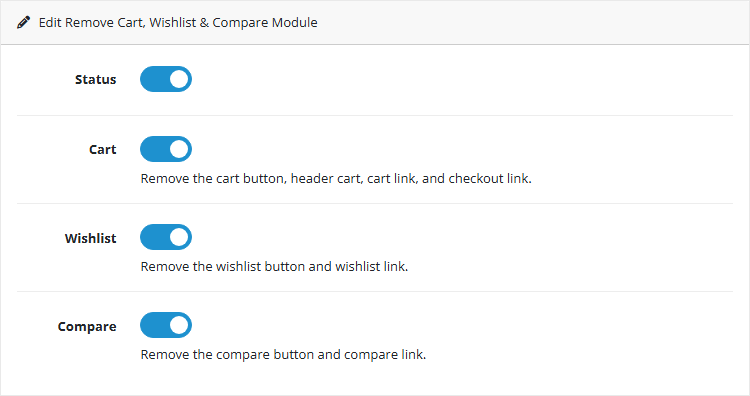
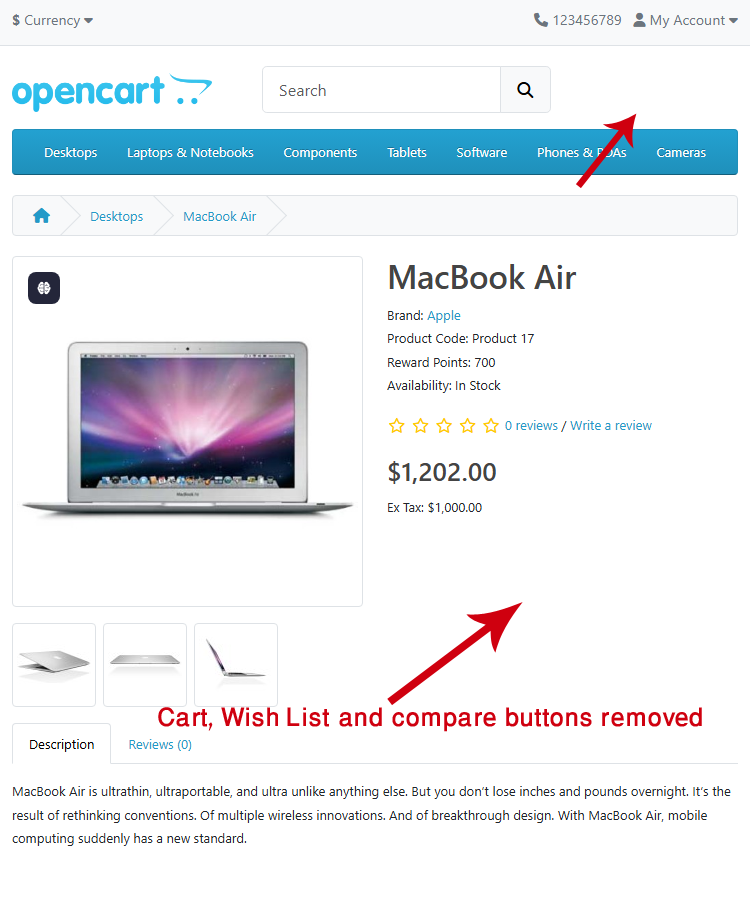
Remove Cart, Wishlist & Compare is a lightweight OpenCart extension that lets you quickly switch your store between shopping mode and a clean catalog mode. With a single click, you can hide cart-related elements and streamline the storefront for a distraction-free browsing experience. Each feature (Cart, Wishlist, and Compare) can be enabled or disabled independently, giving you full control over which functionalities remain visible to customers.



Key Features
Install Instructions
- Log in to your OpenCart Admin panel.
- Navigate to Extensions > Installer and upload the file compatible with your OpenCart version.
- Go to Extensions > Extensions > Modules, find Remove Cart, Wishlist & Compare, and install and configure it.
Free Installation and Support
Remove Cart, Wishlist & Compare is a lightweight OpenCart extension that lets you quickly switch your store between shopping mode and a clean catalog mode. With a single click, you can hide cart-related elements and streamline the storefront for a distraction-free browsing experience. Each feature (Cart, Wishlist, and Compare) can be enabled or disabled independently, giving you full control over which functionalities remain visible to customers.
Key Features
- One-click catalog mode: turn any OpenCart store into a clean catalog without cart, wishlist, or compare features.
- Hide Cart: remove the cart button, header cart, cart link, and checkout link automatically (configurable to enable/disable).
- Hide Wishlist: remove the wishlist button and wishlist link (configurable to enable/disable).
- Hide Compare: remove the compare button and compare link (configurable to enable/disable).
- Streamlined storefront: product pages and navigation stay intact while cart-related actions are removed for a distraction-free shopping experience.
Install Instructions
- Log in to your OpenCart Admin panel.
- Navigate to Extensions > Installer and upload the file compatible with your OpenCart version.
- Go to Extensions > Extensions > Modules, find Remove Cart, Wishlist & Compare, and install and configure it.
Free Installation and Support
- DigitCart Support
- Email: sabeti05 [at] gmail.com
Price
$20.00
- Developed by OpenCart Community
- 12 Months Free Support
- Documentation Included
Rating
Compatibility
4.x.x.x, 4.0.2.0, 4.0.2.1, 4.0.2.2, 4.0.2.3, 4.1.0.0, 4.1.0.1, 4.1.0.2, 4.1.0.3
Last Update
28 May 2026
Created
12 Oct 2025
1 Sales
0 Comments

Login and write down your comment.
Login my OpenCart Account