Google Tag Manager Pro - Complete DataLayer & Event Tracking


Email Support: opencarttools@gmail.com
WhatsApp Live Chat: Click Here
Live Demo
See the module in action before purchase.
Admin
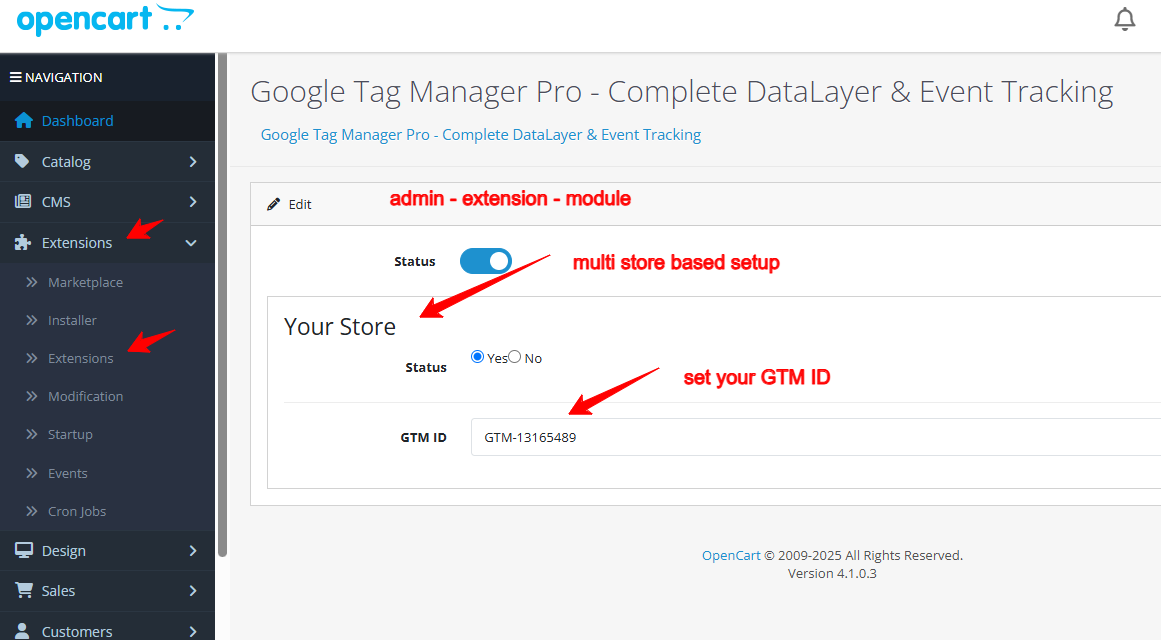
Admin > Extension > Module
Front
Home Page
Title
Google Tag Manager Pro – Complete DataLayer & Event Tracking (GA4 + Enhanced eCommerce) For OpenCart 2.x + 3.x + 4.x
Short Description
Powerful Google Tag Manager integration that automatically pushes complete GA4-compatible DataLayer events — including add to cart, wishlist, checkout, purchase, and more.
Google Tag Manager Pro is an advanced OpenCart integration module that sends all key eCommerce actions to Google Tag Manager using the official GA4 DataLayer format — without editing theme files.
Track the entire customer journey from product view to final purchase with precision.
Free Dedicated Support Included
We provide dedicated technical support to ensure smooth installation and usage of this module.
✔ Fast response time
✔ Installation guidance
✔ Bug fixes assistance
What This Module Does
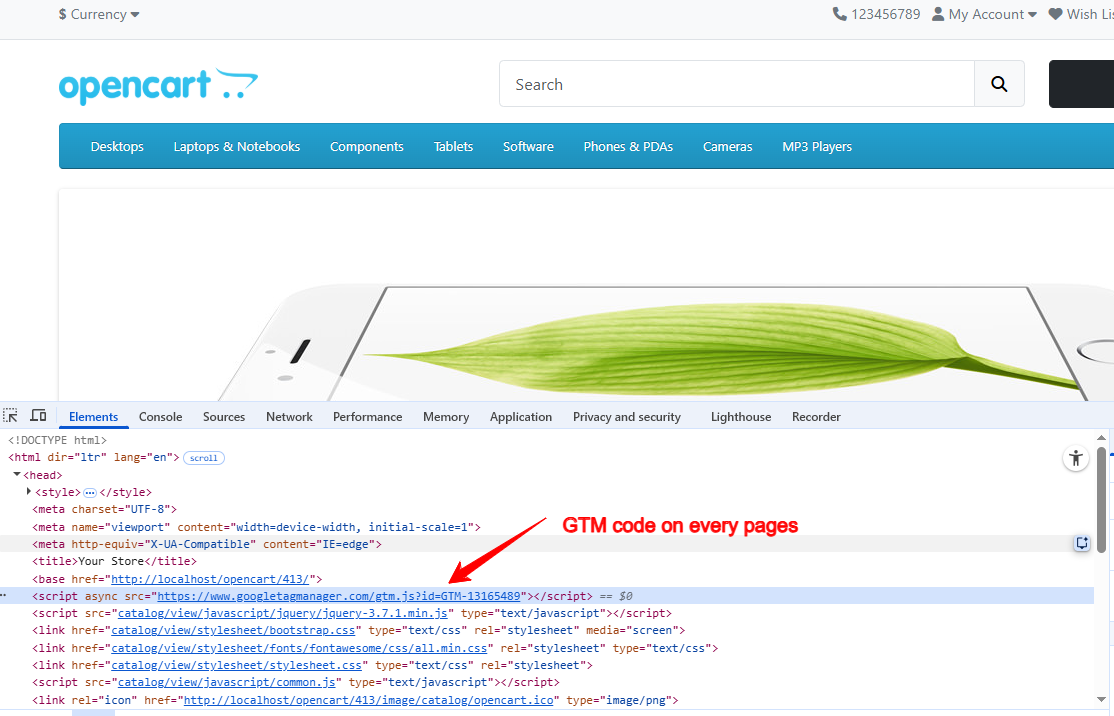
Once installed and configured with your GTM Container ID, the module automatically injects the GTM container script into your store and pushes structured GA4 DataLayer events for all major eCommerce actions.
You can then configure Google Tag Manager to send data to:
✔ Google Analytics 4 (GA4)
✔ Google Ads
✔ Facebook Pixel
✔ TikTok Pixel
✔ Any other GTM-supported tracking tool
No theme modification required.
Key Features
Easy Google Tag Manager Integration
✔ Just enter your GTM-XXXXXX Container ID
✔ Automatic GTM script injection
✔ No template editing required
✔ Zero coding setup
Complete GA4 DataLayer Events
✔ Pushes official GA4-compatible eCommerce events
✔ Structured DataLayer format
✔ Accurate item-level tracking
✔ Fully compatible with GA4 Enhanced eCommerce
Unified Tracking System
✔ Track GA4, Google Ads & remarketing via GTM
✔ Centralized event management
✔ Clean and organized DataLayer structure
✔ Easy to extend with custom tags
Performance & Compatibility
✔ Works with any OpenCart theme (Default, Journal, Fastor, custom themes)
✔ Lightweight and performance optimized
✔ No core file changes
✔ Multi-store supported
✔ Multi-language supported
eCommerce Events Covered
✔ view_item_list – When a product list or category page is viewed
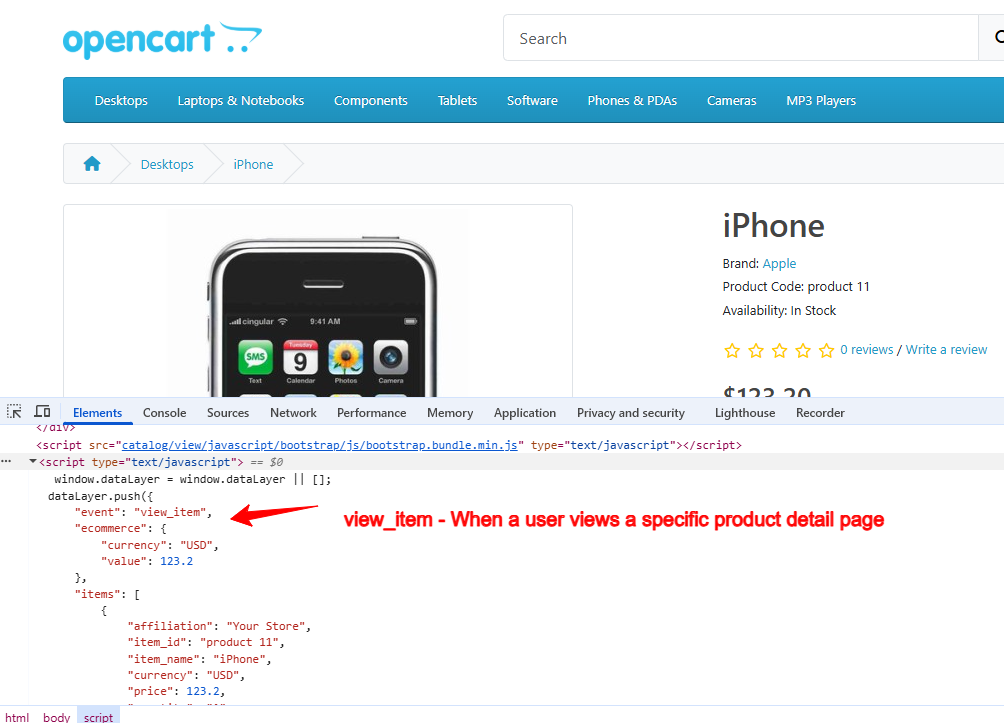
✔ view_item – When a product detail page is viewed
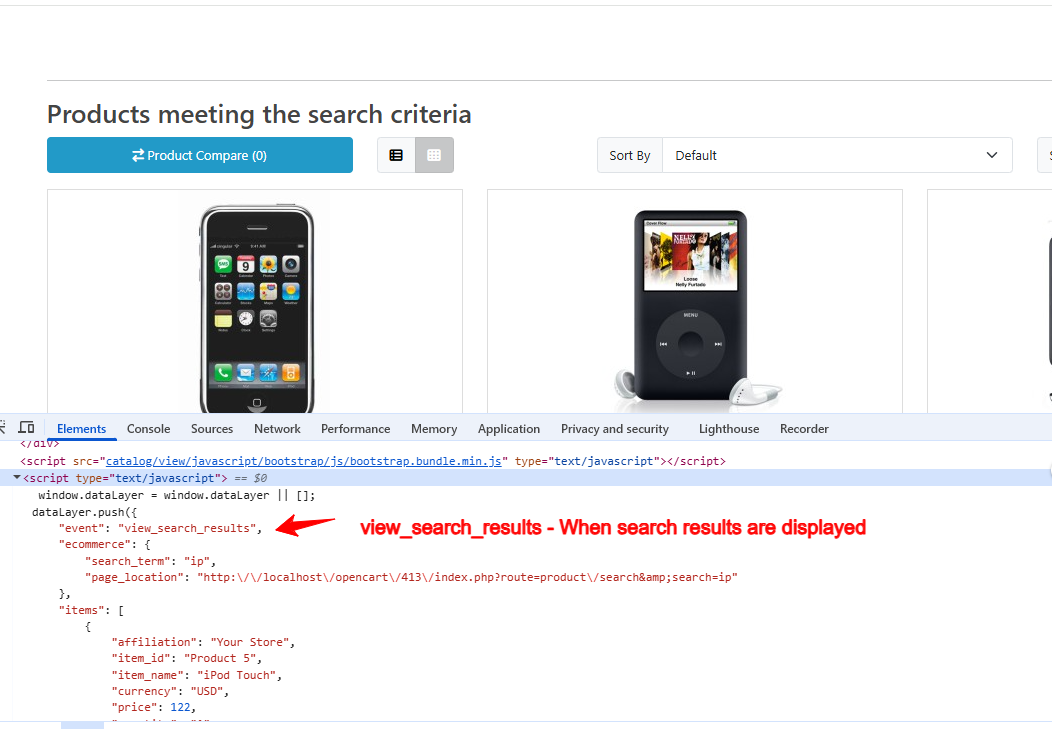
✔ view_search_results – When search results appear
✔ add_to_cart – When product is added to cart
✔ remove_from_cart – When product is removed from cart
✔ add_to_wishlist – When product is added to wishlist
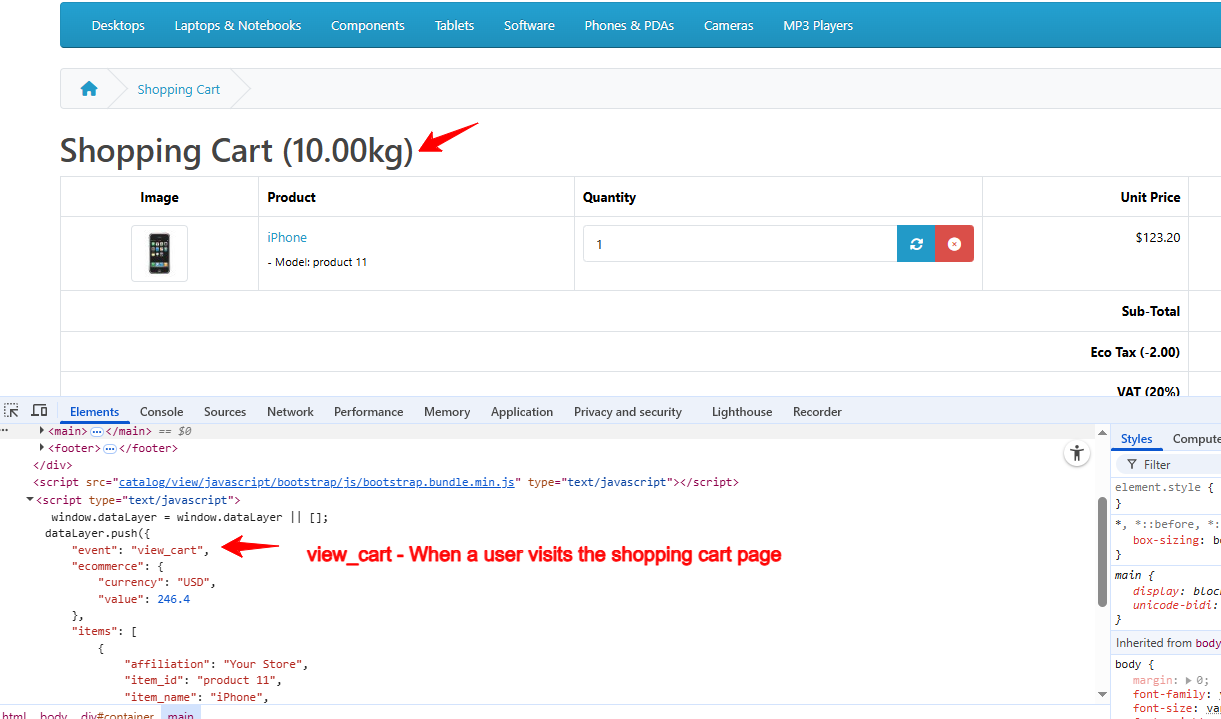
✔ view_cart – When cart page is viewed
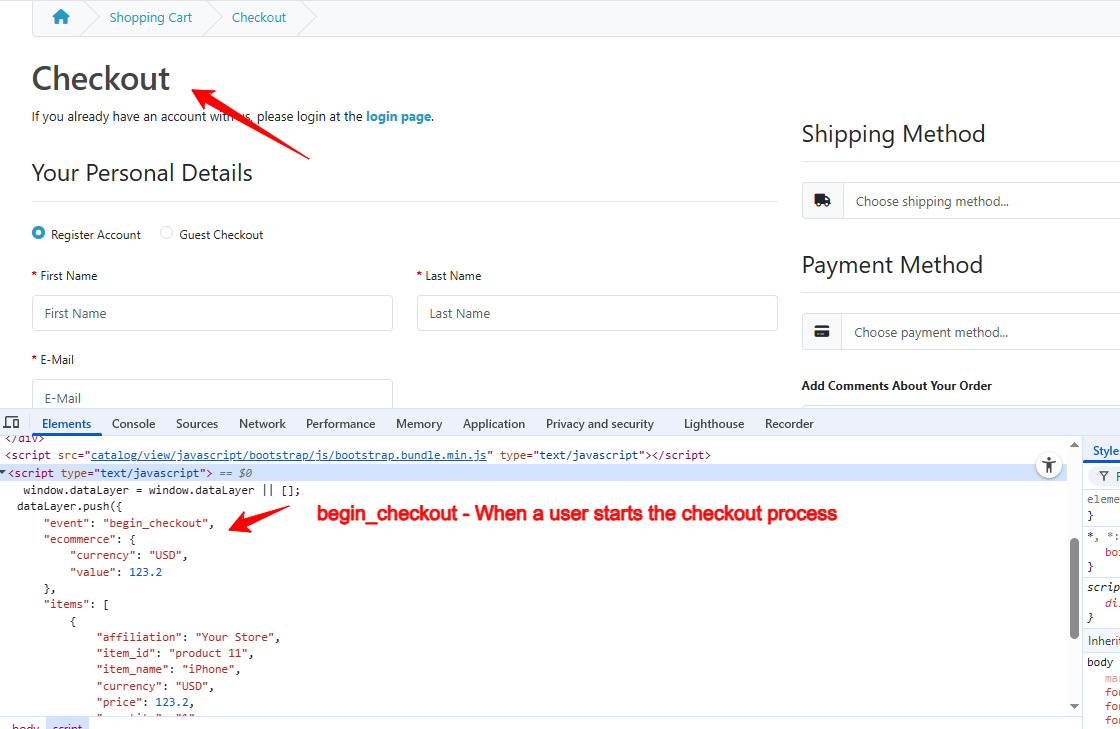
✔ begin_checkout – When checkout starts
✔ add_shipping_info – When shipping method is selected
✔ add_payment_info – When payment method is selected
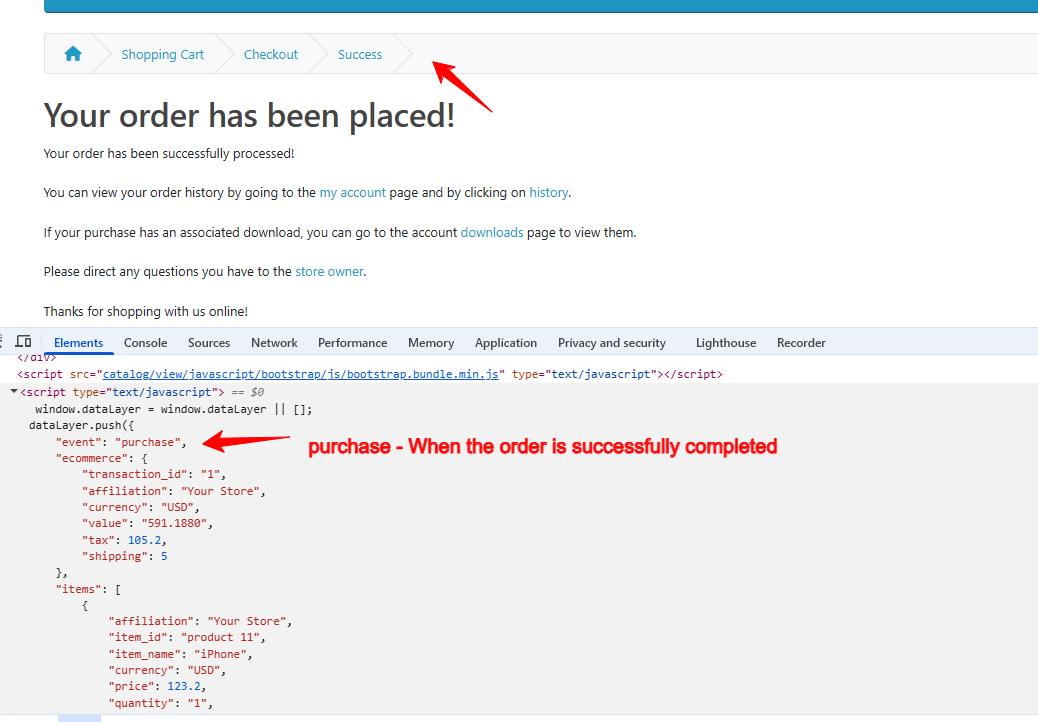
✔ purchase – When order is successfully completed
Complete funnel tracking from awareness to conversion.
DataLayer Parameters Included
Each event sends structured and GA4-compliant data:
✔ affiliation – Store name (multi-store supported)
✔ id – SKU or Product ID
✔ name – Product title
✔ quantity – Ordered quantity
✔ price – Product price (actual or discounted)
✔ discount – Discount amount
✔ currency – ISO 3-letter currency code
✔ brand – Manufacturer name
✔ category – Product category
✔ search_term – Search keyword
✔ transaction_id – OpenCart Order ID
✔ value – Final order amount
✔ shipping – Shipping charge
✔ tax – Tax amount
✔ items – Ordered product array
Ensures accurate GA4 reporting and conversion analysis.
Technical Highlights
✔ Official GA4 DataLayer structure
✔ GTM container auto injection
✔ No JavaScript conflicts
✔ Built using OpenCart coding standards
✔ OCMOD based (no core changes)
✔ Lightweight & optimized script loading
✔ Compatible with OpenCart 2.x, 3.x & 4.x
✔ Supports PHP 5.6 – 8.3
✔ Tested with Default Theme & Journal 3
Installation Steps
✔ Upload the extension via Admin → Extensions → Installer
✔ Go to Admin → Extensions → Modules
✔ Install and enable the module
✔ Enter your GTM Container ID (GTM-XXXXXX)
✔ Save settings
Tracking starts immediately.
How It Works
✔ GTM container script loads automatically
✔ OpenCart actions trigger DataLayer pushes
✔ GTM reads DataLayer events
✔ GA4 and other tags capture conversion data
✔ You analyse complete customer journey inside GA4
No code editing required.
Why Choose This Module
✔ Complete GA4 eCommerce Tracking
✔ Plug & Play Setup
✔ No template modification
✔ Fully GA4 compatible
✔ Centralized tracking via GTM
✔ Accurate conversion data
✔ Works with all OpenCart themes
✔ Lightweight & fast
✔ Easy to extend for custom events
✔ Backed by professional support and updates
Money-Back Guarantee
We stand behind the quality of our module.
If the extension does not work as described or is incompatible with your supported OpenCart version, we offer a 7-Day Money-Back Guarantee.
✔ Full refund if confirmed technical issue
✔ Dedicated support before refund decision
✔ Transparent and fair resolution process
Your satisfaction and store performance are our priority.
Requirements
✔ OpenCart 2.X + 3.X + 4.X
✔ Supports PHP 5.6 – 8.3
✔ No core file changes
✔ Built using OpenCart coding standards
Ideal For
✔ Stores using Google Analytics 4
✔ Businesses running Google Ads & remarketing
✔ Performance marketing agencies
✔ Multi-store OpenCart setups
✔ Advanced tracking implementations
✔ Stores wanting clean GTM-based tracking
Images & Screenshots View all screenshots
✔ Module Settings Page
✔ DataLayer Preview in Browser Console
✔ Product Page Tracking
✔ Search Results Tracking
✔ Cart Page Tracking
✔ Checkout Tracking
✔ Purchase Confirmation Page
Price
$35.00
- Developed by OpenCart Community
- 12 Months Free Support
- Documentation Included
Rating
Compatibility
2.0.0.0, 2.0.1.0, 2.0.1.1, 2.0.2.0, 2.0.3.1, 2.1.0.1, 2.1.0.2, 2.2.0.0, 2.3.0.0, 2.3.0.1, 2.3.0.2, 3.0.0.0, 3.0.1.0, 3.0.1.1, 3.0.1.2, 3.0.1.3, 3.0.2.0, 4.x.x.x, 3.0.3.0, 3.0.3.1, 3.0.3.2, 3.0.3.3, 3.0.3.5, 3.0.3.6, 3.0.3.7, 3.0.3.8, 4.0.0.0, 4.0.1.0, 4.0.1.1, 3.x.x.x, 4.0.2.0, 4.0.2.1, 4.0.2.2, 4.0.2.3, 3.0.3.9, 3.0.4.0, 4.1.0.0, 4.1.0.1, 4.1.0.2, 4.1.0.3, 3.0.4.1, 3.0.5.0
Last Update
28 May 2026
Created
5 Nov 2025
27 Sales
0 Comments

Login and write down your comment.
Login my OpenCart Account