Admin Order PowerSearch (Products)
Admin Order PowerSearch
FIND PRODUCTS, FASTER.
The Ultimate Product Finder for Your Admin Order Page
Tired of the slow, basic, single-field product search when creating or editing orders? Wasting time trying to find a product by its SKU, Model, or MPN, but the default search only allows searching by Name?
Stop wasting time and supercharge your order creation process!
Admin Order PowerSearch completely replaces the default OpenCart product autocomplete with a powerful, modern, and lightning-fast search interface, directly within your admin order form. It's an essential tool for any admin who handles orders manually.
Key Features
Check out the DEMO!
See the module in action for yourself! We have set up a live demo for the admin panel.
Admin Demo: Click Here
(Login with username: demo and password: demo)
To test, navigate to Sales > Orders and click "Add New" or "Edit" an existing order. Go to the "Products" tab to use the new search interface.
"If you encounter any issues while using or viewing the demo, please contact us at: hoseynsabeti9@gmail.com"
Installation
Support
For free support, please click the "Get Support" button on this page or email us directly at:
hoseynsabeti9@gmail.com
We are happy to help with any questions or issues!
FIND PRODUCTS, FASTER.
The Ultimate Product Finder for Your Admin Order Page
Tired of the slow, basic, single-field product search when creating or editing orders? Wasting time trying to find a product by its SKU, Model, or MPN, but the default search only allows searching by Name?
Stop wasting time and supercharge your order creation process!
Admin Order PowerSearch completely replaces the default OpenCart product autocomplete with a powerful, modern, and lightning-fast search interface, directly within your admin order form. It's an essential tool for any admin who handles orders manually.
This module saves you valuable time on every single order you create, reducing frustration and increasing your team's efficiency.
Key Features
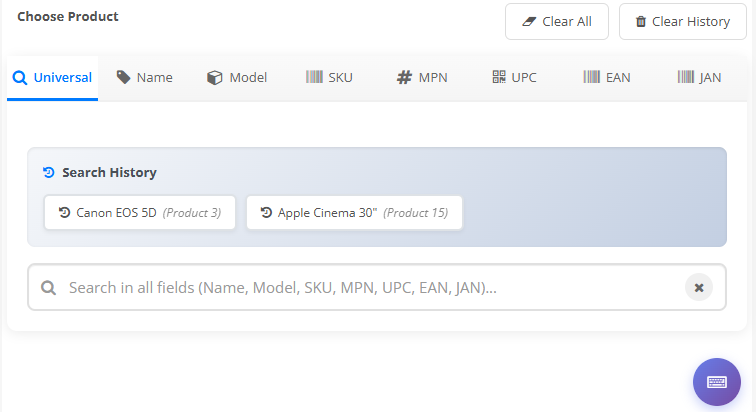
- Multi-Field "OmniSearch": A "Universal" tab allows searching across ALL fields at once: Name, Model, SKU, MPN, UPC, EAN, and JAN.
- Targeted Search Tabs: Instantly switch tabs to search by a specific field like Model, SKU, or MPN.
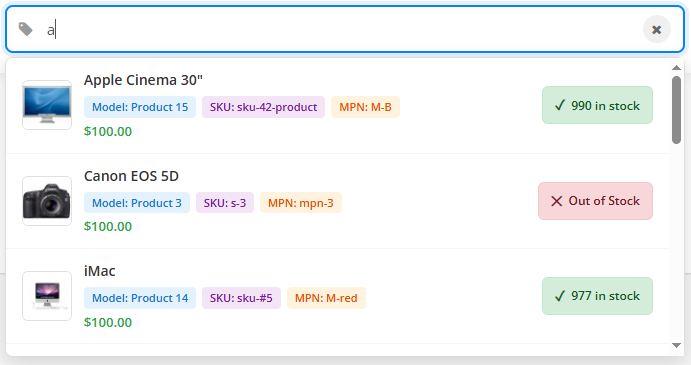
- Rich Autocomplete Results: See results instantly with all the info you need:
- Product Image
- Full Product Name
- Badges for Model, SKU, & MPN
- Price vs. Special Price
- Live Stock Status (In Stock, Low Stock, Out of Stock)
- Search History: Quickly re-select products you've searched for in the past.
- Recently Added Products: A quick-access list of products you've recently added to orders.
- Duplicate Product Warning: The interface clearly flags items that are already in the current order list to prevent mistakes.
- Full Option Support: Selecting a product with options will immediately display those options, just like the default system.
- Keyboard Shortcuts: A true power-user tool! Use keyboard shortcuts (like Ctrl+K for Universal search, Arrow keys to navigate, Enter to select) to add products without ever touching your mouse.
- Sleek, Modern UI: A clean, professional interface that feels like a native part of OpenCart.
- OCMOD Installation: No core files are overwritten. Clean and easy to install.
Check out the DEMO!
See the module in action for yourself! We have set up a live demo for the admin panel.
Admin Demo: Click Here
(Login with username: demo and password: demo)
To test, navigate to Sales > Orders and click "Add New" or "Edit" an existing order. Go to the "Products" tab to use the new search interface.
"If you encounter any issues while using or viewing the demo, please contact us at: hoseynsabeti9@gmail.com"
Installation
1. Upload the compressed file via Extensions > Installer > Upload.<br />2. Go to Extensions > Modifications and click the 'Refresh' button.<br />3. That's it! There is no setup. Navigate to the Admin Order form (Sales > Orders > Add/Edit) to see the new product search in action.
Support
For free support, please click the "Get Support" button on this page or email us directly at:
hoseynsabeti9@gmail.com
We are happy to help with any questions or issues!
Price
$20.00
- Developed by OpenCart Community
- 12 Months Free Support
- Documentation Included
Rating
Compatibility
3.0.0.0, 3.0.1.0, 3.0.1.1, 3.0.1.2, 3.0.1.3, 3.0.3.0, 3.0.3.1, 3.0.3.2, 3.0.3.3, 3.0.3.5, 3.0.3.6, 3.0.3.7, 3.0.3.8, 3.x.x.x, 3.0.3.9, 3.0.4.0, 3.0.4.1, 3.0.5.0
Last Update
7 Jun 2026
Created
16 Nov 2025
0 Sales
0 Comments

Login and write down your comment.
Login my OpenCart Account