OpenCart Zapier, Make.com Custom Webhooks (Automation)
OpenCart Webhooks for Zapier & Make.com - Complete Automation Solution
Automate your OpenCart store with Zapier, Make.com, and 7,000+ apps! Send real-time webhooks for orders, customers, products, and reviews to trigger automated workflows.
WHAT THIS EXTENSION DOES
Connect your OpenCart store to powerful automation platforms like Zapier and Make.com. Automatically send data from your store to thousands of apps including:
KEY FEATURES
SUPPORTED EVENTS
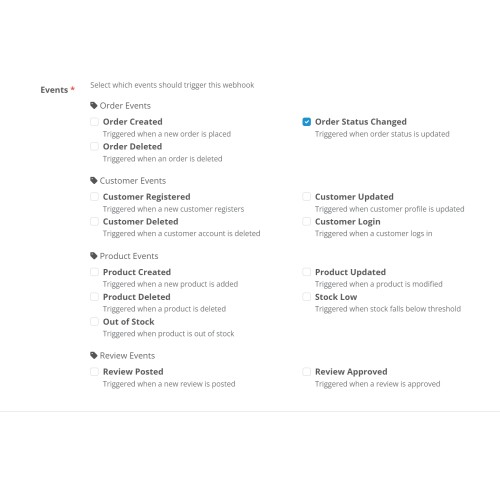
- Order Created: Trigger when new order is placed
- Order Status Changed: Trigger when order status updates
- Order Deleted: Trigger when order is removed
- Invoice Generated: Trigger when invoice is created
- Product Created: Trigger when new product is added
- Product Updated: Trigger when product is modified
- Product Deleted: Trigger when product is removed
- Out of Stock: Trigger when product stock reaches zero
- Low Stock: Trigger when product stock falls below threshold
Customer Events (4 events)
- Customer Registered: Trigger when new customer signs up
- Customer Account Updated: Trigger when customer profile changes
- Customer Login: Trigger when customer logs in
- Customer Deleted: Trigger when customer account is removed
Review Events (2 events)
- Review Posted: Trigger when customer posts new review
- Review Approved: Trigger when admin approves review
POPULAR USE CASES
Marketing Automation:
Add new customers to email marketing lists. Tag customers based on purchase behavior. Send personalized thank-you emails via Gmail. Create Facebook Custom Audiences from customer data.
Customer Support:
Create support tickets for negative reviews. Send order confirmations via SMS. Alert team on Slack for customer registrations. Update customer records in CRM automatically.
Inventory Management:
Get SMS alerts when products go out of stock. Update inventory in external systems. Create purchase orders when stock is low. Log stock changes to Airtable.
Financial Tracking:
Create invoices in QuickBooks automatically. Log daily sales to Google Sheets. Send payment notifications to accounting team. Track revenue in real-time dashboards.
SECURITY FEATURES
WHAT'S INCLUDED
TECHNICAL SPECIFICATIONS
EASY INSTALLATION
1. Download the appropriate version (3.x or 4.x)
2. Upload via Extensions then Installer (or FTP)
3. Install from Extensions then Modules
4. Create webhook in Zapier or Make.com
5. Configure events and test
6. Done! Start automating!
HOW IT WORKS
1. Choose Your Platform: Zapier or Make.com (both supported)
2. Create Webhook: Get webhook URL from your platform
3. Configure Events: Select which events to track
4. Automate: Build workflows with 7,000+ apps
5. Monitor: Check activity logs anytime
SUPPORT & UPDATES
From WorkflowDone.com - Professional automation company
WHY CHOOSE THIS EXTENSION?
PERFECT FOR
START AUTOMATING TODAY!
Stop doing manual work. Let webhooks handle your repetitive tasks automatically. Connect your OpenCart store to the tools you already use and watch your productivity soar!
Purchase includes lifetime license for one domain plus 12 months of updates and support.
Questions? Need custom features? Contact us via Get Support button.
Note: Requires active Zapier or Make.com account (free accounts available on both platforms).
Automate your OpenCart store with Zapier, Make.com, and 7,000+ apps! Send real-time webhooks for orders, customers, products, and reviews to trigger automated workflows.
WHAT THIS EXTENSION DOES
Connect your OpenCart store to powerful automation platforms like Zapier and Make.com. Automatically send data from your store to thousands of apps including:
- CRM Systems: Salesforce, HubSpot, Pipedrive, Zoho
Email Marketing: Mailchimp, ActiveCampaign, ConvertKit, SendGrid
Communication: Slack, Discord, Microsoft Teams, Gmail
Spreadsheets: Google Sheets, Airtable, Excel Online
Accounting: QuickBooks, Xero, FreshBooks
Support: Zendesk, Intercom, Help Scout
SMS: Twilio, ClickSend, MessageBird
And 7,000+ more apps!
KEY FEATURES
- Unlimited Webhooks - Add as many webhook endpoints as you need
Per-Webhook Events - Each webhook can track different events
15 Event Types - Comprehensive event coverage (see below)
Secure & Reliable - HMAC signature verification & API key support
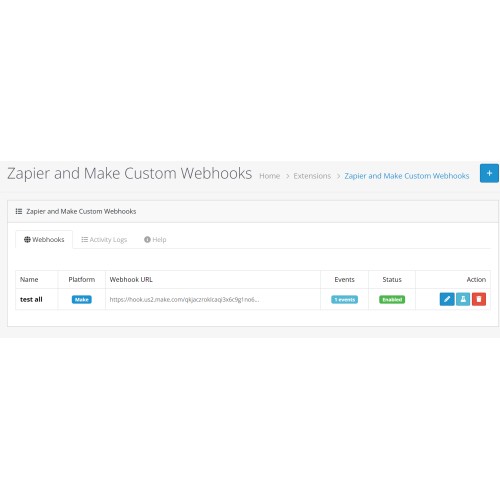
Activity Logs - Debug and monitor webhook deliveries
Test Function - One-click webhook testing
Modern UI - Clean, intuitive admin interface
No Coding Required - Easy setup in minutes
OpenCart 3.x & 4.x - Separate versions for each
SUPPORTED EVENTS
- Order Events (4 events)
- Order Created: Trigger when new order is placed
- Order Status Changed: Trigger when order status updates
- Order Deleted: Trigger when order is removed
- Invoice Generated: Trigger when invoice is created
- Product Events (5 events)
- Product Created: Trigger when new product is added
- Product Updated: Trigger when product is modified
- Product Deleted: Trigger when product is removed
- Out of Stock: Trigger when product stock reaches zero
- Low Stock: Trigger when product stock falls below threshold
Customer Events (4 events)
- Customer Registered: Trigger when new customer signs up
- Customer Account Updated: Trigger when customer profile changes
- Customer Login: Trigger when customer logs in
- Customer Deleted: Trigger when customer account is removed
Review Events (2 events)
- Review Posted: Trigger when customer posts new review
- Review Approved: Trigger when admin approves review
POPULAR USE CASES
- E-commerce Automation:
Send new orders to Google Sheets automatically. Create CRM deals when high-value orders are placed. Send low stock alerts to Slack. Notify warehouse team via email when orders come in.
Marketing Automation:
Add new customers to email marketing lists. Tag customers based on purchase behavior. Send personalized thank-you emails via Gmail. Create Facebook Custom Audiences from customer data.
Customer Support:
Create support tickets for negative reviews. Send order confirmations via SMS. Alert team on Slack for customer registrations. Update customer records in CRM automatically.
Inventory Management:
Get SMS alerts when products go out of stock. Update inventory in external systems. Create purchase orders when stock is low. Log stock changes to Airtable.
Financial Tracking:
Create invoices in QuickBooks automatically. Log daily sales to Google Sheets. Send payment notifications to accounting team. Track revenue in real-time dashboards.
SECURITY FEATURES
- HMAC-SHA256 Signature - Verify webhook authenticity
API Key Authentication - Additional security layer
SSL/TLS Support - Encrypted webhook delivery
Activity Logs - Monitor all webhook activity
Input Validation - Prevent injection attacks
WHAT'S INCLUDED
- Complete extension for OpenCart 3.x
Complete extension for OpenCart 4.x (separate package)
Detailed installation guide
User documentation
Developer documentation
Installation support if you encounter issues
Long-term updates and maintenance
TECHNICAL SPECIFICATIONS
- OpenCart Version: 3.x or 4.x (separate versions)
PHP Version: 7.4 or higher
Database: MySQL 5.6 or higher
Required: cURL extension
Recommended: SSL certificate for production
EASY INSTALLATION
1. Download the appropriate version (3.x or 4.x)
2. Upload via Extensions then Installer (or FTP)
3. Install from Extensions then Modules
4. Create webhook in Zapier or Make.com
5. Configure events and test
6. Done! Start automating!
HOW IT WORKS
1. Choose Your Platform: Zapier or Make.com (both supported)
2. Create Webhook: Get webhook URL from your platform
3. Configure Events: Select which events to track
4. Automate: Build workflows with 7,000+ apps
5. Monitor: Check activity logs anytime
SUPPORT & UPDATES
From WorkflowDone.com - Professional automation company
- Installation Support - We help if you encounter any issues or errors
Long-term Updates - Regular updates for OpenCart compatibility
Bug Fixes - Fast response to any issues
Feature Requests - We listen to customer feedback
Documentation - Comprehensive guides and tutorials
Email Support - Direct support channel
WHY CHOOSE THIS EXTENSION?
- First Modern Solution - Built for OpenCart 3.x & 4.x (competitors are outdated)
Dual Platform Support - Works with both Zapier AND Make.com
Professional Development - Built by automation experts at WorkflowDone.com
Production Ready - Tested and reliable
Best Value - Unlimited webhooks, all features included
Active Support - We're here to help you succeed
PERFECT FOR
- Store owners who want to automate repetitive tasks
Agencies managing multiple OpenCart stores
Businesses using CRM, email marketing, or accounting software
Stores wanting to connect OpenCart with other tools
Anyone looking to save time with automation
START AUTOMATING TODAY!
Stop doing manual work. Let webhooks handle your repetitive tasks automatically. Connect your OpenCart store to the tools you already use and watch your productivity soar!
Purchase includes lifetime license for one domain plus 12 months of updates and support.
Questions? Need custom features? Contact us via Get Support button.
Note: Requires active Zapier or Make.com account (free accounts available on both platforms).
Price
$59.00
- Developed by OpenCart Community
- 12 Months Free Support
- Documentation Included
Rating
Compatibility
4.x.x.x, 4.0.0.0, 4.0.1.0, 4.0.1.1, 4.0.2.0, 4.0.2.1, 4.0.2.2, 4.0.2.3, 4.1.0.0, 4.1.0.1, 4.1.0.2, 4.1.0.3, 3.0.0.0, 3.0.1.0, 3.0.1.1, 3.0.1.2, 3.0.1.3, 3.0.2.0, 3.0.3.0, 3.0.3.1, 3.0.3.2, 3.0.3.3, 3.0.3.5, 3.0.3.6, 3.0.3.7, 3.0.3.8, 3.x.x.x, 3.0.3.9, 3.0.4.0, 3.0.4.1
Last Update
19 Nov 2025
Created
18 Nov 2025
1 Sales
1 Comments

Login and write down your comment.
Login my OpenCart Account