Subcategory Images - Clean, Modern & Fully Responsive

Subcategory Images for OpenCart 4.x — Clean, Modern & Fully Responsive
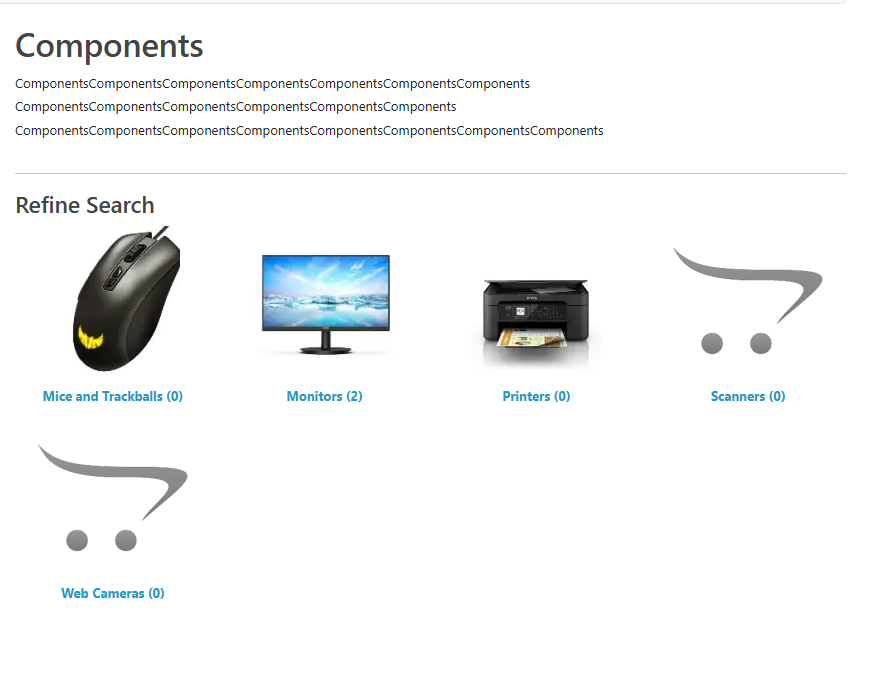
Transform your category pages with clean subcategory tiles that include images, names, hover effects, and full mobile responsiveness.
OpenCart 4 removed subcategory images from the default theme, leaving category pages empty and visually unbalanced.
This free extension restores that functionality with a modern, polished layout… and adds powerful configuration options on top.
✔ Features
Display Subcategory Images
Show attractive, clickable tiles for each subcategory with image + title.
Desktop Column Control (1–6)
Choose how many tiles appear per row on larger screens.
Mobile Column Override
Set a different layout for mobile devices (1–4 columns).
Fully overrides Bootstrap’s row-cols behaviour for a perfect small-screen layout.
Bold or Normal Text Option
Choose how the subcategory names are displayed.
Hover Highlight Effect
Images subtly brighten on hover for a modern, interactive feel.
Lazy Loading
loading="lazy" applied automatically for faster page loads and improved performance.
Fallback Placeholder Image
If a subcategory has no image, a placeholder is used automatically.
No Core Modifications
Event-only implementation. Update-safe and theme-friendly.
Compatible with OpenCart 4.1.0.3+
Built to match OC4’s Bootstrap 5 structure.
✔ Admin Settings Included
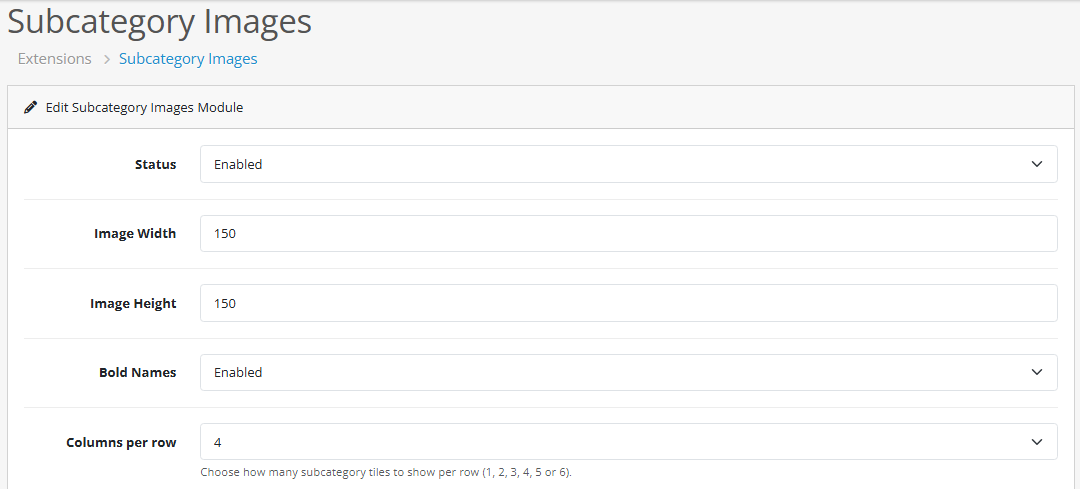
Enable / Disable module
Image width & height
Bold / normal text
Columns per row (desktop)
Mobile column override (optional)
✔ Easy Installation
Upload the OCMOD ZIP via Extensions → Installer
Enable the module under Extensions → Modules → Subcategory Images
Choose your desktop + mobile layout
You're done
No vQmod. No manual editing. Zero core file changes.
✔ Theme Compatibility
Works with the default Bootstrap 5–based layout.
Compatible with most OC4 themes that use the standard category template.
✔ Free Forever
Released free to improve the OpenCart 4 experience.
If you find it helpful, a quick rating or comment goes a long way.
Support
Basic support via Marketplace comments.
Custom tweaks and theme integrations available separately.
Demo:
Front End
https://opencart.ddac.uk/en-gb/catalog/component
Back End
https://opencart.ddac.uk/adminhere/index.php
Username: demo
Password: demo
-
Transform your category pages with clean subcategory tiles that include images, names, hover effects, and full mobile responsiveness.
OpenCart 4 removed subcategory images from the default theme, leaving category pages empty and visually unbalanced.
This free extension restores that functionality with a modern, polished layout… and adds powerful configuration options on top.
✔ Features
Show attractive, clickable tiles for each subcategory with image + title.
Choose how many tiles appear per row on larger screens.
Set a different layout for mobile devices (1–4 columns).
Fully overrides Bootstrap’s row-cols behaviour for a perfect small-screen layout.
Choose how the subcategory names are displayed.
Images subtly brighten on hover for a modern, interactive feel.
loading="lazy" applied automatically for faster page loads and improved performance.
If a subcategory has no image, a placeholder is used automatically.
Event-only implementation. Update-safe and theme-friendly.
Built to match OC4’s Bootstrap 5 structure.
✔ Admin Settings Included
✔ Easy Installation
Upload the OCMOD ZIP via Extensions → Installer
Enable the module under Extensions → Modules → Subcategory Images
Choose your desktop + mobile layout
You're done
No vQmod. No manual editing. Zero core file changes.
✔ Theme Compatibility
Works with the default Bootstrap 5–based layout.
Compatible with most OC4 themes that use the standard category template.
✔ Free Forever
Released free to improve the OpenCart 4 experience.
If you find it helpful, a quick rating or comment goes a long way.
Support
Basic support via Marketplace comments.
Custom tweaks and theme integrations available separately.
Demo:
Front End
Back End
Username: demo
Password: demo
-
Download
- Developed by OpenCart Community
- Documentation Included
Rating
Compatibility
4.1.0.0, 4.1.0.1, 4.1.0.2, 4.1.0.3
Last Update
3 Dec 2025
Created
29 Nov 2025
56 Downloads
2 Comments

Login and write down your comment.
Login my OpenCart Account