Shipping Methods Rules

Enhance Your Store’s Flexibility and Customer Experience with Our Advanced Shipping Rules Module
Unlock new levels of customization and control over your online store’s shipping process with our comprehensive Shipping Rules Module.
Designed specifically for store managers seeking to optimize their sales strategies and improve customer satisfaction, this powerful tool allows you to implement tailored shipping methods based on a wide range of criteria.
Key Features and Benefits:
1. Dynamic Shipping Method Application:
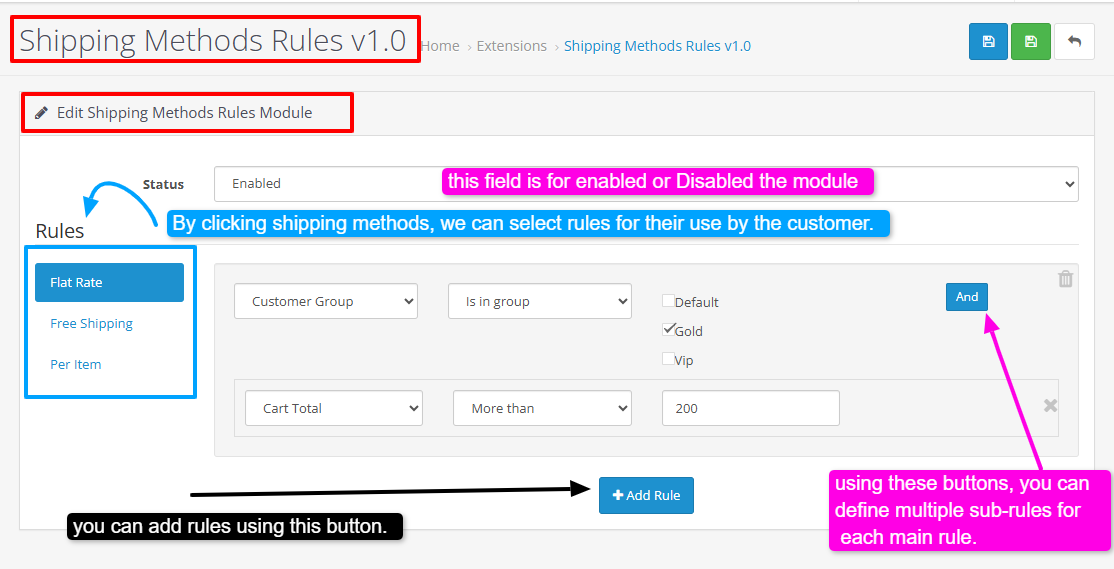
Easily set up rules that determine which shipping options are available to your customers during checkout. Whether you want to restrict certain shipping methods to specific customer groups or promote preferred options, this module provides the flexibility to do so effortlessly.
2. Customer Group Segmentation:
Create targeted shipping experiences based on customer segmentation. For example, offer exclusive shipping options to premium members or restrict certain methods for new users, enhancing personalization and loyalty.
3. Order Value-Based Rules:
Implement conditions based on the total value of the customer's cart. For instance, you can enable or disable specific shipping methods when the order exceeds or falls below a certain amount, such as $100, to encourage larger purchases or manage transaction risk.
4. Seamless Integration and Management:
Our user-friendly interface allows store managers to define and manage rules without the need for complex configurations or technical expertise. Changes can be made swiftly to adapt to evolving business needs.
5. Boost Conversion Rates and Reduce Abandonment:
By presenting relevant and appropriate shipping options tailored to each customer’s context, you can streamline the checkout process, reduce cart abandonment, and increase overall conversion rates.
6.Enhance Security and Compliance :
Control shipping methods based on various parameters to ensure compliance with shipping security standards and reduce potential risks associated with certain transactions.
Install:
First download the ZIP file.
Then go to Extension>Installer Click on the (Upload) button And upload the downloaded ZIP file.
Then go to Extension>Extension>module and activate a new plugin called "Shipping Methods Rules v1.0".
Support:
cartcraft.oc@gmail.com
Unlock new levels of customization and control over your online store’s shipping process with our comprehensive Shipping Rules Module.
Designed specifically for store managers seeking to optimize their sales strategies and improve customer satisfaction, this powerful tool allows you to implement tailored shipping methods based on a wide range of criteria.
Key Features and Benefits:
1. Dynamic Shipping Method Application:
Easily set up rules that determine which shipping options are available to your customers during checkout. Whether you want to restrict certain shipping methods to specific customer groups or promote preferred options, this module provides the flexibility to do so effortlessly.
2. Customer Group Segmentation:
Create targeted shipping experiences based on customer segmentation. For example, offer exclusive shipping options to premium members or restrict certain methods for new users, enhancing personalization and loyalty.
3. Order Value-Based Rules:
Implement conditions based on the total value of the customer's cart. For instance, you can enable or disable specific shipping methods when the order exceeds or falls below a certain amount, such as $100, to encourage larger purchases or manage transaction risk.
4. Seamless Integration and Management:
Our user-friendly interface allows store managers to define and manage rules without the need for complex configurations or technical expertise. Changes can be made swiftly to adapt to evolving business needs.
5. Boost Conversion Rates and Reduce Abandonment:
By presenting relevant and appropriate shipping options tailored to each customer’s context, you can streamline the checkout process, reduce cart abandonment, and increase overall conversion rates.
6.Enhance Security and Compliance :
Control shipping methods based on various parameters to ensure compliance with shipping security standards and reduce potential risks associated with certain transactions.
Install:
First download the ZIP file.
Then go to Extension>Installer Click on the (Upload) button And upload the downloaded ZIP file.
Then go to Extension>Extension>module and activate a new plugin called "Shipping Methods Rules v1.0".
Support:
cartcraft.oc@gmail.com
Price
$20.00
- Developed by OpenCart Community
- 12 Months Free Support
- Documentation Included
Rating
Compatibility
3.0.0.0, 3.0.1.0, 3.0.1.1, 3.0.1.2, 3.0.1.3, 3.0.2.0, 3.0.3.0, 3.0.3.1, 3.0.3.2, 3.0.3.3, 3.0.3.5, 3.0.3.6, 3.0.3.7, 3.0.3.8, 3.x.x.x, 3.0.3.9, 3.0.4.0, 3.0.4.1, 3.0.5.0
Last Update
26 May 2026
Created
5 Jan 2026
0 Sales
0 Comments

Login and write down your comment.
Login my OpenCart Account