W360 Stocktaking - Product Count Sheet + Inventory Value
W360 Stocktaking (Admin) — Product Count Sheet + Inventory Value
W360 Stocktaking is a lightweight OpenCart admin module that helps you run a stocktaking session quickly:
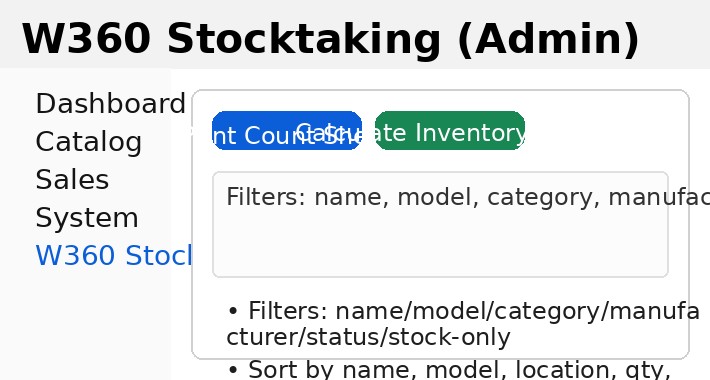
Filter products by name, model, category, manufacturer, status, and in-stock only
Sort by name, model, location, quantity, and price
Print a clean Count Sheet for warehouse counting
Calculate Inventory Value (quantity × price) instantly in the admin UI (AJAX)
Compatibility
OpenCart 3.0.4.0 (tested)
Admin side only
Key features
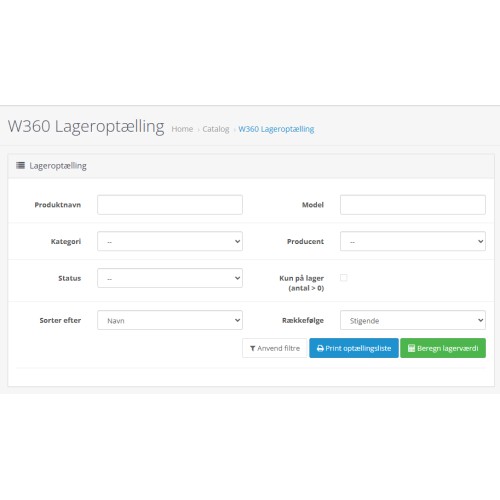
1) Stocktaking screen (Admin)
Use filters to narrow the list and sorting to prepare a practical count list.
2) Print Count Sheet
Generates a printer-friendly sheet including:
Product name, model, location, system quantity
Columns for counted quantity and notes
Optional pricing columns: sale price + stock value per line
Total stock value at the bottom (based on filtered products)
3) Calculate Inventory Value (AJAX)
One click calculates the inventory value for the current filter selection and shows the formatted total.
Installation
Upload the files to your OpenCart installation (admin + system files as provided by the package).
Go to Extensions → Installer and upload the extension archive (or install using your preferred method).
Go to Extensions → Modifications and click Refresh.
Go to Extensions → Extensions → Modules and install/enable W360 Stocktaking.
Ensure your admin user group has permissions for:
access / modify : extension/module/w360_stocktaking
Navigation shortcut (Admin menu)
The module can add a direct menu shortcut so users don’t have to dig under Extensions.
The menu label is language-driven (supports English and Danish language packs).
Appears in the left sidebar menu (placement can be controlled in the OCMOD insertion point).
Language support
The module uses standard OpenCart language files, so all button labels and UI strings are translatable:
English: admin/language/en-gb/extension/module/w360_stocktaking.php
Danish: admin/language/da-dk/extension/module/w360_stocktaking.php
Notes / recommendations
Inventory value uses OpenCart’s configured currency formatting.
Large catalogs: printing uses a high limit to include “all matching” products—adjust if your server needs a lower number.
Support
Author: W360
W360 Stocktaking is a lightweight OpenCart admin module that helps you run a stocktaking session quickly:
Filter products by name, model, category, manufacturer, status, and in-stock only
Sort by name, model, location, quantity, and price
Print a clean Count Sheet for warehouse counting
Calculate Inventory Value (quantity × price) instantly in the admin UI (AJAX)
Compatibility
OpenCart 3.0.4.0 (tested)
Admin side only
Key features
1) Stocktaking screen (Admin)
Use filters to narrow the list and sorting to prepare a practical count list.
2) Print Count Sheet
Generates a printer-friendly sheet including:
Product name, model, location, system quantity
Columns for counted quantity and notes
Optional pricing columns: sale price + stock value per line
Total stock value at the bottom (based on filtered products)
3) Calculate Inventory Value (AJAX)
One click calculates the inventory value for the current filter selection and shows the formatted total.
Installation
Upload the files to your OpenCart installation (admin + system files as provided by the package).
Go to Extensions → Installer and upload the extension archive (or install using your preferred method).
Go to Extensions → Modifications and click Refresh.
Go to Extensions → Extensions → Modules and install/enable W360 Stocktaking.
Ensure your admin user group has permissions for:
access / modify : extension/module/w360_stocktaking
Navigation shortcut (Admin menu)
The module can add a direct menu shortcut so users don’t have to dig under Extensions.
The menu label is language-driven (supports English and Danish language packs).
Appears in the left sidebar menu (placement can be controlled in the OCMOD insertion point).
Language support
The module uses standard OpenCart language files, so all button labels and UI strings are translatable:
English: admin/language/en-gb/extension/module/w360_stocktaking.php
Danish: admin/language/da-dk/extension/module/w360_stocktaking.php
Notes / recommendations
Inventory value uses OpenCart’s configured currency formatting.
Large catalogs: printing uses a high limit to include “all matching” products—adjust if your server needs a lower number.
Support
Author: W360
Price
$20.00
- Developed by OpenCart Community
- Documentation Included
Rating
Compatibility
3.0.4.0, 3.0.4.1, 3.0.5.0
Last Update
28 Jan 2026
Created
28 Jan 2026
0 Sales
0 Comments

Login and write down your comment.
Login my OpenCart Account