Enhanced Drag & Drop Product Gallery Images Upload


Email Support: opencarttools@gmail.com
WhatsApp Live Chat: Click Here
Live Demo
See the module in action before purchase.
Experience the drag & drop image upload directly inside the Product → Images tab.
Admin
Admin - Product - Add/Edit Form - Image tab
Front
Product Page
Title
Enhanced Drag & Drop Product Gallery Images Upload
Short Description
Easily upload multiple product gallery images using a modern drag & drop interface inside the admin panel.
Automatically compress, secure, and organize images without overwriting existing files.
Free Dedicated Support Included
We provide dedicated technical support to ensure smooth installation and usage of this module.
✔ Fast response time
✔ Installation guidance
✔ Bug fixes assistance
Key Features
✔ Drag & Drop images directly in Product → Images tab
✔ Multi-image upload support
✔ Auto image preview after upload
✔ Auto insert into product additional images
✔ No duplicate overwrite protection
✔ File type validation (jpg, jpeg, png, webp)
✔ File size validation (5MB limit configurable)
✔ Clean filename formatting
✔ Auto increment file naming (-1, -2, -3...ex: rose.png, rose-1.png, rose-2.png)
✔ Prevent accidental file overwrite
✔ Compress large images at 70% quality
✔ Save optimized image automatically
How It Works
This module integrates directly into the OpenCart admin Product → Images tab and enhances the default image upload system with a modern drag & drop interface.
Step-by-Step Workflow:
✔ 1 Admin - Catalog → Products → Edit Product → Images Tab
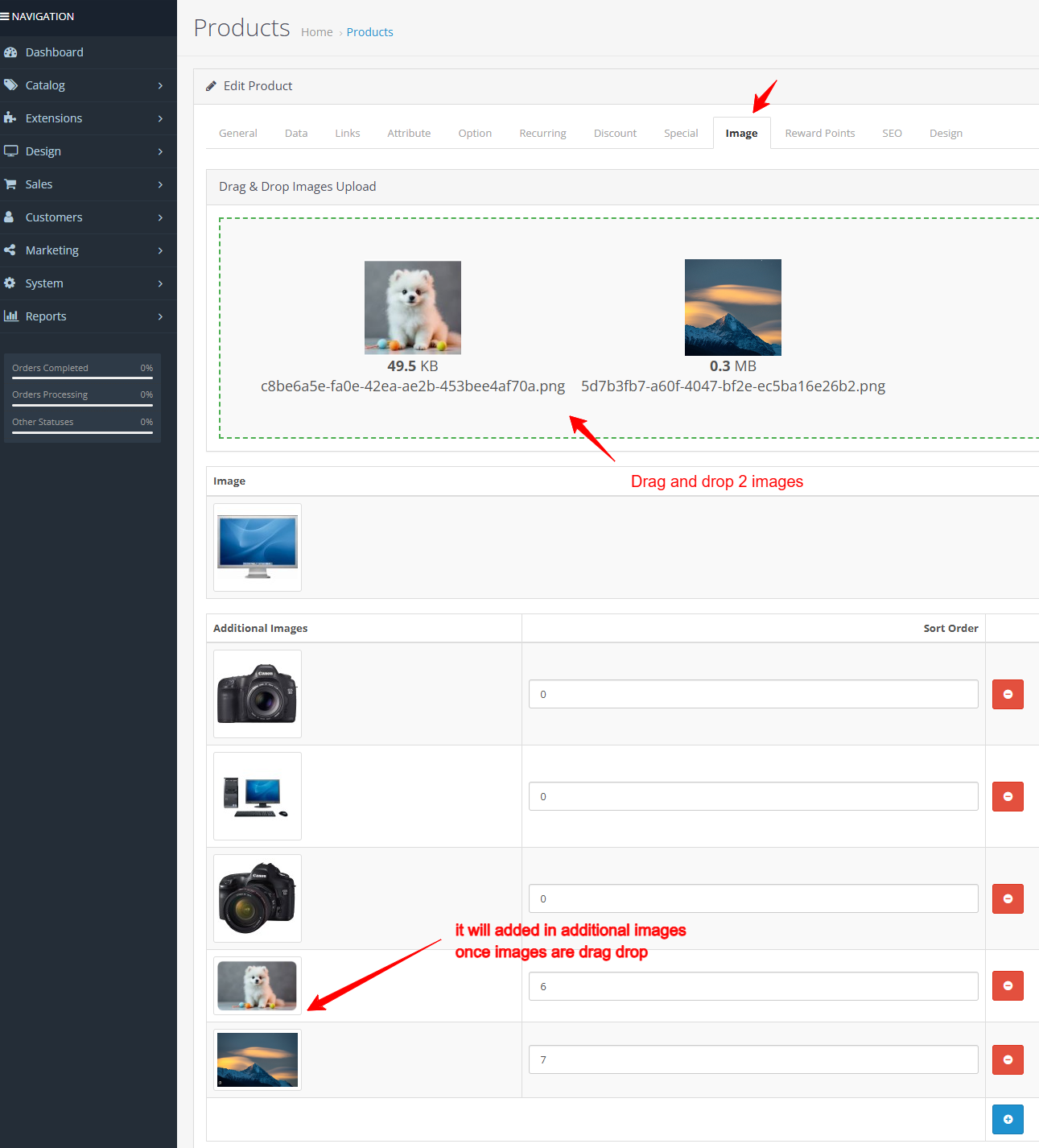
✔ 2 Drag & drop one or multiple images into the upload box.
✔ 3 System automatically:
- Validates file type (jpg, jpeg, png, webp)
- Checks file size limit
- Cleans the filename
- Prevents duplicate overwrite
- Renames file if already exists (-1, -2, -3...)
- ompresses image at 70% quality
- Saves optimized image to server
✔ 4 Uploaded images are instantly:
- Previewed in the images list
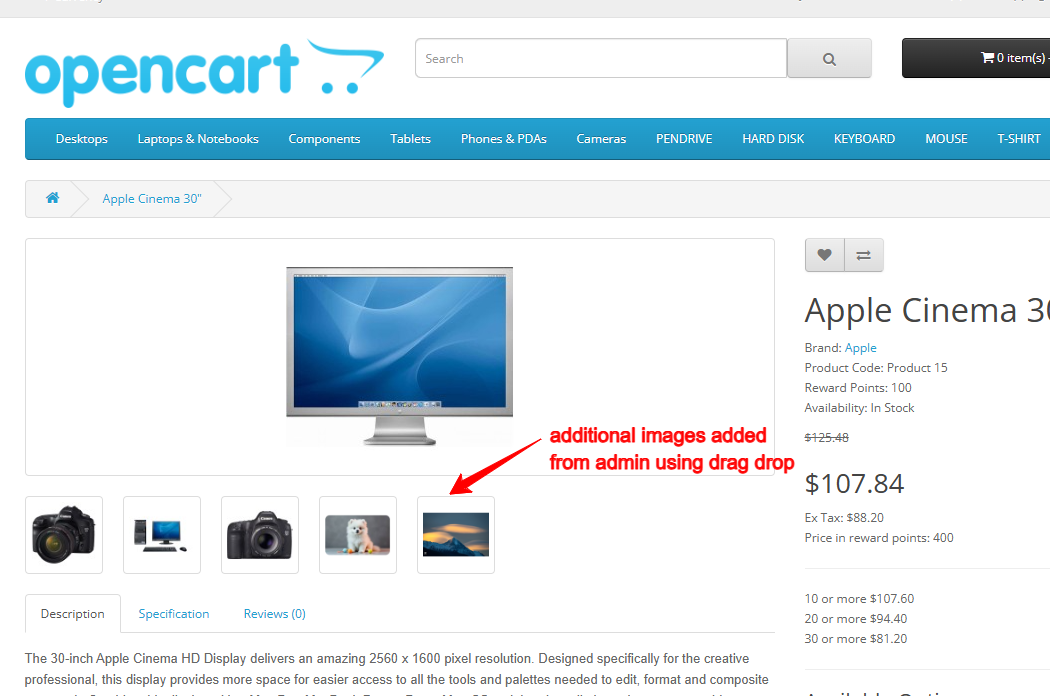
- Inserted into product additional images
- Ready to save with the product
- No manual file manager needed.
- No page reload required.
Why Choose This Module?
Uploading product images manually one by one wastes valuable time. This module modernizes your OpenCart admin with a professional drag-and-drop upload experience while ensuring:
✔ Faster product management
✔ Optimized image storage
✔ Improved website loading speed
✔ Automatic image compression
✔ Zero duplicate conflicts
✔ Clean and organized media folder
✔ for store owners who manage large catalogs and want speed, safety, and automation in one solution.
Money-Back Guarantee
We stand behind the quality of our module.
If the extension does not work as described or is incompatible with your supported OpenCart version, we offer a 7-Day Money-Back Guarantee.
✔ Full refund if confirmed technical issue
✔ Dedicated support before refund decision
✔ Transparent and fair resolution process
Your satisfaction and store performance are our priority.
Requirements
✔ OpenCart 2.X + 3.X + 4.X
✔ Supports PHP 5.6 – 8.3
✔ GD Library Enabled
✔ No core file changes
✔ Built using OpenCart coding standards
✔ Lightweight and performance-friendly
Ideal For
✔ Large product catalogs
✔ Fashion & apparel stores
✔ Electronics stores
✔ Dropshipping stores
✔ Marketplace sellers
Images & Screenshots View all screenshots
✔ Admin - Catalog → Products → Edit Product → Images Tab - You will see the new Drag & Drop Upload Box.
✔ Front end product additional images
Price
$25.00
- Developed by OpenCart Community
- 12 Months Free Support
- Documentation Included
Rating
Compatibility
2.0.0.0, 2.0.1.0, 2.0.1.1, 2.0.2.0, 2.0.3.1, 2.1.0.1, 2.1.0.2, 2.2.0.0, 2.3.0.0, 2.3.0.1, 2.3.0.2, 3.0.0.0, 3.0.1.0, 3.0.1.1, 3.0.1.2, 3.0.1.3, 3.0.2.0, 4.x.x.x, 3.0.3.0, 3.0.3.1, 3.0.3.2, 3.0.3.3, 3.0.3.5, 3.0.3.6, 3.0.3.7, 3.0.3.8, 4.0.0.0, 4.0.1.0, 4.0.1.1, 3.x.x.x, 4.0.2.0, 4.0.2.1, 4.0.2.2, 4.0.2.3, 3.0.3.9, 3.0.4.0, 4.1.0.0, 4.1.0.1, 4.1.0.2, 4.1.0.3, 3.0.4.1, 3.0.5.0
Last Update
4 May 2026
Created
16 Feb 2026
1 Sales
0 Comments

Login and write down your comment.
Login my OpenCart Account