OpenCart Dynamic API & Swagger Documentation
OpenCart Dynamic API is a powerful extension that instantly transforms your OpenCart store
into a fully RESTful API. It automatically discovers and exposes all Models and Controllers
from both the Catalog (Frontend) and Admin (Backend) sides, without requiring any manual
route definition.
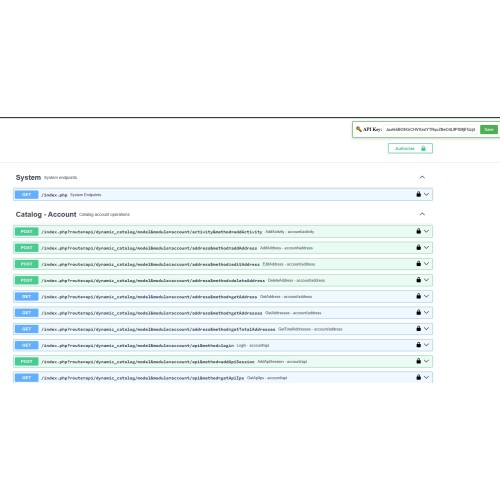
It comes with a built-in Swagger/OpenAPI generator and an interactive documentation
interface for exploring, testing, and integrating with your store's API.
== KEY FEATURES ==
[1] Dynamic Access
Call any public method from any Model or Controller on both the Admin and Catalog sides.
No hardcoded endpoints — everything is discovered automatically.
[2] Auto-Discovery
Automatically scans your OpenCart installation and lists all available modules,
methods, parameters, and return types.
[3] Swagger / OpenAPI 3.0
Auto-generated OpenAPI specification available in both JSON and YAML formats.
Includes a built-in Swagger UI for interactive exploration.
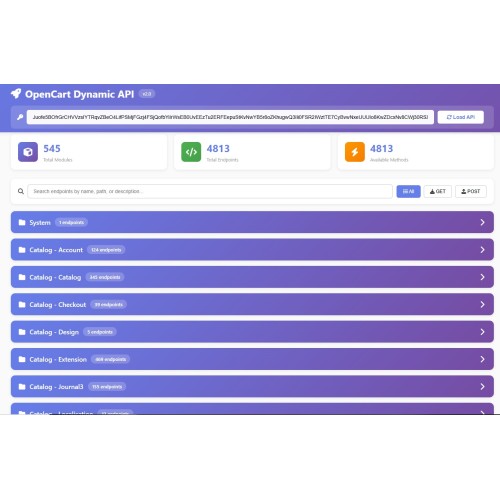
[4] Interactive Documentation
A beautiful, built-in documentation page (docs.html) with:
- Search and filter capabilities
- "Try It Out" functionality for every endpoint
- JSON syntax highlighting
- Response time tracking
- One-click response copying
[5] Smart Method Inspection
Analyze any method before calling it. The API returns:
- Required and optional parameters
- Detected database fields
- Validation rules
- Example JSON request body
- Source file location and modification status
[6] Partial Updates (Auto-Merge)
For edit/update methods, send only the fields you want to change.
The extension automatically:
- Detects the record ID from the URL
- Fetches existing data using the corresponding getter method
- Merges your changes with the existing data
- Passes the complete merged data to the edit method
[7] Admin Access from Frontend
Execute Admin-side model and controller methods through the Frontend API,
fully secured by API Key authentication.
[8] VQMod & OCMOD Support
Automatically detects your modification system and loads the correct
(modified) files. Searches in this priority order:
1. VQMod Cache (vqmod/vqcache/)
2. OCMOD Storage (system/storage/modification/)
3. Original Directory
[9] Automatic Dependency Loading
When a model depends on other models, the extension automatically detects
and loads all required dependencies before execution.
== API ENDPOINTS ==
--- Catalog (Frontend) ---
Discover: GET /index.php?route=api/dynamic_catalog/discover&type=all&api_key=XXX
Model: GET /index.php?route=api/dynamic_catalog/model&module=catalog/product&method=getProduct&product_id=42&api_key=XXX
Controller: GET /index.php?route=api/dynamic_catalog/controller&module=product/product&method=index&api_key=XXX
System Info: GET /index.php?route=api/base_catalog/info&api_key=XXX
--- Admin (Backend) ---
Discover: GET /index.php?route=api/dynamic_admin/discover&type=all&api_key=XXX
Model: POST /index.php?route=api/dynamic_admin/model&module=catalog/product&method=editProduct&product_id=42&api_key=XXX
Controller: GET /index.php?route=api/dynamic_admin/controller&module=catalog/product&api_key=XXX
System Info: GET /index.php?route=api/base_admin/info&api_key=XXX
--- Swagger / Documentation ---
JSON Spec: GET /index.php?route=api/swagger&format=json&api_key=XXX
YAML Spec: GET /index.php?route=api/swagger&format=yaml&api_key=XXX
Swagger UI: Open catalog/view/swagger-ui.html in your browser
Docs UI: Open catalog/view/docs.html in your browser
== AUTHENTICATION ==
All API requests require a valid API Key. You can pass it in three ways:
1. Query Parameter: ?api_key=YOUR_API_KEY
2. HTTP Header: X-API-Key: YOUR_API_KEY
3. Bearer Token: Authorization: Bearer YOUR_API_KEY
Create your API Key in:
OpenCart Admin > System > Users > API > Add New
== EXAMPLE: Get a Product (Catalog) ==
GET /index.php?route=api/dynamic_catalog/model&module=catalog/product&method=getProduct&product_id=42&api_key=YOUR_KEY
Response:
{
"success": true,
"result": {
"product_id": "42",
"name": "Sample Product",
"price": "99.99",
"quantity": "100",
"status": "1",
...
},
"meta": {
"type": "catalog_model",
"module": "catalog/product",
"method": "getProduct",
"execution_time": "12.5ms"
}
}
== EXAMPLE: Update Product Price (Admin, Partial Update) ==
POST /index.php?route=api/dynamic_admin/model&module=catalog/product&method=editProduct&product_id=42&api_key=YOUR_KEY
Content-Type: application/json
{
"price": "149.99",
"status": 1
}
The extension automatically fetches the existing product data and merges
your changes. Only the fields you send are updated.
== EXAMPLE: Inspect a Method Before Calling It ==
GET /index.php?route=api/dynamic_admin/model&module=catalog/product&method=addProduct&api_key=YOUR_KEY
Response includes:
- Required parameters and their types
- Optional parameters with defaults
- Database fields used in SQL queries
- Validation rules detected in source code
- Complete example JSON body ready to copy-paste
- File path and modification status
== SECURITY NOTICE ==
This extension exposes internal OpenCart methods via API. Please observe the
following security practices:
1. Keep your API Key secret and rotate it periodically.
2. Always use HTTPS in production to encrypt API Keys in transit.
3. Only enable this extension on production if you strictly control
which clients have access.
4. Consider restricting API access by IP address in your server configuration.
5. Disable DEBUG mode in production environments.
== REQUIREMENTS ==
- OpenCart 2.0.x, 2.1.x, 2.2.x, 2.3.x
- OpenCart 3.0.x, 3.1.x
- PHP 5.6 or higher
- VQMod (optional, automatically detected if installed)
- OCMOD (optional, automatically detected if installed)
into a fully RESTful API. It automatically discovers and exposes all Models and Controllers
from both the Catalog (Frontend) and Admin (Backend) sides, without requiring any manual
route definition.
It comes with a built-in Swagger/OpenAPI generator and an interactive documentation
interface for exploring, testing, and integrating with your store's API.
== KEY FEATURES ==
[1] Dynamic Access
Call any public method from any Model or Controller on both the Admin and Catalog sides.
No hardcoded endpoints — everything is discovered automatically.
[2] Auto-Discovery
Automatically scans your OpenCart installation and lists all available modules,
methods, parameters, and return types.
[3] Swagger / OpenAPI 3.0
Auto-generated OpenAPI specification available in both JSON and YAML formats.
Includes a built-in Swagger UI for interactive exploration.
[4] Interactive Documentation
A beautiful, built-in documentation page (docs.html) with:
- Search and filter capabilities
- "Try It Out" functionality for every endpoint
- JSON syntax highlighting
- Response time tracking
- One-click response copying
[5] Smart Method Inspection
Analyze any method before calling it. The API returns:
- Required and optional parameters
- Detected database fields
- Validation rules
- Example JSON request body
- Source file location and modification status
[6] Partial Updates (Auto-Merge)
For edit/update methods, send only the fields you want to change.
The extension automatically:
- Detects the record ID from the URL
- Fetches existing data using the corresponding getter method
- Merges your changes with the existing data
- Passes the complete merged data to the edit method
[7] Admin Access from Frontend
Execute Admin-side model and controller methods through the Frontend API,
fully secured by API Key authentication.
[8] VQMod & OCMOD Support
Automatically detects your modification system and loads the correct
(modified) files. Searches in this priority order:
1. VQMod Cache (vqmod/vqcache/)
2. OCMOD Storage (system/storage/modification/)
3. Original Directory
[9] Automatic Dependency Loading
When a model depends on other models, the extension automatically detects
and loads all required dependencies before execution.
== API ENDPOINTS ==
--- Catalog (Frontend) ---
Discover: GET /index.php?route=api/dynamic_catalog/discover&type=all&api_key=XXX
Model: GET /index.php?route=api/dynamic_catalog/model&module=catalog/product&method=getProduct&product_id=42&api_key=XXX
Controller: GET /index.php?route=api/dynamic_catalog/controller&module=product/product&method=index&api_key=XXX
System Info: GET /index.php?route=api/base_catalog/info&api_key=XXX
--- Admin (Backend) ---
Discover: GET /index.php?route=api/dynamic_admin/discover&type=all&api_key=XXX
Model: POST /index.php?route=api/dynamic_admin/model&module=catalog/product&method=editProduct&product_id=42&api_key=XXX
Controller: GET /index.php?route=api/dynamic_admin/controller&module=catalog/product&api_key=XXX
System Info: GET /index.php?route=api/base_admin/info&api_key=XXX
--- Swagger / Documentation ---
JSON Spec: GET /index.php?route=api/swagger&format=json&api_key=XXX
YAML Spec: GET /index.php?route=api/swagger&format=yaml&api_key=XXX
Swagger UI: Open catalog/view/swagger-ui.html in your browser
Docs UI: Open catalog/view/docs.html in your browser
== AUTHENTICATION ==
All API requests require a valid API Key. You can pass it in three ways:
1. Query Parameter: ?api_key=YOUR_API_KEY
2. HTTP Header: X-API-Key: YOUR_API_KEY
3. Bearer Token: Authorization: Bearer YOUR_API_KEY
Create your API Key in:
OpenCart Admin > System > Users > API > Add New
== EXAMPLE: Get a Product (Catalog) ==
GET /index.php?route=api/dynamic_catalog/model&module=catalog/product&method=getProduct&product_id=42&api_key=YOUR_KEY
Response:
{
"success": true,
"result": {
"product_id": "42",
"name": "Sample Product",
"price": "99.99",
"quantity": "100",
"status": "1",
...
},
"meta": {
"type": "catalog_model",
"module": "catalog/product",
"method": "getProduct",
"execution_time": "12.5ms"
}
}
== EXAMPLE: Update Product Price (Admin, Partial Update) ==
POST /index.php?route=api/dynamic_admin/model&module=catalog/product&method=editProduct&product_id=42&api_key=YOUR_KEY
Content-Type: application/json
{
"price": "149.99",
"status": 1
}
The extension automatically fetches the existing product data and merges
your changes. Only the fields you send are updated.
== EXAMPLE: Inspect a Method Before Calling It ==
GET /index.php?route=api/dynamic_admin/model&module=catalog/product&method=addProduct&api_key=YOUR_KEY
Response includes:
- Required parameters and their types
- Optional parameters with defaults
- Database fields used in SQL queries
- Validation rules detected in source code
- Complete example JSON body ready to copy-paste
- File path and modification status
== SECURITY NOTICE ==
This extension exposes internal OpenCart methods via API. Please observe the
following security practices:
1. Keep your API Key secret and rotate it periodically.
2. Always use HTTPS in production to encrypt API Keys in transit.
3. Only enable this extension on production if you strictly control
which clients have access.
4. Consider restricting API access by IP address in your server configuration.
5. Disable DEBUG mode in production environments.
== REQUIREMENTS ==
- OpenCart 2.0.x, 2.1.x, 2.2.x, 2.3.x
- OpenCart 3.0.x, 3.1.x
- PHP 5.6 or higher
- VQMod (optional, automatically detected if installed)
- OCMOD (optional, automatically detected if installed)
Download
- Developed by OpenCart Community
- Documentation Included
Rating
Compatibility
2.2.0.0, 2.3.0.0, 2.3.0.1, 2.3.0.2, 3.0.0.0, 3.0.1.0, 3.0.1.1, 3.0.1.2, 3.0.1.3, 3.0.2.0, 3.0.3.0, 3.0.3.1, 3.0.3.2, 3.0.3.3, 3.0.3.5, 3.0.3.6, 3.0.3.7, 3.0.3.8, 3.x.x.x, 3.0.3.9, 3.0.4.0, 3.0.4.1, 3.0.5.0
Last Update
28 Feb 2026
Created
28 Feb 2026
34 Downloads
1 Comments

Login and write down your comment.
Login my OpenCart Account