LLMS.txt Generator - AI SEO for OpenCart 3

Make your OpenCart store visible to AI-powered search engines, chatbots, and assistants.
The llms.txt standard (llmstxt.org) is a simple text file that helps large language models (LLMs) like ChatGPT, Claude, Google Gemini, and Perplexity understand what your store sells, which brands you carry, and how customers can get support. When AI tools can read your store's structured data, they are more likely to recommend your products in conversations.
This extension automatically generates and maintains your llms.txt files based on your live catalog data — no manual editing required.
How it works:
The extension reads your OpenCart categories, products, manufacturers, and information pages, then generates a clean, structured llms.txt file following the llms.txt specification. Every time you add or edit a product, category, manufacturer, or information page, the file is automatically regenerated.
What is included in the generated llms.txt:
- Store name, tagline, and contact information
- All active product categories with descriptions and direct links
- Featured/bestselling products with prices and links
- All manufacturers/brands with links to their store pages
- Information pages (About Us, Delivery, Returns, etc.)
- Custom support links and policy URLs
- Properly structured markdown format per the llms.txt standard
Why your store needs llms.txt:
- AI assistants are increasingly used for product research and shopping recommendations
- Stores without llms.txt are invisible to AI-powered search
- Early adoption gives you a competitive advantage while most stores don't have it yet
- Zero impact on your existing SEO — llms.txt works alongside robots.txt and sitemaps
FEATURES
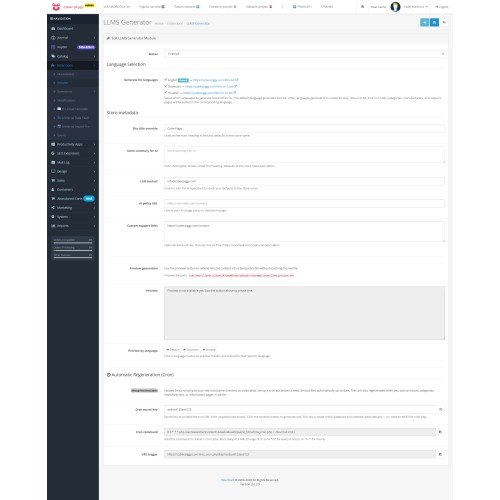
Image of plugin - https://go.legit.si/LLMSOC3img
- One-click generation — Save settings and your llms.txt files are instantly created
- Multilanguage support — Generates separate llms.txt files for each store language (e.g., llms.txt for default language, llms-de-de.txt for German, llms-fr-fr.txt for French)
- Auto-regeneration — Files are automatically updated when you add or edit products, categories, manufacturers, or information pages via OpenCart events
- Cron job support — Schedule automatic regeneration via CLI or URL with secret key authentication
- Live preview — Preview your llms.txt content directly in the admin panel before publishing
- Per-language preview — Preview the generated output for each language individually
- Customizable metadata — Set store title, tagline, contact email, privacy policy URL, and custom support links
- Language-aware taglines — Uses each language's meta description for the correct tagline per language file
- Smart category filtering — Automatically excludes empty categories and internal/system categories
- Full UTF-8 support — Correct handling of special characters and diacritics (Latin, Cyrillic, CJK, etc.)
- Clean output — Strips HTML tags, emojis, and special characters for clean, readable text
- Markdown format — Output follows the official llms.txt specification with proper markdown structure
- Secure cron endpoint — URL-based cron trigger requires a configurable secret key
- Copy-to-clipboard — One-click copy for cron CLI command and cron URL
- Random key generator — Generate a secure cron key with one click
- No core file modifications — Installs cleanly as a standard OpenCart OCMOD extension
- OpenCart 3.x compatible — Tested with OpenCart 3.0.x
INSTALLATION
1. Download the llms_generator.ocmod.zip file.
2. In your OpenCart admin panel, go to Extensions > Installer.
3. Click the Upload button and select the llms_generator.ocmod.zip file.
4. After upload completes, go to Extensions > Modifications and click the Refresh button (blue circular arrow in the top right).
5. Go to Extensions > Extensions, select "Modules" from the extension type dropdown.
6. Find "LLMS.txt Generator" in the list and click the green Install (+) button.
7. Click the Edit (pencil) button to open the module settings.
8. Configure your settings:
- Set Status to "Enabled"
- Select which languages to generate llms.txt files for
- Customize the store title, tagline, contact email, and policy URL (optional — defaults are pulled from your store settings)
- Add custom support links if needed (format: Title|URL|Description, one per line)
9. Click Save. Your llms.txt files will be generated automatically.
10. Verify by visiting your store URL + /llms.txt (e.g., https://yourdomain.com/llms.txt).
Optional: Cron Job Setup
For automatic daily regeneration (recommended for stores with frequent catalog changes):
1. In the module settings, set a Cron Secret Key (or click the random generator button).
2. Click Save to store the key.
3. Set up a cron job using one of these methods:
CLI (recommended):
0 3 * * * php /path/to/public_html/llms_cron.php > /dev/null 2>&1
URL (alternative):
0 3 * * * wget -q -O /dev/null "https://yourdomain.com/llms_cron.php?key=YOUR_SECRET_KEY"
4. IMPORTANT: Copy the llms_cron.php file from the extension package to your site root directory (the same folder where your OpenCart index.php and config.php are located). This file is NOT installed automatically by the OCMOD installer because it must be placed outside the OpenCart directory structure.
REQUIREMENTS
- OpenCart 3.0.x
- PHP 7.0 or higher
- Write permissions on the site root directory (where index.php is located)
If needed for Opencart 4 please contact me.
SUPPORT
Developer: 36O d.o.o.
For support, bug reports, or feature requests, please use the extension's support channel on the OpenCart marketplace.
CHANGELOG
v1.0.0 — Initial release
- Full llms.txt generation from OpenCart catalog data
- Multilanguage support
- Auto-regeneration via OpenCart events
- Cron job support (CLI and URL)
- Admin preview panel
- UTF-8 encoding support for Central European and other character sets
The llms.txt standard (llmstxt.org) is a simple text file that helps large language models (LLMs) like ChatGPT, Claude, Google Gemini, and Perplexity understand what your store sells, which brands you carry, and how customers can get support. When AI tools can read your store's structured data, they are more likely to recommend your products in conversations.
This extension automatically generates and maintains your llms.txt files based on your live catalog data — no manual editing required.
How it works:
The extension reads your OpenCart categories, products, manufacturers, and information pages, then generates a clean, structured llms.txt file following the llms.txt specification. Every time you add or edit a product, category, manufacturer, or information page, the file is automatically regenerated.
What is included in the generated llms.txt:
- Store name, tagline, and contact information
- All active product categories with descriptions and direct links
- Featured/bestselling products with prices and links
- All manufacturers/brands with links to their store pages
- Information pages (About Us, Delivery, Returns, etc.)
- Custom support links and policy URLs
- Properly structured markdown format per the llms.txt standard
Why your store needs llms.txt:
- AI assistants are increasingly used for product research and shopping recommendations
- Stores without llms.txt are invisible to AI-powered search
- Early adoption gives you a competitive advantage while most stores don't have it yet
- Zero impact on your existing SEO — llms.txt works alongside robots.txt and sitemaps
FEATURES
Image of plugin - https://go.legit.si/LLMSOC3img
- One-click generation — Save settings and your llms.txt files are instantly created
- Multilanguage support — Generates separate llms.txt files for each store language (e.g., llms.txt for default language, llms-de-de.txt for German, llms-fr-fr.txt for French)
- Auto-regeneration — Files are automatically updated when you add or edit products, categories, manufacturers, or information pages via OpenCart events
- Cron job support — Schedule automatic regeneration via CLI or URL with secret key authentication
- Live preview — Preview your llms.txt content directly in the admin panel before publishing
- Per-language preview — Preview the generated output for each language individually
- Customizable metadata — Set store title, tagline, contact email, privacy policy URL, and custom support links
- Language-aware taglines — Uses each language's meta description for the correct tagline per language file
- Smart category filtering — Automatically excludes empty categories and internal/system categories
- Full UTF-8 support — Correct handling of special characters and diacritics (Latin, Cyrillic, CJK, etc.)
- Clean output — Strips HTML tags, emojis, and special characters for clean, readable text
- Markdown format — Output follows the official llms.txt specification with proper markdown structure
- Secure cron endpoint — URL-based cron trigger requires a configurable secret key
- Copy-to-clipboard — One-click copy for cron CLI command and cron URL
- Random key generator — Generate a secure cron key with one click
- No core file modifications — Installs cleanly as a standard OpenCart OCMOD extension
- OpenCart 3.x compatible — Tested with OpenCart 3.0.x
INSTALLATION
1. Download the llms_generator.ocmod.zip file.
2. In your OpenCart admin panel, go to Extensions > Installer.
3. Click the Upload button and select the llms_generator.ocmod.zip file.
4. After upload completes, go to Extensions > Modifications and click the Refresh button (blue circular arrow in the top right).
5. Go to Extensions > Extensions, select "Modules" from the extension type dropdown.
6. Find "LLMS.txt Generator" in the list and click the green Install (+) button.
7. Click the Edit (pencil) button to open the module settings.
8. Configure your settings:
- Set Status to "Enabled"
- Select which languages to generate llms.txt files for
- Customize the store title, tagline, contact email, and policy URL (optional — defaults are pulled from your store settings)
- Add custom support links if needed (format: Title|URL|Description, one per line)
9. Click Save. Your llms.txt files will be generated automatically.
10. Verify by visiting your store URL + /llms.txt (e.g., https://yourdomain.com/llms.txt).
Optional: Cron Job Setup
For automatic daily regeneration (recommended for stores with frequent catalog changes):
1. In the module settings, set a Cron Secret Key (or click the random generator button).
2. Click Save to store the key.
3. Set up a cron job using one of these methods:
CLI (recommended):
0 3 * * * php /path/to/public_html/llms_cron.php > /dev/null 2>&1
URL (alternative):
0 3 * * * wget -q -O /dev/null "https://yourdomain.com/llms_cron.php?key=YOUR_SECRET_KEY"
4. IMPORTANT: Copy the llms_cron.php file from the extension package to your site root directory (the same folder where your OpenCart index.php and config.php are located). This file is NOT installed automatically by the OCMOD installer because it must be placed outside the OpenCart directory structure.
REQUIREMENTS
- OpenCart 3.0.x
- PHP 7.0 or higher
- Write permissions on the site root directory (where index.php is located)
If needed for Opencart 4 please contact me.
SUPPORT
Developer: 36O d.o.o.
For support, bug reports, or feature requests, please use the extension's support channel on the OpenCart marketplace.
CHANGELOG
v1.0.0 — Initial release
- Full llms.txt generation from OpenCart catalog data
- Multilanguage support
- Auto-regeneration via OpenCart events
- Cron job support (CLI and URL)
- Admin preview panel
- UTF-8 encoding support for Central European and other character sets
Price
$20.00
- Developed by OpenCart Community
- 12 Months Free Support
- Documentation Included
Rating
Compatibility
3.x.x.x
Last Update
14 Mar 2026
Created
14 Mar 2026
1 Sales
1 Comments

Login and write down your comment.
Login my OpenCart Account