Analytix Tracker
Analytix Tracker gives you complete visibility into how visitors interact with your store — no third-party services, no GDPR headaches from external scripts, all data stays on your server.
Real-Time Dashboard
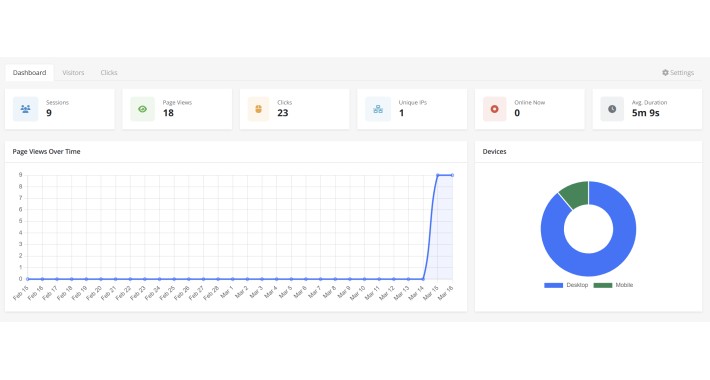
A clean, built-in admin dashboard shows you everything at a glance: active sessions right now, page views over time, top pages, top countries, device breakdown and more — all without leaving your OpenCart admin.
Click Tracking
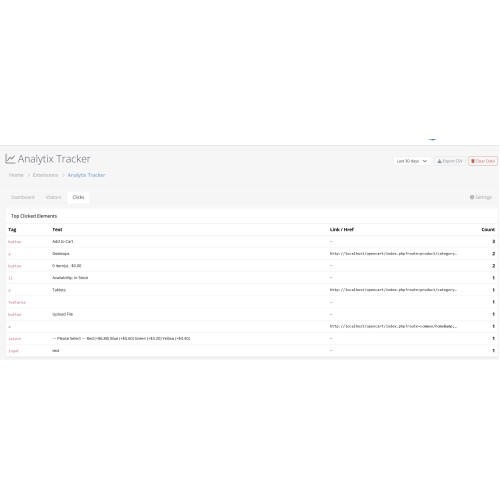
Every click on links, buttons and interactive elements is recorded. See exactly what your customers are clicking on, where they drop off, and what drives conversions.
Visitor Intelligence
IP geolocation (powered by ip-api.com) automatically resolves visitors to country, region and city. Browser, OS and device type are detected from the User-Agent — no extra tools needed.
Session & Time Tracking
Track how long visitors spend on each page and per session. Lightweight JavaScript uses the native sendBeacon API — zero impact on store load time.
Privacy-First & Self-Hosted
All data is stored in your own database. No cookies are set. No data is shared with third parties. Works without consent banners for analytics-only use in many jurisdictions (consult your legal advisor).
Key Features
- Sessions, page views, clicks, unique IPs — all in one dashboard
- Online visitors counter (last 5 minutes, live pulse indicator)
- Average session duration based on real measured time
- Page views chart (7 / 30 / 90 day periods)
- Device breakdown (Desktop / Mobile / Tablet)
- Top pages, top referrers, top countries, top clicked elements
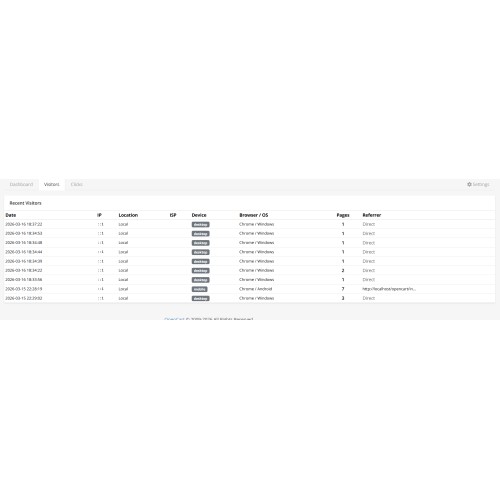
- Full recent visitors table with IP, location, ISP, browser, OS
- Data retention setting — automatically purges old data
- IP exclusion list (exclude yourself or your team)
- Export all visitor data to CSV
- 7 languages: English, Deutsch, Espanol, Italiano, Polski, Magyar, Bulgarian
Requirements
- OpenCart 4.0.x – 4.1.x
- PHP 8.1+
- MySQL 5.7+ / MariaDB 10.4+
- Internet access on server (for IP geolocation lookups)
Installation
1. Upload the .ocmod.zip via Admin > Extensions > Installer
2. Go to Admin > Extensions > Extensions > Modules
3. Find Analytix Tracker and click Install
4. Click Edit, enable tracking, click Save
Real-Time Dashboard
A clean, built-in admin dashboard shows you everything at a glance: active sessions right now, page views over time, top pages, top countries, device breakdown and more — all without leaving your OpenCart admin.
Click Tracking
Every click on links, buttons and interactive elements is recorded. See exactly what your customers are clicking on, where they drop off, and what drives conversions.
Visitor Intelligence
IP geolocation (powered by ip-api.com) automatically resolves visitors to country, region and city. Browser, OS and device type are detected from the User-Agent — no extra tools needed.
Session & Time Tracking
Track how long visitors spend on each page and per session. Lightweight JavaScript uses the native sendBeacon API — zero impact on store load time.
Privacy-First & Self-Hosted
All data is stored in your own database. No cookies are set. No data is shared with third parties. Works without consent banners for analytics-only use in many jurisdictions (consult your legal advisor).
Key Features
- Sessions, page views, clicks, unique IPs — all in one dashboard
- Online visitors counter (last 5 minutes, live pulse indicator)
- Average session duration based on real measured time
- Page views chart (7 / 30 / 90 day periods)
- Device breakdown (Desktop / Mobile / Tablet)
- Top pages, top referrers, top countries, top clicked elements
- Full recent visitors table with IP, location, ISP, browser, OS
- Data retention setting — automatically purges old data
- IP exclusion list (exclude yourself or your team)
- Export all visitor data to CSV
- 7 languages: English, Deutsch, Espanol, Italiano, Polski, Magyar, Bulgarian
Requirements
- OpenCart 4.0.x – 4.1.x
- PHP 8.1+
- MySQL 5.7+ / MariaDB 10.4+
- Internet access on server (for IP geolocation lookups)
Installation
1. Upload the .ocmod.zip via Admin > Extensions > Installer
2. Go to Admin > Extensions > Extensions > Modules
3. Find Analytix Tracker and click Install
4. Click Edit, enable tracking, click Save
Price
$29.00
- Developed by OpenCart Community
- 12 Months Free Support
- Documentation Included
Rating
Compatibility
4.0.0.0, 4.0.1.0, 4.0.1.1, 4.0.2.0, 4.0.2.1, 4.0.2.2, 4.0.2.3, 4.1.0.0, 4.1.0.1, 4.1.0.2, 4.1.0.3
Last Update
31 Mar 2026
Created
17 Mar 2026
0 Sales
0 Comments

Login and write down your comment.
Login my OpenCart Account