Google Language Switcher – Auto Translate Store Content
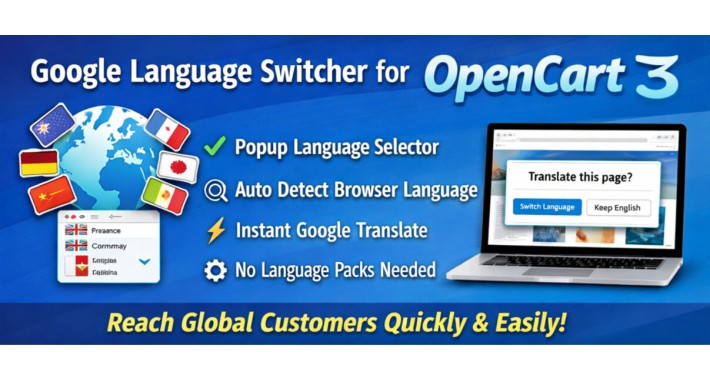




Allow visitors to translate your OpenCart store instantly using Google Translate.
Add a modern popup language switcher that detects browser language and suggests translation automatically. Works with both single-language and multi-language OpenCart stores.
Detailed Summary
Google Language Switcher for OpenCart allows customers to translate your website into multiple languages instantly using Google Translate.
Instead of installing and maintaining multiple OpenCart language packs, this extension provides a simple popup language selector that helps international visitors view your store in their preferred language.
The extension works for both single-language OpenCart stores and multi-language stores. It can run alongside the native OpenCart language selector, providing additional flexibility for multilingual browsing.
It integrates smoothly into the OpenCart language section and provides automatic browser language detection, translation suggestions, and remembered visitor preference.

Problem Statement
Managing multiple languages in OpenCart can be complex and time consuming.
Store owners often need to:
- install language packs
- translate products manually
- maintain translated categories and content
- manage multiple SEO URLs
- update translations regularly
Maintaining multilingual content requires continuous effort, especially for stores with large catalogs or frequently updated products.
Many store owners delay expanding internationally due to translation complexity and cost.
Google Language Switcher removes this barrier by allowing visitors to instantly translate website content using Google Translate.
Purpose of the Extension
The purpose of this OpenCart extension is to help merchants make their store accessible to international customers without maintaining manual translations.
Visitors can instantly translate store content and understand product information in their native language.
This helps OpenCart stores serve global audiences while keeping store management simple and efficient.
All Features of the Extension
- Adds Google Translate popup language switcher to OpenCart storefront
- Works with both single-language and multi-language OpenCart stores
- Can run alongside the native OpenCart language selector
- Detect visitor browser language automatically
- Option to auto suggest translation popup
- Remember visitor language preference using localStorage or cookie fallback
- Popup mode selection: CSS popup or Magnific Popup
- Compatible with most OpenCart themes
- Custom CSS styling option for design adjustments
- Optional Google Analytics event tracking using gtag
- Lightweight frontend assets for fast loading
- OCMOD based implementation (no core file modification)
- Safe fallback popup mode for better theme compatibility
- Cache-busted JS and CSS loading
- Clean controller, Twig, CSS, and JS structure
How the Extension Works
The extension integrates with the OpenCart language section and adds a popup language selector powered by Google Translate.
Visitors can:
- Click the language switch button
- Choose preferred language
- View translated content instantly
- Continue browsing in translated language
If browser language detection is enabled, the extension can automatically suggest translation when the visitor language differs from the store default language.
Visitor language preference can also be remembered to avoid repeated prompts.
SEO Advantage
Google Language Switcher helps international visitors understand your content easily, improving user experience and engagement.
Benefits include:
- improved accessibility for global visitors
- increased time spent on site
- improved conversion potential
- ability to test international markets
- reduced translation cost
- faster global expansion
Although Google Translate does not create separate SEO URLs for each language, it improves usability and helps visitors interact with your store more comfortably.
Important SEO Clarification
Many store owners believe that using only English content prevents their website from appearing in non-English search results.
In reality, search engines rank pages based on relevance, content quality, and authority, not only language.
English content can still appear in international search results, especially when competition is low or users search using English keywords.
Google Language Switcher helps those visitors read and understand content once they land on your website.
Google Translate vs Traditional OpenCart Language Packs
Google Language Switcher
- quick setup
- no manual translation required
- low cost solution
- ideal for testing global markets
- suitable for large product catalogs
- minimal maintenance effort
Traditional Language Packs
- better multilingual SEO structure
- separate SEO URLs per language
- higher translation accuracy
- requires manual translation effort
- ongoing maintenance required
Who Should Use This Extension
Recommended for:
- stores selling internationally
- stores targeting multiple geozones
- startups with limited translation budget
- stores testing global markets
- stores with large product catalogs
- dropshipping businesses
- B2B stores serving international customers
- multi-language stores wanting additional translation option
Expected Results After Installation
- improved accessibility for international visitors
- better experience for non-English customers
- increased global reach
- reduced effort managing multilingual content
- faster international expansion
- improved engagement from global users
- simplified multilingual browsing experience


Price
$20.00
- Developed by OpenCart Partner
- 12 Months Free Support
- Documentation Included
Rating
Compatibility
3.0.3.2, 3.0.3.3, 3.0.3.5, 3.0.3.6, 3.0.3.7, 3.0.3.8, 3.x.x.x, 3.0.3.9, 3.0.4.0, 3.0.4.1, 3.0.5.0
Last Update
2 Apr 2026
Created
29 Mar 2026
0 Sales
1 Comments

Login and write down your comment.
Login my OpenCart Account