Popup Dialog Box

The Playful Sparkle - Popup Dialog Box extension for OpenCart 3.x+, 4.x+ allows store owners to easily display fully customizable popup dialogs on their storefront. Designed to boost engagement and conversions, it gives you complete control over when, where, and how the popup appears - perfect for promotions, announcements, or any message you want to highlight. The module integrates directly into OpenCart layouts and provides a flexible configuration interface without requiring any coding knowledge.
Features
For more information, visit the extension's GitHub page at https://github.com/playfulsparkle/oc3_popup_dialog_box or https://github.com/playfulsparkle/oc4_popup_dialog_box.




Installation Instructions
Installation Instructions for OpenCart 3.x+
MD5 Checksum: 5c8d6076f0bdfea22809b0c5567a5d0e
SHA256 Checksum: 7e1b94ae34c96bb2138216cdd9d6ed6c44c1140345f127389a6f0986d8ed1425
Installation Instructions for OpenCart 4.x+
MD5 Checksum: 17f575d6a65107eba75ca1a27edd7169
SHA256 Checksum: f08df6be168f3d17f883898365d4c3ae641f0293e7e1367ba28e03b9f0d730c1
Support & Inquiries
For assistance or inquiries regarding this extension, please visit our support website or contact us via email at support@playfulsparkle.com.
Features
- Flexible trigger system: Choose when the popup appears - on page load, when the user intends to leave (exit intent), or after scrolling a defined distance.
- Precise positioning: Place the popup exactly where you want - top (left, center, right), center (left, center, right), or bottom (left, center, right).
- Custom content editor: Built‑in WYSIWYG editor with multi‑language support, allowing rich text, images, and HTML content.
- Full appearance control: Customise background image, background colour, backdrop colour & opacity, box shadow colour & opacity, and border radius - all from the admin panel.
- Animation control: Choose entrance and exit animations independently - fade, zoom, or slide - for a smooth, professional user experience.
- Display behaviour settings: Set a delay for page‑load popups, define a scroll distance threshold, and decide how long to remember dismissed popups (next page load, 1 day, 1 week, 1 month, or 1 year).
- User interaction control: Option to close the popup by clicking outside the dialog box, improving usability.
- Size configuration: Set custom width and height to fit any content or design requirement.
- Layout integration: Easily assign the module to any layout (home, product, category, checkout, etc.) and enable/disable it per store.
- No coding required: All options are managed through OpenCart’s intuitive admin interface - just install, configure, and enjoy.
- Compatibility: Integrates smoothly with OpenCart 3.x+, 4.x+, supporting a range of online store setups.
- Multilingual Support: Ready for international use with languages including العربية (ar), Български (bg), 中文(简体) (zh-cn), 中文(繁體) (zh-tw), Čeština (cs-cz), English (UK) (en-gb), English (US) (en-us), Français (fr-fr), Deutsch (de-de), Ελληνικά (el-gr), Magyar (hu-hu), Italiano (it-it), 日本語 (ja), 한국어 (ko-kr), Polski (pl-pl), Português (Brasil) (pt-br), Русский (ru-ru), Slovenčina (sk-sk), Español (es-es), and Türkçe (tr-tr).
For more information, visit the extension's GitHub page at https://github.com/playfulsparkle/oc3_popup_dialog_box or https://github.com/playfulsparkle/oc4_popup_dialog_box.
Installation Instructions
Installation Instructions for OpenCart 3.x+
- 1) Download the latest version from the OpenCart Marketplace.
2) Log in to your OpenCart admin panel.
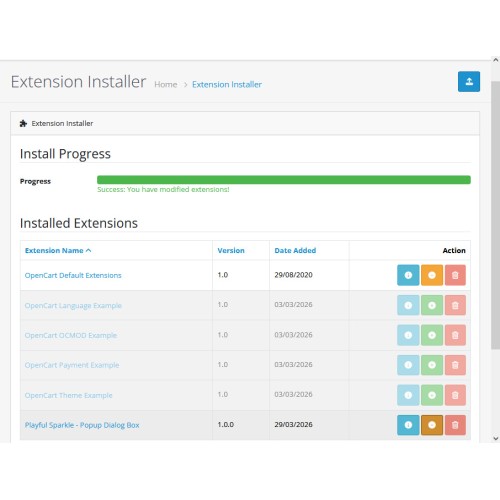
3) Navigate to Extensions > Installer.
4) Click the Upload button and upload the ps_popup_dialog_box.ocmod.zip file.
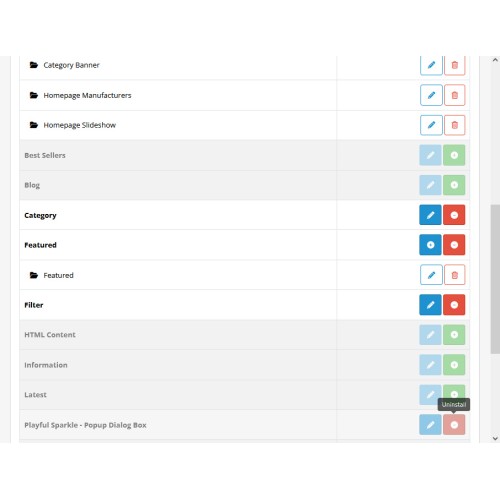
5) Navigate to Extensions > Extensions and select Modules from the Choose the extension type dropdown list.
6) Locate the extension in the Modules list and click the Install button.
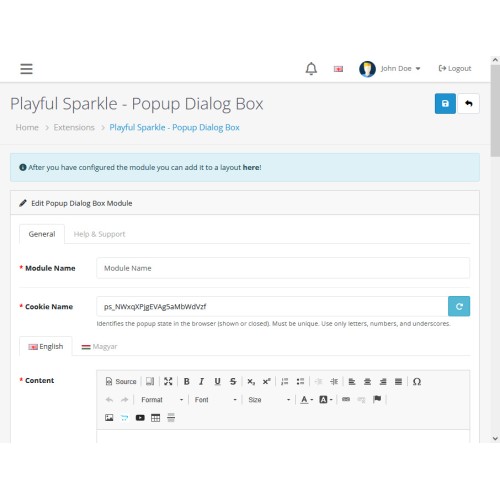
7) Click the Edit button, configure the extension parameters, and click the Save button to save your settings.
8) Navigate to Extensions > Modifications, select all your modifications and click the Refresh button to update the modification cache and apply the changes.
MD5 Checksum: 5c8d6076f0bdfea22809b0c5567a5d0e
SHA256 Checksum: 7e1b94ae34c96bb2138216cdd9d6ed6c44c1140345f127389a6f0986d8ed1425
Installation Instructions for OpenCart 4.x+
- 1) Download the latest version from the OpenCart Marketplace.
2) Log in to your OpenCart admin panel.
3) Navigate to Extensions > Installer.
4) Click the Upload button and upload the ps_popup_dialog_box.ocmod.zip file.
5) Locate the extension in the Installed Extensions list and click the Install button.
6) Navigate to Extensions > Extensions and select Modules from the Choose the extension type dropdown list.
7) Locate the extension in the Modules list and click the Install button.
8) Click the Edit button, configure the extension parameters, and click the Save button to save your settings.
MD5 Checksum: 17f575d6a65107eba75ca1a27edd7169
SHA256 Checksum: f08df6be168f3d17f883898365d4c3ae641f0293e7e1367ba28e03b9f0d730c1
Support & Inquiries
For assistance or inquiries regarding this extension, please visit our support website or contact us via email at support@playfulsparkle.com.
Download
- Developed by OpenCart Community
- 3 Months Free Support
- Documentation Included
Rating
Compatibility
4.x.x.x, 4.0.0.0, 4.0.1.0, 4.0.1.1, 4.0.2.0, 4.0.2.1, 4.0.2.2, 4.0.2.3, 4.1.0.0, 4.1.0.1, 4.1.0.2, 4.1.0.3, 3.0.0.0, 3.0.1.0, 3.0.1.1, 3.0.1.2, 3.0.1.3, 3.0.2.0, 3.0.3.0, 3.0.3.1, 3.0.3.2, 3.0.3.3, 3.0.3.5, 3.0.3.6, 3.0.3.7, 3.0.3.8, 3.x.x.x, 3.0.3.9, 3.0.4.0, 3.0.4.1, 3.0.5.0
Last Update
8 Apr 2026
Created
30 Mar 2026
65 Downloads
1 Comments

Login and write down your comment.
Login my OpenCart Account