Quantity Increment Decrement

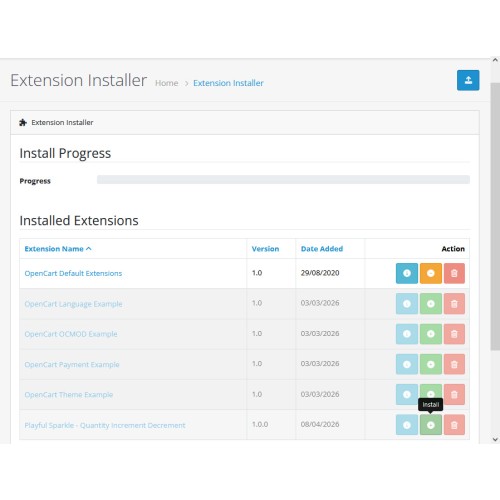
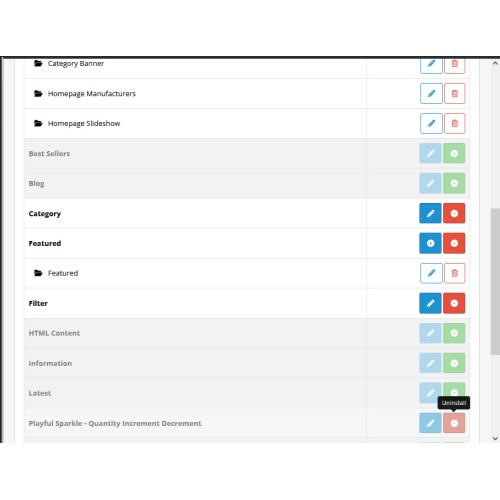
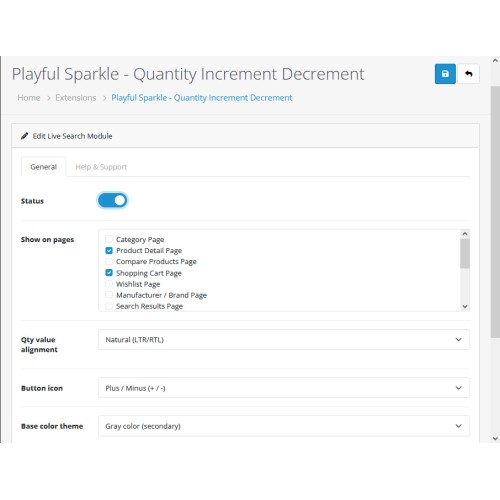
The Playful Sparkle - Quantity Increment Decrement extension for OpenCart 3.x+, 4.x+ enhances the shopping experience by adding intuitive plus and minus buttons to product quantity inputs. This allows customers to easily adjust the number of items they wish to purchase without manual typing, streamlining the path to checkout. With extensive customization options, store owners can perfectly match the appearance of these buttons to their store's branding, choosing from various icon styles, color themes, and custom CSS overrides.
Features
Extension Visibility
You can choose to display the quantity buttons on a per-page or per-module basis:
Previews
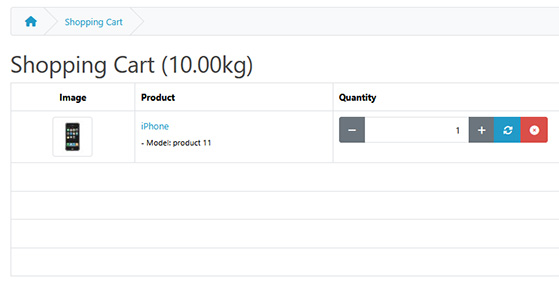


For more information, visit the extension's GitHub page at https://github.com/playfulsparkle/oc3_quantity_increment_decrement or https://github.com/playfulsparkle/oc4_quantity_increment_decrement.




Installation Instructions
Installation Instructions for OpenCart 3.x+
MD5 Checksum: c0682c43c7be81ec817e96637c2d2582
SHA256 Checksum: aaafda6c72ec81a0fa88a3a6d9ef4e5d68ea7c774e78b3cea28bc5a5651f1e41
Installation Instructions for OpenCart 4.x+
MD5 Checksum: 965067e0b72429f2c5890f0691b196c7
SHA256 Checksum: 31cbbb489113d3d968bda11d372ba82830799d7f35b3c9049a582eb13f2ae084
Support & Inquiries
For assistance or inquiries regarding this extension, please visit our support website or contact us via email at support@playfulsparkle.com.
Features
- Visual Customization: Choose from multiple icon sets including plus / minus (+ / -), chevron left / right (‹ ›), arrow up / down (↑ ↓).
- Flexible Styling: Select from standard Bootstrap color themes (Primary, Success, Danger, etc.) or enable manual overrides for complete control over colors.
- Comprehensive Placement: Enable the increment/decrement functionality across various sections of your store, including category page, product detail page, compare products page, shopping cart page, wishlist page, manufacturer / brand page, search results page, specials page, specials module, latest products module, bestsellers module, featured products module and the order information page.
- Button State Management: Independently customize colors for different increment/decrement button states: default, hover, active, and disabled.
- Quantity Input Integration: Enhances text inputs with a user-friendly quantity adjustment interface.
- Native Layout Integration: Nicely incorporates into your webshop by utilizing the standard OpenCart layout structures and Bootstrap grid system for a seamless look and feel.
- Compatibility: Integrates smoothly with OpenCart 3.x+, 4.x+, supporting a range of online store setups.
- Multilingual Support: Ready for international use with languages including العربية (ar), فارسی (fa-ir), Български (bg), 中文(简体) (zh-cn), 中文(繁體) (zh-tw), Čeština (cs-cz), English (UK) (en-gb), English (US) (en-us), Français (fr-fr), Deutsch (de-de), Ελληνικά (el-gr), Magyar (hu-hu), Italiano (it-it), 日本語 (ja), 한국어 (ko-kr), Polski (pl-pl), Português (Brasil) (pt-br), Русский (ru-ru), Slovenčina (sk-sk), Español (es-es), and Türkçe (tr-tr).
Extension Visibility
You can choose to display the quantity buttons on a per-page or per-module basis:
- Pages: Category, product detail, compare products, shopping cart, wishlist, manufacturer / brand, search results, specials and order information pages.
- Modules: Specials, latest products, bestsellers and featured products modules.
Previews
For more information, visit the extension's GitHub page at https://github.com/playfulsparkle/oc3_quantity_increment_decrement or https://github.com/playfulsparkle/oc4_quantity_increment_decrement.
Installation Instructions
Installation Instructions for OpenCart 3.x+
- 1) Download the latest version from the OpenCart Marketplace.
2) Log in to your OpenCart admin panel.
3) Navigate to Extensions > Installer.
4) Click the Upload button and upload the ps_quantity_increment_decrement.ocmod.zip file.
5) Navigate to Extensions > Extensions and select Modules from the Choose the extension type dropdown list.
6) Locate the extension in the Modules list and click the Install button.
7) Click the Edit button, configure the extension parameters, and click the Save button to save your settings.
8) Navigate to Extensions > Modifications, select all your modifications and click the Refresh button to update the modification cache and apply the changes.
MD5 Checksum: c0682c43c7be81ec817e96637c2d2582
SHA256 Checksum: aaafda6c72ec81a0fa88a3a6d9ef4e5d68ea7c774e78b3cea28bc5a5651f1e41
Installation Instructions for OpenCart 4.x+
- 1) Download the latest version from the OpenCart Marketplace.
2) Log in to your OpenCart admin panel.
3) Navigate to Extensions > Installer.
4) Click the Upload button and upload the ps_quantity_increment_decrement.ocmod.zip file.
5) Locate the extension in the Installed Extensions list and click the Install button.
6) Navigate to Extensions > Extensions and select Modules from the Choose the extension type dropdown list.
7) Locate the extension in the Modules list and click the Install button.
8) Click the Edit button, configure the extension parameters, and click the Save button to save your settings.
MD5 Checksum: 965067e0b72429f2c5890f0691b196c7
SHA256 Checksum: 31cbbb489113d3d968bda11d372ba82830799d7f35b3c9049a582eb13f2ae084
Support & Inquiries
For assistance or inquiries regarding this extension, please visit our support website or contact us via email at support@playfulsparkle.com.
Download
- Developed by OpenCart Community
- 3 Months Free Support
- Documentation Included
Rating
Compatibility
3.0.0.0, 3.0.1.0, 3.0.1.1, 3.0.1.2, 3.0.1.3, 3.0.2.0, 3.0.3.0, 3.0.3.1, 3.0.3.2, 3.0.3.3, 3.0.3.5, 3.0.3.6, 3.0.3.7, 3.0.3.8, 3.x.x.x, 3.0.3.9, 3.0.4.0, 3.0.4.1, 3.0.5.0, 4.x.x.x, 4.0.0.0, 4.0.1.0, 4.0.1.1, 4.0.2.0, 4.0.2.1, 4.0.2.2, 4.0.2.3, 4.1.0.0, 4.1.0.1, 4.1.0.2, 4.1.0.3
Last Update
9 Apr 2026
Created
8 Apr 2026
36 Downloads
1 Comments

Login and write down your comment.
Login my OpenCart Account