Admin Extensions Tabs - tabs instead of dropdown
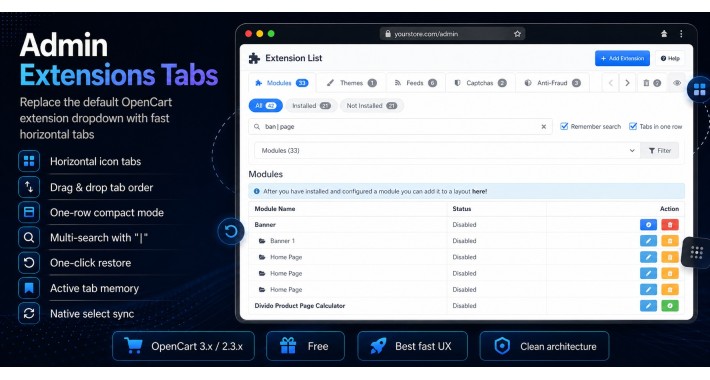
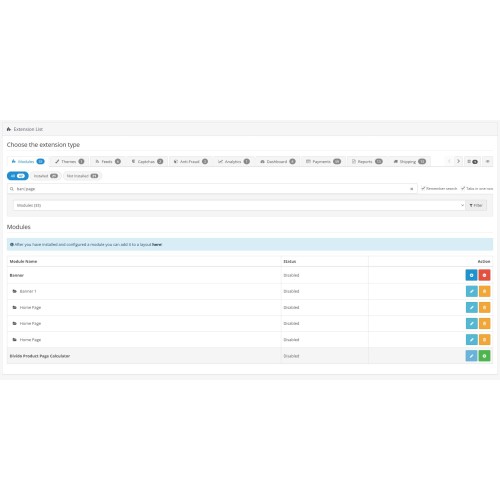
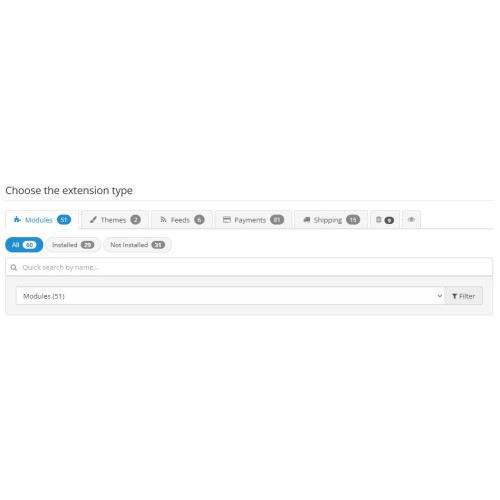
Every time you open Extensions → Extensions in the OpenCart admin panel, you have to click the dropdown list, wait for the dropdown to open, scroll down, find the needed category, and click it. And this happens every time. The same thing happens in Shipping, Payments, Order Totals, Captcha - anywhere this terrible select appears.
This module replaces the dropdown list with horizontal tabs.
The main idea is to bring order to the standard OpenCart admin Extensions section with one small OCMOD
This is a free solution for the OpenCart community
Description and features
❖ Standard horizontal tabs with Font Awesome icons for each extension category
❖ Drag-n-drop tab sorting - hold and drag, the order is saved
❖ Quick search by name - instant filtering of the extension list while typing
❖ Filtering: All / Installed / Not installed - with counters
❖ Trash - drag a tab to hide it, with a hidden tabs counter
❖ Eye - restore all hidden tabs with one click
❖ Counter badges show the number of extensions in each tab
❖ The active tab is highlighted with color - so you always know where you are
❖ Active tab memory - next time, the same section you were in will open
❖ Two-way synchronization with the original select - nothing breaks
❖ Standard OpenCart AJAX requests - no hacks
❖ Race condition protection - fast tab switching does not mix up the content
❖ Language files through the standard OpenCart system
❖ Localization support: English / Ukrainian
Benefits
❖ Clean architecture - one OCMOD, without overwriting files
❖ Does not touch business logic - only a UI wrapper over the native select
❖ Compatible with OpenCart updates - new categories are picked up automatically
❖ Compatible with any modules - nothing is blocked or broken
❖ Settings are saved in browser localStorage - nothing is written to the database
❖ Works with any admin theme
❖ The module does not replace system files
❖ The module does not use ionCube
❖ Free
Installation
❖ Open the admin panel: Extensions → Extension Installer
❖ Upload the file adminmodtab.ocmod.zip
❖ Go to Extensions → Modifications and click the Refresh button - the blue button in the top right
❖ Open Extensions → Extensions - enjoy the tabs
Requirements
❖ OpenCart or any build, including ocStore, version 3.x / 2.3.x
This module replaces the dropdown list with horizontal tabs.
The main idea is to bring order to the standard OpenCart admin Extensions section with one small OCMOD
This is a free solution for the OpenCart community
Description and features
❖ Standard horizontal tabs with Font Awesome icons for each extension category
❖ Drag-n-drop tab sorting - hold and drag, the order is saved
❖ Quick search by name - instant filtering of the extension list while typing
❖ Filtering: All / Installed / Not installed - with counters
❖ Trash - drag a tab to hide it, with a hidden tabs counter
❖ Eye - restore all hidden tabs with one click
❖ Counter badges show the number of extensions in each tab
❖ The active tab is highlighted with color - so you always know where you are
❖ Active tab memory - next time, the same section you were in will open
❖ Two-way synchronization with the original select - nothing breaks
❖ Standard OpenCart AJAX requests - no hacks
❖ Race condition protection - fast tab switching does not mix up the content
❖ Language files through the standard OpenCart system
❖ Localization support: English / Ukrainian
Benefits
❖ Clean architecture - one OCMOD, without overwriting files
❖ Does not touch business logic - only a UI wrapper over the native select
❖ Compatible with OpenCart updates - new categories are picked up automatically
❖ Compatible with any modules - nothing is blocked or broken
❖ Settings are saved in browser localStorage - nothing is written to the database
❖ Works with any admin theme
❖ The module does not replace system files
❖ The module does not use ionCube
❖ Free
Installation
❖ Open the admin panel: Extensions → Extension Installer
❖ Upload the file adminmodtab.ocmod.zip
❖ Go to Extensions → Modifications and click the Refresh button - the blue button in the top right
❖ Open Extensions → Extensions - enjoy the tabs
Requirements
❖ OpenCart or any build, including ocStore, version 3.x / 2.3.x
Download
- Developed by OpenCart Community
- Documentation Included
Rating
Compatibility
2.3.0.0, 2.3.0.1, 2.3.0.2, 3.0.0.0, 3.0.1.0, 3.0.1.1, 3.0.1.2, 3.0.1.3, 3.0.2.0, 3.0.3.0, 3.0.3.1, 3.0.3.2, 3.0.3.3, 3.0.3.5, 3.0.3.6, 3.0.3.7, 3.0.3.8, 3.x.x.x, 3.0.3.9, 3.0.4.0, 3.0.4.1, 3.0.5.0
Last Update
30 Apr 2026
Created
28 Apr 2026
12 Downloads
0 Comments

Login and write down your comment.
Login my OpenCart Account