Admin Maintenance Sticky Banner & Reminder (OCMOD)
Stop losing money because of a forgotten Maintenance Mode!
Have you ever put your store in maintenance mode to make a few quick changes, got distracted, and left it turned on for hours or even days? While you see the fully functional admin panel, your customers see a "closed" page, resulting in lost sales and traffic.
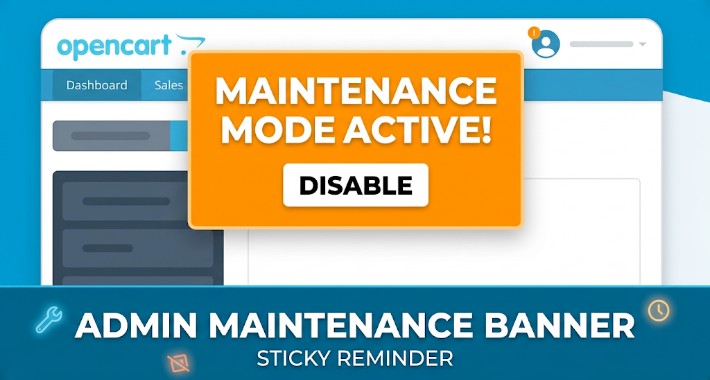
The Admin Maintenance Sticky Banner solves this problem permanently. This lightweight OCMOD extension adds a beautiful, highly visible warning banner to the top of your OpenCart admin panel. It serves as a constant reminder that your storefront is currently hidden from the public.
Key Features:
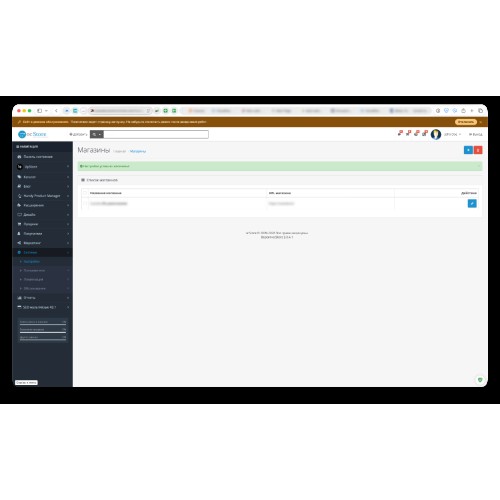
Highly Visible Warning: Displays a sleek, modern, and eye-catching banner at the very top of your admin panel, but only when Maintenance Mode is ON.
1-Click Quick Access: Includes a direct "Disable" button that takes you straight to the correct Store Settings tab to turn maintenance mode off instantly.
Smart & Dismissible: Getting in the way? You can close the banner by clicking the "X" button.
Zero Core Modifications: Built strictly on OCMOD. It does not overwrite any core OpenCart files and leaves your system completely clean.
Ultra Lightweight: Does not create extra database queries or slow down your admin panel. It uses native OpenCart config variables.
Multi-Language Ready: Out-of-the-box support for English, Russian, Ukrainian, and Kazakh. Easy to add any other language.
Compatibility:
OpenCart 3.0.x.x (Twig & OCMOD)
Works perfectly with most custom admin themes.
Languages:
1. English
2. Українська
3. Қазақша
4. Русский
5. Español (Spanish)
6. Português do Brasil (Brazilian Portuguese)
7. Français (French)
8. Deutsch (German)
9. 简体中文 (Simplified Chinese)
Installation (Plug & Play):
1. Upload the `.ocmod.zip` file via the Extension Installer.
2. Go to Modifications and click the Refresh button.
3. Clear your Theme/SASS cache on the Dashboard.
4. That's it! Turn on Maintenance Mode to see it in action.
Have you ever put your store in maintenance mode to make a few quick changes, got distracted, and left it turned on for hours or even days? While you see the fully functional admin panel, your customers see a "closed" page, resulting in lost sales and traffic.
The Admin Maintenance Sticky Banner solves this problem permanently. This lightweight OCMOD extension adds a beautiful, highly visible warning banner to the top of your OpenCart admin panel. It serves as a constant reminder that your storefront is currently hidden from the public.
Key Features:
Highly Visible Warning: Displays a sleek, modern, and eye-catching banner at the very top of your admin panel, but only when Maintenance Mode is ON.
1-Click Quick Access: Includes a direct "Disable" button that takes you straight to the correct Store Settings tab to turn maintenance mode off instantly.
Smart & Dismissible: Getting in the way? You can close the banner by clicking the "X" button.
Zero Core Modifications: Built strictly on OCMOD. It does not overwrite any core OpenCart files and leaves your system completely clean.
Ultra Lightweight: Does not create extra database queries or slow down your admin panel. It uses native OpenCart config variables.
Multi-Language Ready: Out-of-the-box support for English, Russian, Ukrainian, and Kazakh. Easy to add any other language.
Compatibility:
OpenCart 3.0.x.x (Twig & OCMOD)
Works perfectly with most custom admin themes.
Languages:
1. English
2. Українська
3. Қазақша
4. Русский
5. Español (Spanish)
6. Português do Brasil (Brazilian Portuguese)
7. Français (French)
8. Deutsch (German)
9. 简体中文 (Simplified Chinese)
Installation (Plug & Play):
1. Upload the `.ocmod.zip` file via the Extension Installer.
2. Go to Modifications and click the Refresh button.
3. Clear your Theme/SASS cache on the Dashboard.
4. That's it! Turn on Maintenance Mode to see it in action.
Price
$20.00
- Developed by OpenCart Community
- Documentation Included
Rating
Compatibility
3.0.3.0, 3.0.3.1, 3.0.3.2, 3.0.3.3, 3.0.3.5, 3.0.3.6, 3.0.3.7, 3.0.3.8, 3.x.x.x, 3.0.3.9, 3.0.4.0, 3.0.4.1, 3.0.5.0
Last Update
20 May 2026
Created
20 May 2026
0 Sales
0 Comments

Login and write down your comment.
Login my OpenCart Account