Have you ever scrolled past a product video on mute and still understood exactly what was being sold? That's the power of subtitles. They're not just helpful they're essential for driving conversions. No matter whether you create product demos, unboxing reels, or store tutorials, captions keep your shoppers engaged long enough to hit "Add to Cart."
Honestly, writing subtitles manually can be boring and take time. This is why today most creators use AI tools to automatically generate video subtitles. These tools do the hard work for you with just a few clicks.
Smart AI tools like Wondershare Filmora make subtitle creation super easy by offering simple features and quick results. You don’t need any editing experience to get started.
In this guide, you’ll explore the 10 best automatic subtitle generators in detail. know exactly which tool fits your needs, even if you’re just starting.
Part 1. Why You Need an AI Subtitle Generator
Making videos is fun but making sure that everyone actually gets your message is also important. That’s where generate subtitles for video helps you a lot. They can completely change how people watch and enjoy your content.

AI subtitle generators take this a step further by doing the hard work for you.
Reach viewers on mute: Most people scroll through videos without sound. Subtitles make sure your message hits every time.
Save time and effort: Writing captions manually is slow and tiring. AI tools automatically generate subtitles in seconds.
Boost accessibility: Captions make your content easier to follow for everyone that include people with hearing difficulties.
Go global: Multi-language support means your content can connect with viewers worldwide.
AI subtitle generators make creating captions easy and stress-free. Their main motive is people can understand and engage with your videos.
Part 2. Detailed Breakdown of Top Auto Caption Generators
When it comes to creating subtitles, each tool offers something unique. Some focus on speed, others on style, and some on professional-grade accuracy. If you know different AI auto caption generator, it is easy to pick one according to your needs.
1. Wondershare Filmora
If you want a tool that is both simple and powerful, Wondershare Filmora is a great pick. It is not just a video editor tool. But it also helps you to generate subtitles with AI within minutes.

Here is a Key features of Filmora:
AI Auto Subtitle Generator: Turns speech into text in seconds
One-click captions: No complicated setup
Multiple language support: Great for global content
Auto timing & sync: Subtitles match your video perfectly
Smart punctuation: Adds commas and full stops automatically
Easy editing: Fix or adjust captions anytime
Export subtitles: Save as SRT or use directly in your video
Filmora makes subtitle creation quick and stress-free with its smart and simple features. This strong tool is preferred by most new creators.
Pros:
Super easy to use and perfect for beginners
Fast and saves a lot of time
All-in-one tool (editing + subtitles together)
Clean and simple interface
Reliable accuracy for most videos
Cons:
Needs internet for AI features
You may need to make small edits sometimes
Some advanced features may not be fully free
Now, let’s see how easy it is to generate subtitles in Filmora using AI.
Step 1: Import Your Video
Install Wondershare Filmora and open it on your Laptop or PC. On the home screen, click on Add Captions to start creating subtitles.

Step 2: Select Your Clip
Select the video you want to work on and import it. Then a small window will pop up and confirm your options to start the Speech-to-Text process.

Step 3: Click Generate
Filmora will detect the speech in your video and create subtitles for you. You can see the created subtitles right on the timeline.

Step 4: Review & Edit Captions
Once the captions are generated, take the moment to review them on the timeline. Simply tap on any caption to edit or style it the way you like.

When you are satisfied with the subtitles, save your project and export the video to share on social media.
And that’s it! See how easy that was? With Wondershare Filmora, adding subtitles doesn’t have to be tricky or take forever.
2. Kapwing
Kapwing is a user-friendly online tool to create subtitles fast. It’s perfect if you want to add captions to short videos or quick projects.

Features:
Browser-based
Automatic subtitle generation
Easy editing tools
Supports multiple video formats
Quick export options
Pros:
Makes your videos more engaging for viewers
Helps boost accessibility for all audiences
Great for quick content creation when you’re in a rush
Let's you experiment with captions without commitment
Cons:
The free version has watermarks
Limited features for long or complex videos
Some AI-generated captions may need manual correction
Internet connection required
Kapwing is great for creators who prefer easy subtitle creation for social media content.
3. VEED.io
VEED.io is a simple online tool for adding subtitles to videos. Its clean design is perfect for beginners and pros alike to create captions without fuss.

Features:
Instant auto captions
Subtitle animations
Text styling options
Collaborative editing
Cloud storage
Pros:
Makes your subtitles visually appealing with animations
No software installation required
Great for social media videos and marketing content
Let's you quickly tweak captions to match your video style
Cons:
Some advanced effects are limited in the free version
Can get slow with very long videos
Requires an internet connection to work
Watermark included in the free plan
VEED.io is the best option if you want stylish subtitles without any complicated setup.
4. Descript
Descript is a great tool if you work with podcasts or interviews. It’s designed to make editing and captioning as simple as editing a document.

Features:
AI-powered transcription
Text-based video editing
Speaker detection
Screen recording & overdub
Pros:
Makes editing video as easy as editing text
Automatically organize captions
Great for multi-speaker content
Saves a lot of time compared to traditional video editing
Cons:
Free version has limited export options
Some features, like overdub, require a paid plan
Can be tricky for complete beginners
Descript makes video and audio editing simple, so you can focus on creating great content.
5. Rev
Rev is an excellent solution for creators who want highly accurate captions. It combines AI and human transcription for precision.

Features:
AI and human-generated subtitles
Supports many formats
Time-coded captions
Professional services
Pros:
Extremely accurate subtitles, especially for tricky audio
Great for professional projects or business use
Fast turnaround for AI-generated captions
Can handle long videos and multiple formats
Excellent customer support
Cons:
Paid service, no full free plan
AI version may still need minor edits
Slightly slower if you choose human transcription
Rev’s professional-quality captions make your videos clear and ready to impress your audience.
6. Otter.ai
Otter.ai is mainly known for meetings and interviews. But it also works really well for creating video captions, especially for conversational content.

Features:
Real-time captions
Easy export options
Speaker identification
Searchable transcripts
Integrations
Pros:
Great for interviews, webinars, and video content
Saves time with live transcription
Makes multi-speaker content easier to follow
Easy to organize and search through captions
Can improve accessibility for audiences
Cons:
The free plan has limits on minutes per month
Mainly designed for audio, so video editing is minimal
Some captions may require manual adjustment
Otter.ai turns spoken words into searchable captions quickly. That makes it ideal for webinars or any video with lots of dialogue.
7. Subly
Subly is an amazing tool that lets you create subtitles and even translate them into multiple languages. Perfect for social media creators who want quick results.

Features:
Automatic subtitles
Multiple language support
Easy editing interface
Fast export
Cloud-based
Pros:
Super fast for social media videos
Great for creators who need translated subtitles
Simple, beginner-friendly interface
You can tweak captions easily
Works on any device via browser
Cons:
The free plan is limited in features
Styling options are basic compared to bigger editors
Best suited for shorter videos
Subly easily creates and translates subtitles to connect with audiences around the world.
8. Happy Scribe
Happy Scribe is popular for transcription and subtitle generation. It is basically known for high accuracy and language flexibility.

Features:
AI subtitle generator
Supports many languages
Manual editing tools
Export opti ons
Pros:
Very accurate, even for challenging audio
Supports a wide range of languages for international content
Good for both videos and podcasts
Easy to edit and fine-tune captions
Cloud-based and accessible from any device
Cons:
Paid plans can be pricey for frequent use
Its free version is very limited
Not designed for full video editing
Happy Scribe makes generating precise and multi-language subtitles simple.
9. Sonix
Sonix is a professional-grade AI tool built for creators who desire fast transcription and subtitles for their videos. It’s perfect for content creators, businesses, and educators.

Features:
Automatic transcription
Subtitle editing tools
Multi-language support
Speaker labeling
Integrations
Pros:
Extremely fast and accurate for professional content
Handles multi-speaker videos with ease
Supports international audiences with multiple languages
Ideal for webinars, corporate videos, and online courses
Easy to export subtitles in multiple formats
Cons:
Can feel complicated for beginners
Paid plans are required for full features
Editing long videos can take some time
Sonix makes professional transcription and subtitle creation quick and reliable.
10. Zubtitle
Zubtitle is designed for social media creators. It’s perfect for short videos, Instagram stories, and YouTube clips.

Features:
Auto subtitle generator
Designed for short videos
Easy customization options
Simple export
Mobile-friendly
Pros:
You can add stylish captions in just a few clicks
Great for creating engaging content quickly
Beginner-friendly with no steep learning curve
Makes videos more accessible and engaging
Cons:
The free plan is limited in features
Best suited for short videos, not long projects
Limited advanced editing tools compared to full video editors
Zubtitle turns ordinary clips into content that viewers are more likely to watch and share.
Part 3. Quick Comparison Table for Auto Subtitle Generators
Here’s a handy comparison of the best AI subtitle generators to help you find the right tool.
If you are still confused between different AI tools. You can easily see that Wondershare Filmora is an all-in-one solution for new creators. It combines smart AI features with simplicity, so your subtitle creation becomes effortless.
Part 4. Deep Dive: Why Filmora is the "Editor's Choice"
Wondershare Filmora is not just a subtitle tool. But it’s a complete video editing software that makes creating captions accurate and fast. Here’s why it’s the top pick for creators:
Instant AI Captions
Multi-Language Support
Customize Like a Pro
All-in-One Tool
Style Your Way
Beginner-Friendly Interface
Time-Saving Automation
Filmora is a creative companion that helps you focus on creativity to connect with your audience. In today’s competitive world, it is worth trying Wondershare Filmora to keep your audience engaged in crowed content creation world.
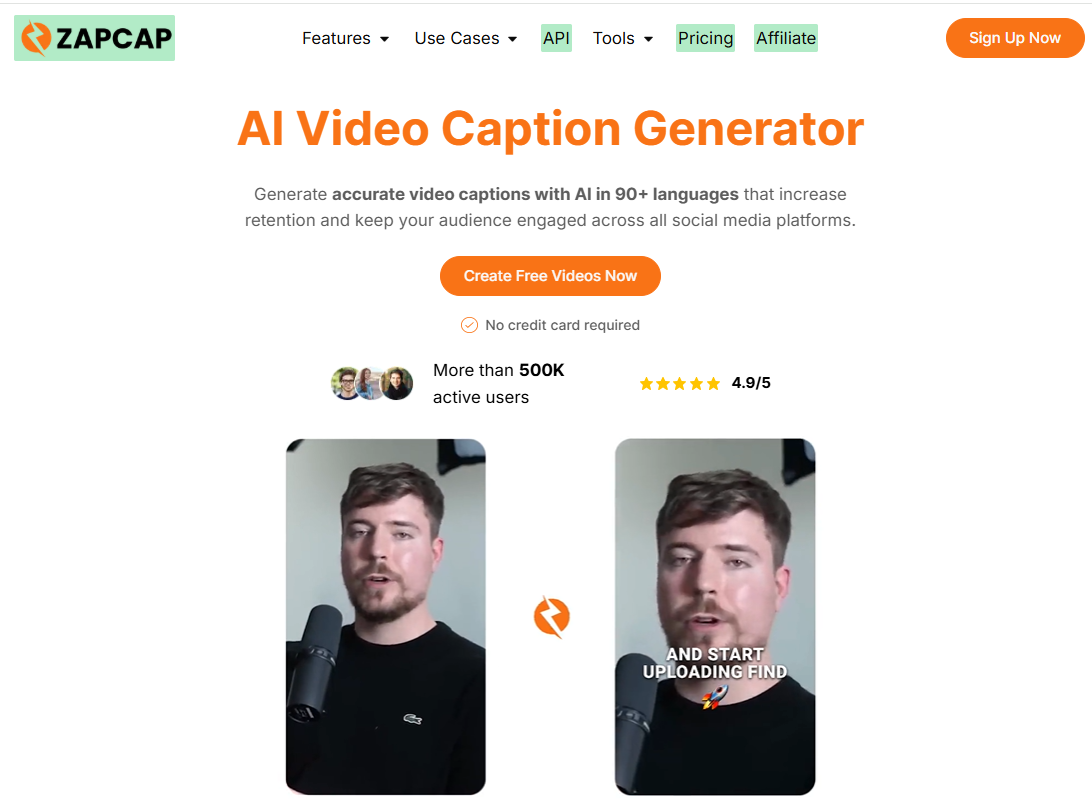
ZapCap is an AI-powered video editing and captioning platform designed to help creators, marketers, and businesses produce engaging videos faster and more efficiently. It automatically generates accurate captions, subtitles, and multilingual translations, making video content more accessible and easier to consume across platforms like YouTube, TikTok, Instagram, and LinkedIn. The platform also enhances videos with dynamic animations, templates, and additional editing features such as B-rolls, transitions, and sound effects, allowing users to create professional-quality content without advanced editing skills.
Features:
AI-powered auto captions and subtitles
Multilingual caption generation (50+ languages)
Animated subtitle styles and templates
AI-generated hooks for engaging video openings
Auto B-roll and visual enhancement generation
Auto descriptions, titles, and hashtags for SEO
Video clipping and short-form content creation
Background music and sound effect integration
Filler word and silence removal
Cloud-based video editing and processing
API access for automation and integrations.
Pros:Makes video editing fast and highly automated using AI
Improves engagement with animated captions and visuals
Helps reach global audiences with multilingual support
Saves time by generating captions, clips, and SEO text automatically
Ideal for short-form content creation on social media
No advanced editing skills required to produce professional videos
Cons:
Free version includes limitations such as watermarks and usage caps
Advanced features require a paid subscription
Internet connection is required since it is cloud-based
Not a full professional video editor for complex production work
Some customization options may feel limited for advanced users
ZapCap simplifies video creation by combining AI captions, automation tools, and social media optimization into one platform, helping creators produce engaging content faster and more efficiently.
Conclusion
Adding subtitles to your videos is no longer a complicated task. AI tools can generate captions that grab viewers' attention instantly in just a few clicks.
While each tool on our list has unique strengths according to its speed, accuracy, or customization. Among them, Wondershare Filmora stands out as a trusted platform for creators. Its powerful AI auto caption features make subtitle creation seamless and fun.
Right now, Filmora is offering 20% off. Try it today and elevate your videos instantly!
FAQs
1. What is the best AI subtitle generator for beginners?
Wondershare Filmora is beginner-friendly with one-click auto captions and an intuitive interface.
2. Can AI subtitle generators handle multiple languages?
Yes, many tools including Filmora support multiple languages for global reach.
3. Do I need prior video editing experience to use these tools?
No, tools like Filmora and Kapwing are easy for beginners to use.
4. Are AI-generated subtitles always accurate?
Mostly accurate, though minor edits may be needed for fast speech or background noise.
5. Can I export subtitles for other platforms?
Yes, most tools let you export SRT files or embed subtitles directly into videos.



Login and write down your comment.
Login my OpenCart Account